SECONDARY CONTROLS
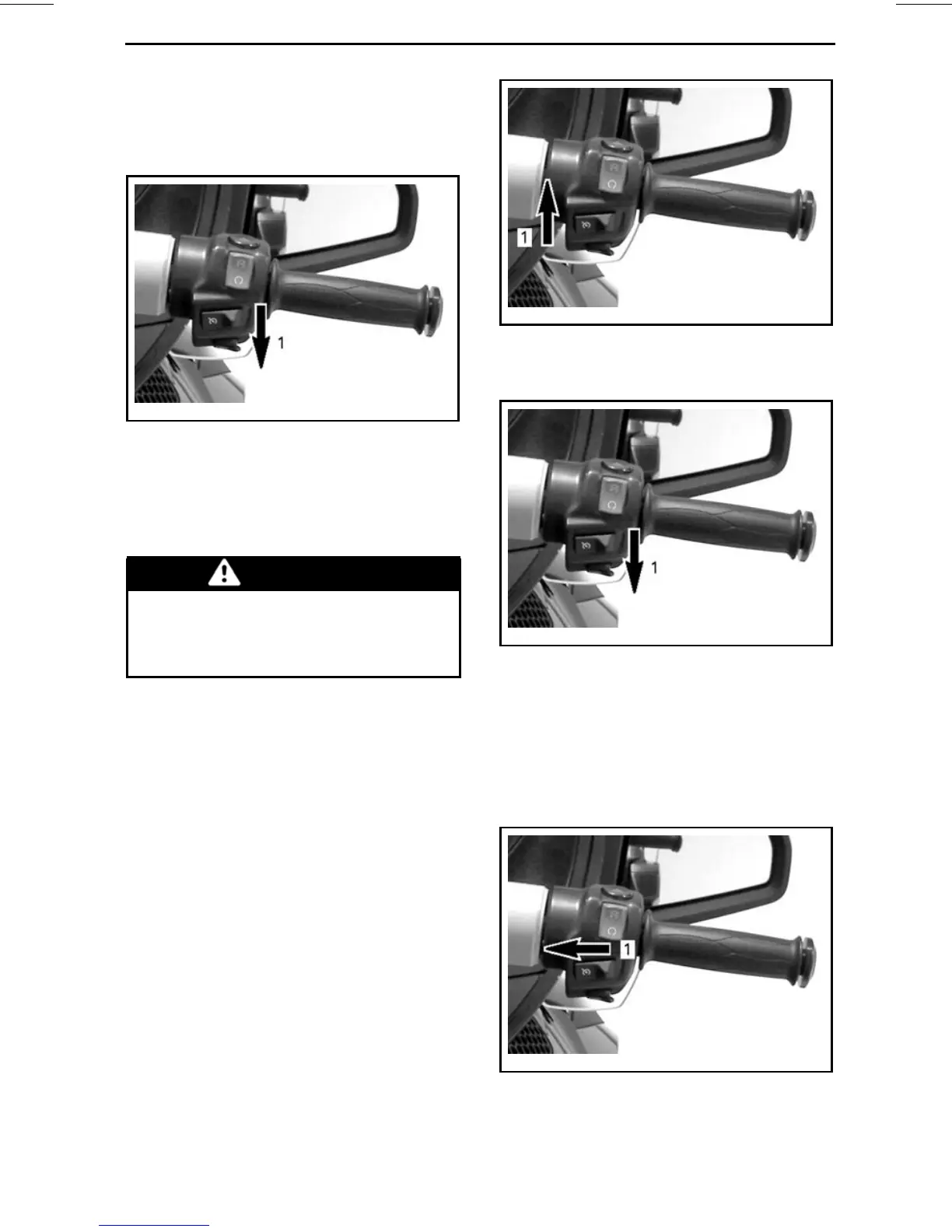
Bring the vehicle at the speed you want
to maintain then press the cruise but-
ton downward to SET the speed.
rmo2010-001-031_f
1. Push button downward to SET
NOTE: The cruise control status will
show CRUISE SET in the digital dis-
play.
You can now release the throttle.
WARNING
Always keep both hands on the
handlebar while riding. Other-
wise, this could cause a vehicle
loss of control.
NOTE: You can increase engine speed
using the throttle grip if you need to go
faster than the set speed. Releasing
the throttle will allow the cruise control
to recover the set speed.
Once the cruise control has been set,
the speed setting may be increased
or reduced by pushing the button UP
or DOWN. Each press of the button
will change the speed setting by incre-
ments of 1.6 km/h (1 MPH). Holding
the button will change the speed set-
ting until released or the operating limit
has been reached.
rmo2010-001-031_i
CRUISE CONTROL PREVIOUSLY SET
1. Push up button to increase the speed
setting
rmo2010-001-031_f
CRUISE CONTROL PREVIOUSLY SET
1. Push down button to reduce the speed
setting
Stopping the Cruise Control
To completely stop the cruise control
operation, slide the cruise control but-
tontotheleft.
rmo2010-001-031_h
1. Slide button to OFF
_______________
19



 To Next Page