AUDIO CONTROLS
Press and hold the LEFT/RIGHT button
for more than one second to change
the playlist if the playlist item is se-
lected, to change the artist if the artist
item is selected and to change the al-
bum if the album item is selected.
While riding, the available functions
are:
– Audio volume and mute
– Previous or next song selection
– Artist, album or playlist selection.
Compatible iPod Device
Made for:
–iPodtouch(2
nd
,3
rd
and 4
th
genera-
tion)
– iPodnano(5
th
and 6
th
generation)
–iPad
–iPad2
– iPhone 4
– iPhone 3GS
– iPhone 3G.
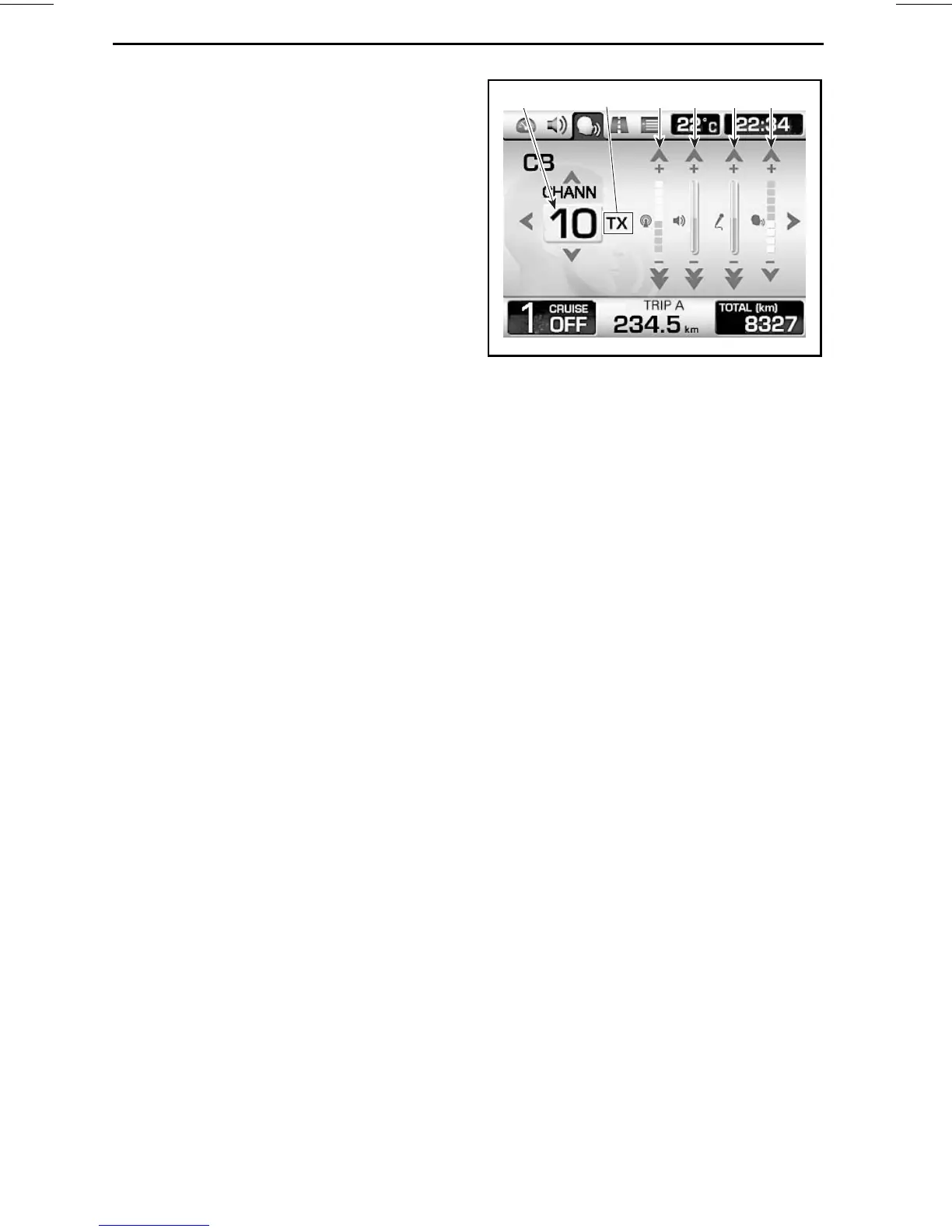
CB Screen (Optional)
This screen is only available when a CB
is installed.
NOTE: The CB screen will appear
whenever the PTT (push to talk) but-
ton is pressed whatever the screen
that was displayed.
1 2 3 654
rmo2010-001-023_aen
1. Current channel
2. CB communication status:RX (receiving), TX
(transmitting) and OFF
3. Squelch adjustment
4. CB volume adjustment
5. Intercom volume adjustment (i-com)
6. Voice activation sensitivity adjustment (vox)
Use the LEFT/RIGHT buttons to select
the item to change (channel, squelch,
CB volume, intercom volume and vox
detection).
Use the UP/DOWN buttons to set a
value.
Press and hold the DOWN button for
more than one second to set the item
to its lowest value.
42
______________






 To Next Page