Technical data
and startup
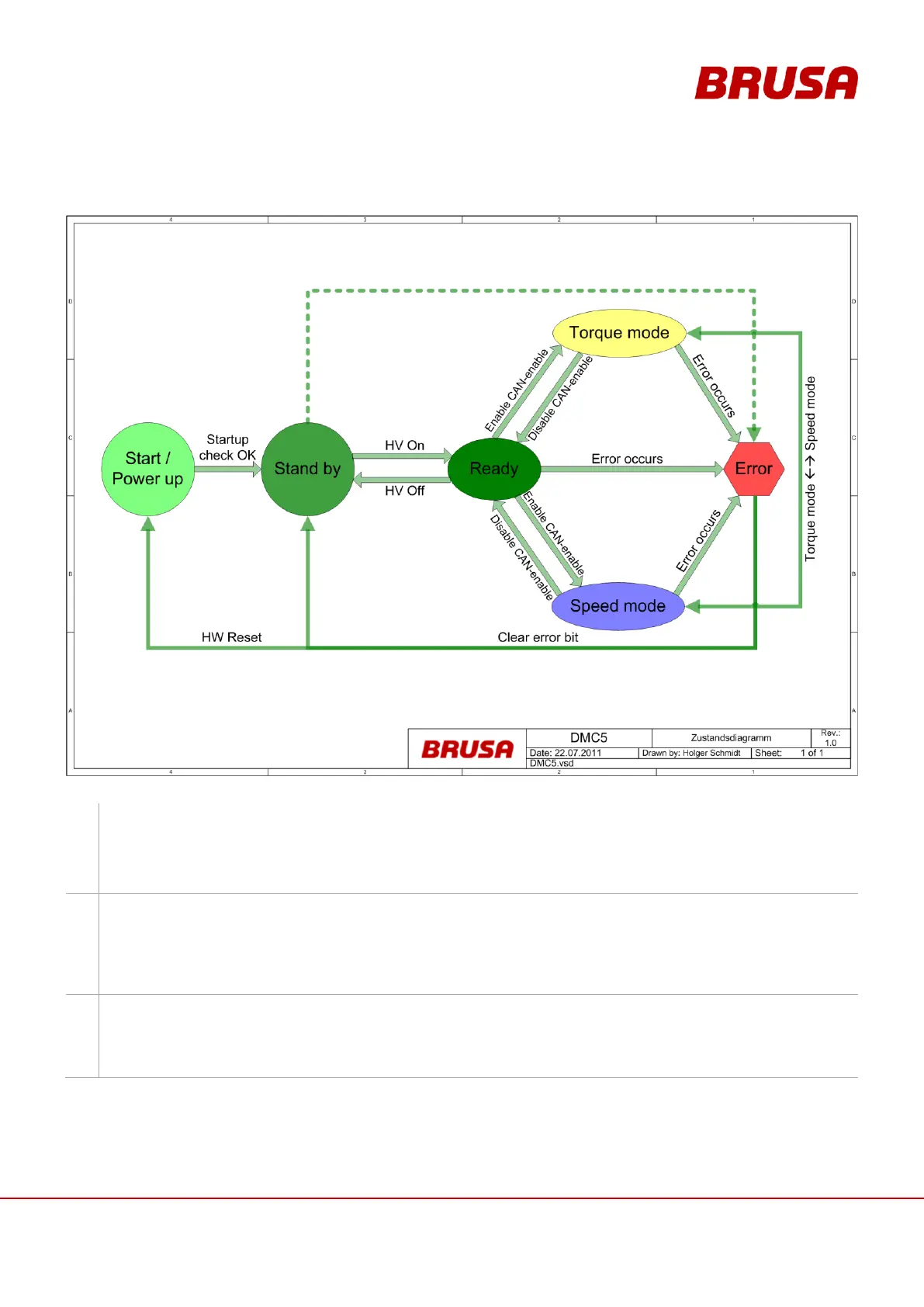
6.10 Operating modes of the inverter
Start / Power up:
This mode can be viewed as standby state. The requirements for this are:
Terminal 30 connected (12 V is engaged)
Connect terminal 15 (activation of the ignition key)
Standby:
The activation of this mode takes place automatically after the start-up process (after activation of Start mode
/ Power up).
For detailed information see also the descriptions of Pin 2 and Pin 3
(see chapter 8.3.2 Pin 2 AUX (Wiring system terminal 30) and chapter 8.3.3 Pin 3 EN (Enable, Power ON)).
Ready:
As soon as a voltage is present at the HV inputs, the inverter switches to this mode automatically. For this it
is required that the inverter is in standby mode.
From this mode, the inverter can drive the motor through CAN-enable.



 To Next Page