17
10.2 Error Message
Display
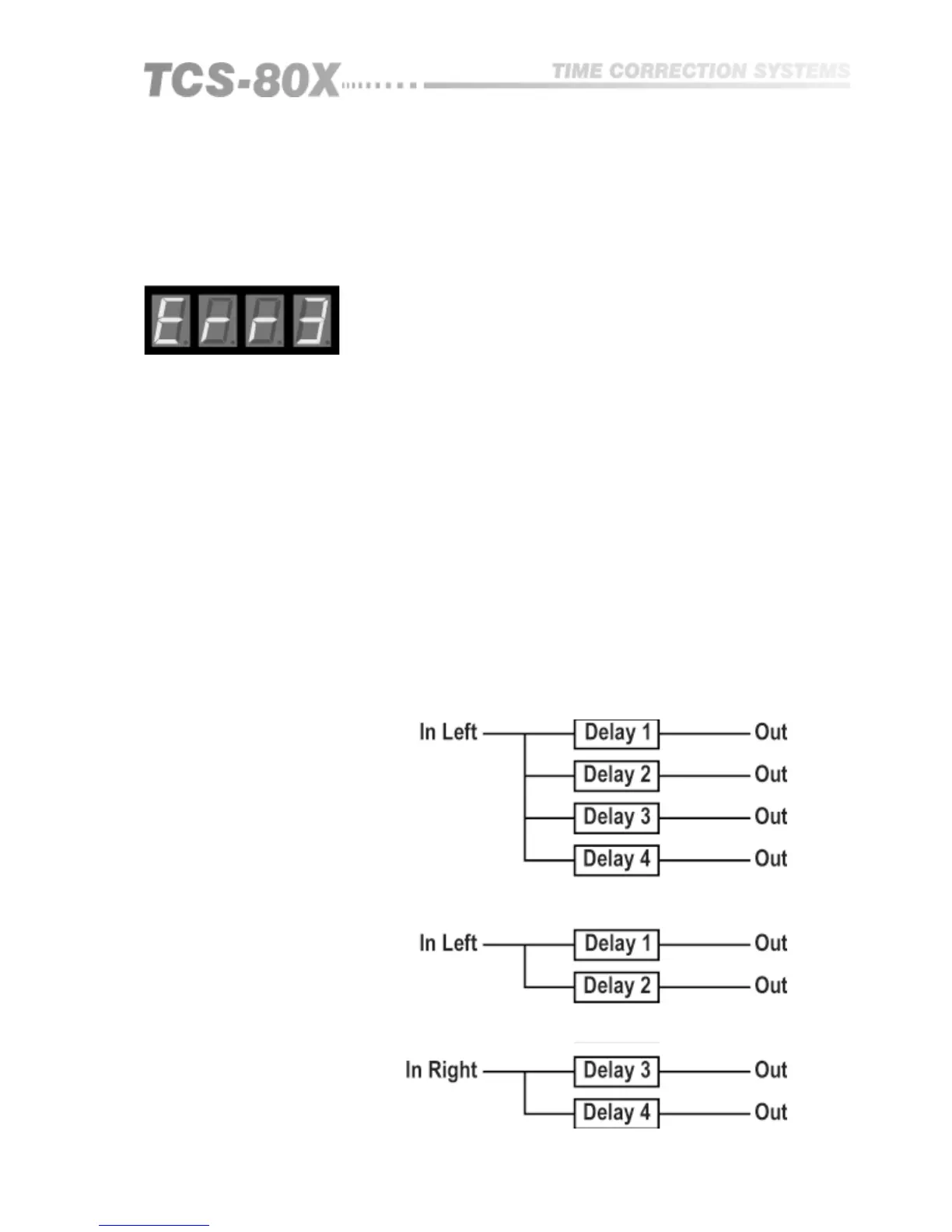
Should the unit detect bad data internally, on a control interface, or an
incompatible mode setting, an error message number will be displayed to
show there is a problem. Any other indicated errors will require the unit to be
referred to an authorised service centre for repair.
Err.3 Midi timing error
Err.4 Option interface timing error
Err.5 Incorrect mode selected for master-slave linking or program recall
Err.6 Program Store Error
The two modes of operation of the unit are selected by the push switch
located on the rear panel and labelled ‘mode select’.
Confirmation of the selected mode will be seen from the front panel display.
For MONO mode the top headroom meter display will be active, as will the
legend MONO. In DUAL CHANNEL mode the MONO legend will be
extinguished and replaced by the letters L and R adjacent to each headroom
display meter.
The MONO operation mode is where all four delay outputs are part of the one
channel, this being the ‘left’ channel. Four independent delay taps from the
one unit give extra flexibility in system design. Please use the legend printed
above the delay selection switches.
In DUAL CHANNEL mode, the TCS-804 is partitioned, to give two identical
channels, each one having two delay outputs. Each channel can be operated
separately, or with the output pairs linked as is necessary for true stereo
operation. Linking is explained fully later on in this manual.
10.3 Mode Setting
(TCS-804 only)
Fig 10.1 Mono Mode
Grouping
Figure 10.2 Stereo
Mode Grouping


 To Next Page