28
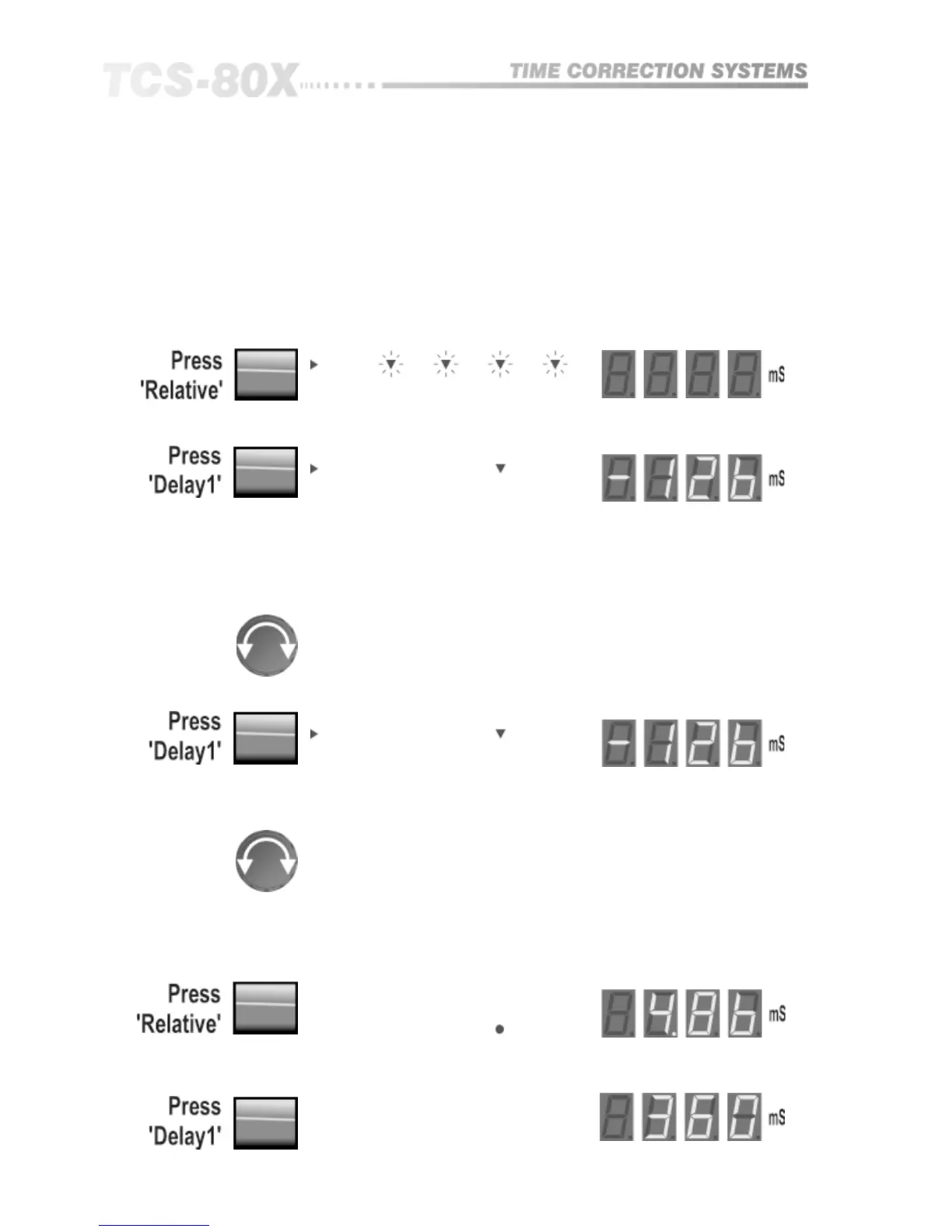
The four flashing red LEDs indicate to choose which delay is to be assigned as
the reference. Selecting delay 3 gives:
Relative delay is a display and adjustment mode that allows the assigning of
either of the four outputs as a reference such that all other outputs will be
linked to it, and dragged when the reference is moved. The relative delay
between reference and a chosen other output is also displayed.
This unique facility is invaluable when using the TCS-804 as an array
alignment tool, or when using it for loudspeaker driver offset alignment.
Enter the relative mode:
13.2 Relative
Delay, Mono mode
The red indicator points to delay 3 to confirm it is the reference, the green
indicator underneath shows that this is the delay currently being displayed,
and the three remaining green indicators are flashing to warn that their
respective delay outputs will all be dragged when delay three is adjusted.
Turn the knob to set the required delay, and the incremental change will be
applied EQUALLY to delay 1, 2 and 4.
Now select delay 1:
The display will show the RELATIVE delay between delay one and the
reference delay (which is delay 3).
Turn the knob to set the required delay RELATIVE to delay 3
It is possible to display and adjust the RELATIVE delay for any of the non
reference delay outputs in a similar manner.
Confirmation of the absolute delay time can be obtained by exiting the
relative mode and selecting delay display in the usual manner.
Exit relative mode:
and select delay 1:
Linking (804 Only)


 To Next Page