2003 Buell XB9S: Electrical 7-59
HOME
Sweep Test
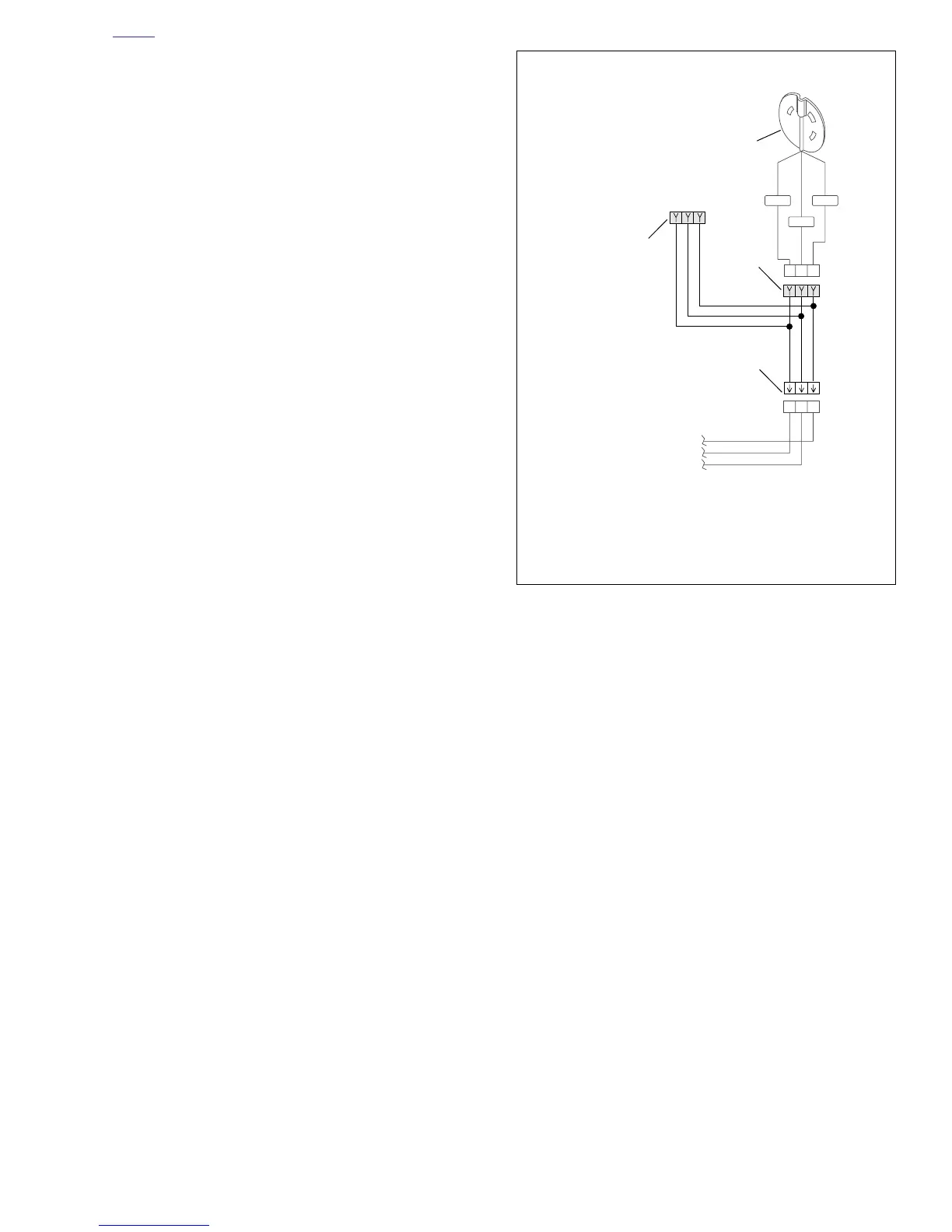
1. See Figure 7-69. Connect the speedometer tester to the
cam position sensor Deutsch socket housing using test
harness. See Speedometer Sensor Test under 7.19
SPEEDOMETER PERFORMANCE CHECK for more
information on test harness.
2. Place speedometer tester power switch in the ON posi-
tion. Place signal switch in the OUT position.
3. Turn vehicle ignition switch ON.
4. Begin test by pressing 0 on the tester keypad, then
pressing ENTER. The tester will scan for two seconds,
then the tester will put out a 1 Hz signal.
5. Select a test range.
a. Press 2 to select LO range.
b. Press 5 to select CEN range.
c. Press 8 to select HI range.
6. After selecting a range, use the corresponding arrow
keys to accelerate through the range. As you move
through the speed range, check for smooth needle
movement.
a. If testing LO range, press 1 or 3.
b. If testing CEN range, press 4 or 6.
c. If testing HI range, press 7 or 9.
Figure 7-69. Testing Tachometer
/WGN
/WBK
R/W
ABC
ABC
ABC
b0592x7x
2
3
4
1. Deutsch socket housing test connector
2. Deutsch socket housing
3. Deutsch pin housing
4. Cam position sensor
1
Wires continue to
Electronic Control
Module



 To Next Page