5.4.9. About device
To enter in the "About device" mode from the "Settings" menu (see item 5.4.), select the " About device"
menu option using the <Down arrow> / <Up arrow> buttons and then confirm with the < OK>.
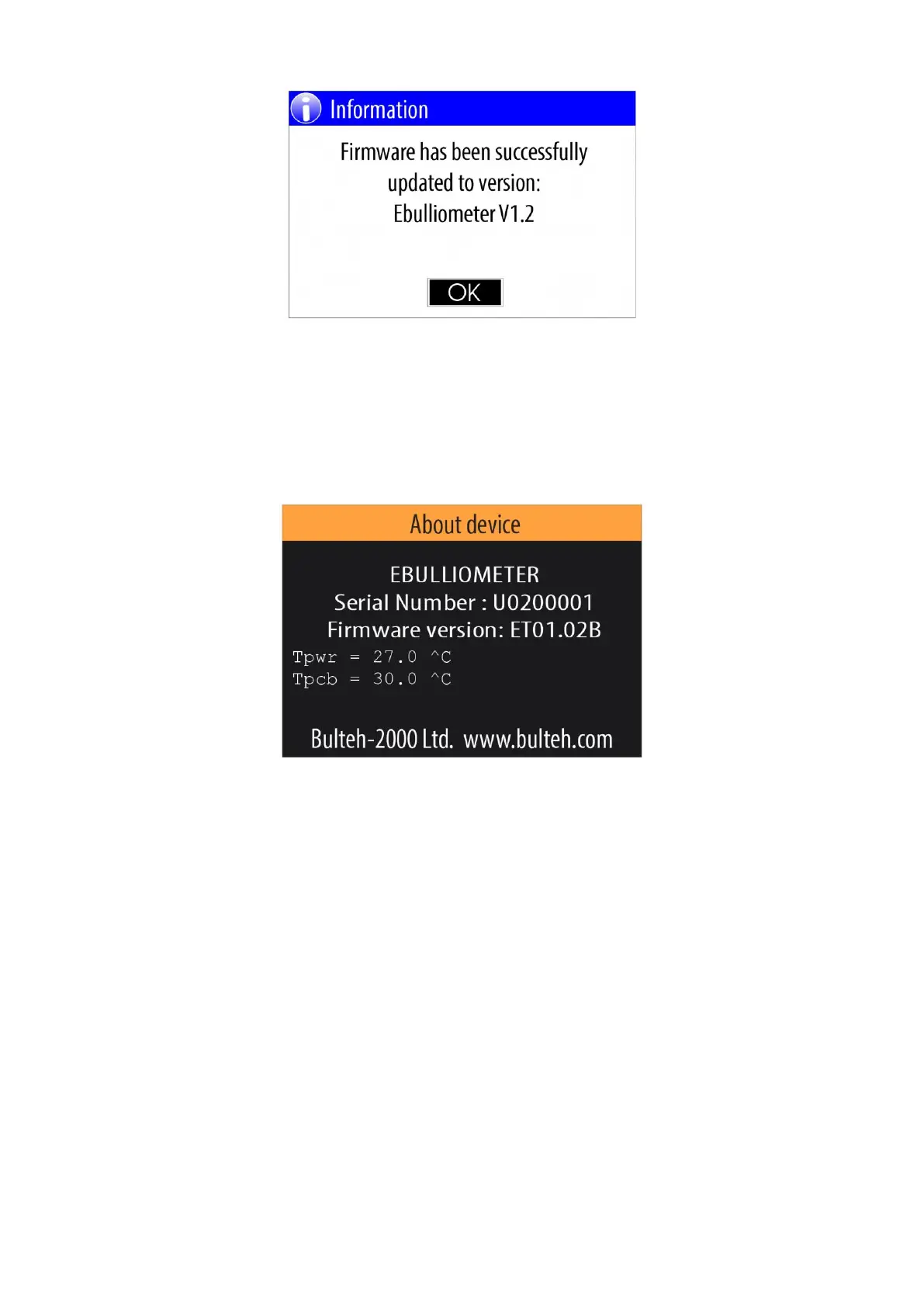
Example of "About device" panel:
where:
EBULLIOMETER - device type
Serial Number - Device serial number
Firmware version - Current firmware version
Tpwr - Current power block temperature
Tpcb - Current PCB temperature
Bulteh-2000 Ltd - device manufacturer
www.bulteh.com - manufacturer's website
5.4.10. System
This mode is intended to be used from the manufacturer only and it is not available for the users.
5.5. "Cooling" mode
In case the temperature of the power block of the device rises above 45.0 ° C or the temperature of PCB rises
above 40.0 ° C, the device automatically switches to "Cooling" mode.


 To Next Page