135
Auxiliary functions
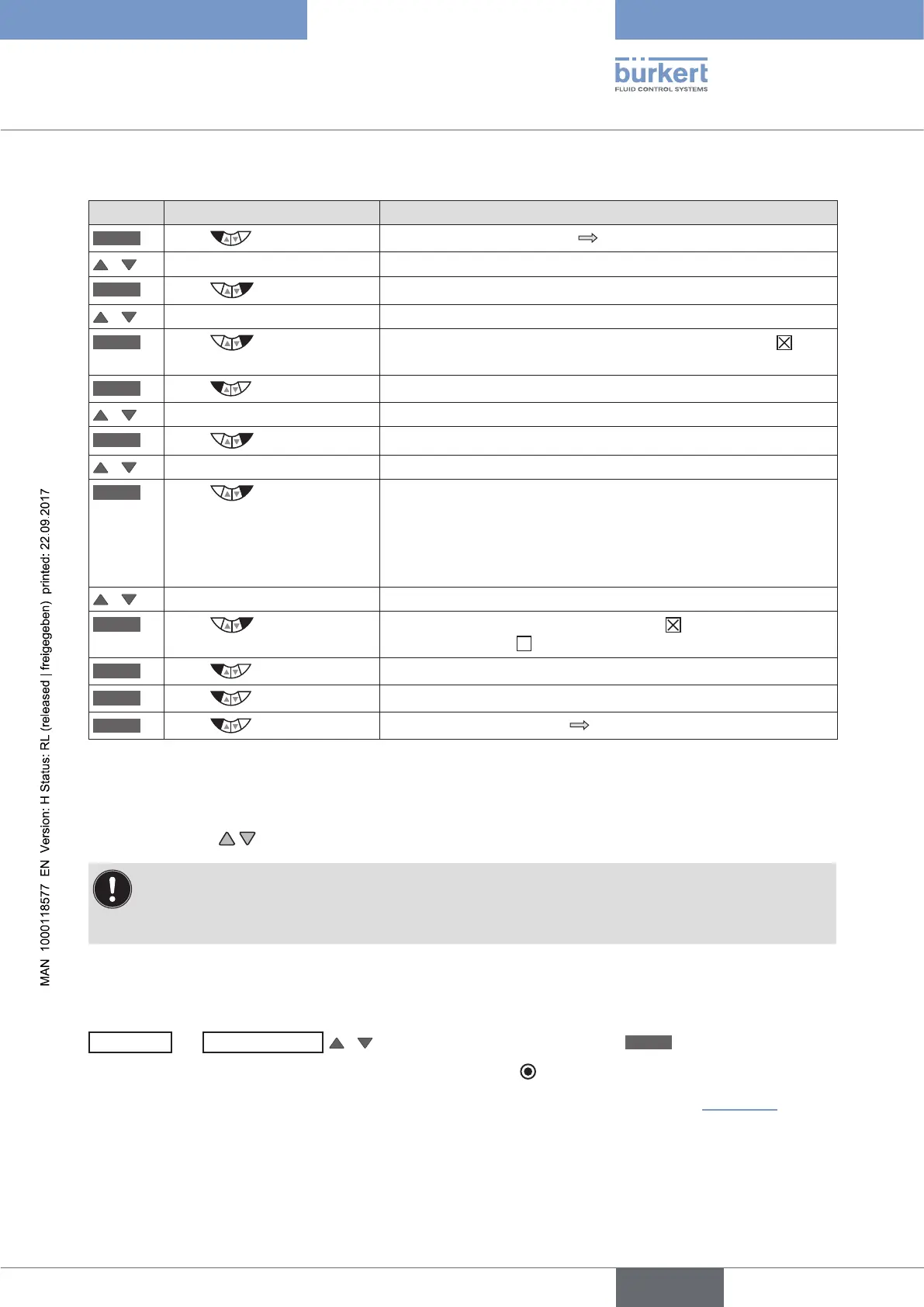
DISP.ITEMS - Activating menu displays for displaying the process level:
Key Action Description
MENU
Press for approx. 3 s
Switching from process level setting level.
/ Select ADD.FUNCTION
ENTER
Press
The possible auxiliary functions are displayed.
/ Select EXTRAS
ENTER
Press
Activate the EXTRAS auxiliary function by checking the box and
transfer into the main menu.
EXIT
Press
Return to the main menu (MAIN).
/ Select EXTRAS
ENTER
Press
The submenus of EXTRAS are displayed.
/ Select DISP. ITEMS
ENTER
Press
The possible menu options are displayed.
POS, CMD, CMDIPOS, CMD/POS(t), CLOCK, INPUT, TEMP,
X.TUNE.
Additionally for process controller Type 8793:
PV, SP, SPlPV, SP/PV(t), P.TUNE, P.LIN.
/ Select required menu options
SELEC
Press
Activate the selection by checking the box or deactivate it by
unchecking the box .
EXIT
Press
Return to the EXTRAS menu.
EXIT
Press
Return to the main menu (MAIN).
EXIT
Press
Switching from setting level process level.
Table 69: DISP.ITEMS; activating menu options to be displayed on the process level
The activated menu options are now displayed on the process level display.
Use the arrow keys
to switch between the displays.
Each menu option which can be selected can also be deactivated so that it is not indicated on the
process level display.
However, there must be at least one menu option available which can be indicated on the display.
If nothing was selected, the POS menu option is automatically activated.
START-UP.ITEM
- Specifying menu option for the start display:
EXTRAS
→
START-UP.ITEM
/
Select menu option and specify with
SELEC
.
The menu option for the start display is marked by the filled circle
.
The detailed procedure can be found in the extensive menu description for DISP.ITEMS (see “Table 69”). The
START-UP.ITEM and DISP.ITEMS menus are set in the same way.





 To Next Page