Solving Problems
4326 9562-007 5-9
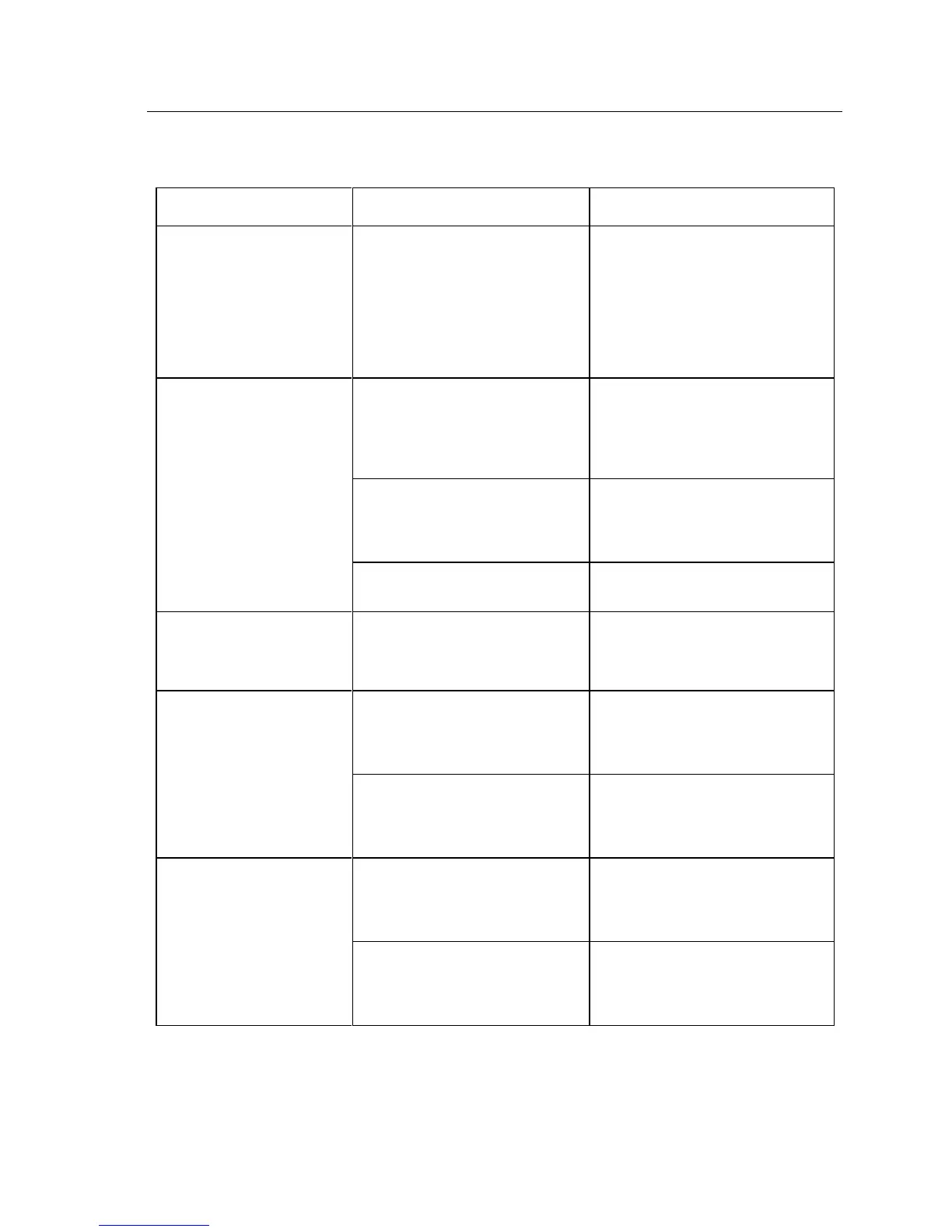
Feeder (continued)
(All units except Professional units
with automatic feeder flag.) The
floor extender is not installed
correctly.
(All units except Professional units
with automatic feeder flag.) See
Section 1 to correctly install floor
extender. Ensure extender tabs are
pushed down into slots on unit as far
as possible. Extender floor must be
even with floor of the feeder bay.
False “Feeder Empty”
messages.
Documents are not properly loaded
in feeder bay.
Documents should be jogged then
loaded into feeder bay with leading
edge of paper stack touching end of
feeder bay.
Blow air with Micro-duster through
the paper path – where feeder bay
touches unit.
Double document stop
message with single item in
track. (False double
document.)
Contact application provider to
ensure latest version software in
use.
Single items do not feed
when inserted (Value units).
Blow air with Micro-duster through
the paper path – where feeder bay
touches unit.
Application; application settings.
Ensure that the application is
capable of (and settings are correct
for) automatic document feed.
Automatic feeder flag does
not close. (Professional units
with automatic feeder flag.)
Software/hardware
synchronization.
Close the application. Turn the unit
off and then on. Restart the
application.
Application; application settings.
Ensure that the application is
capable of (and settings are correct
for) automatic feeder flag.


 To Next Page