17
EN
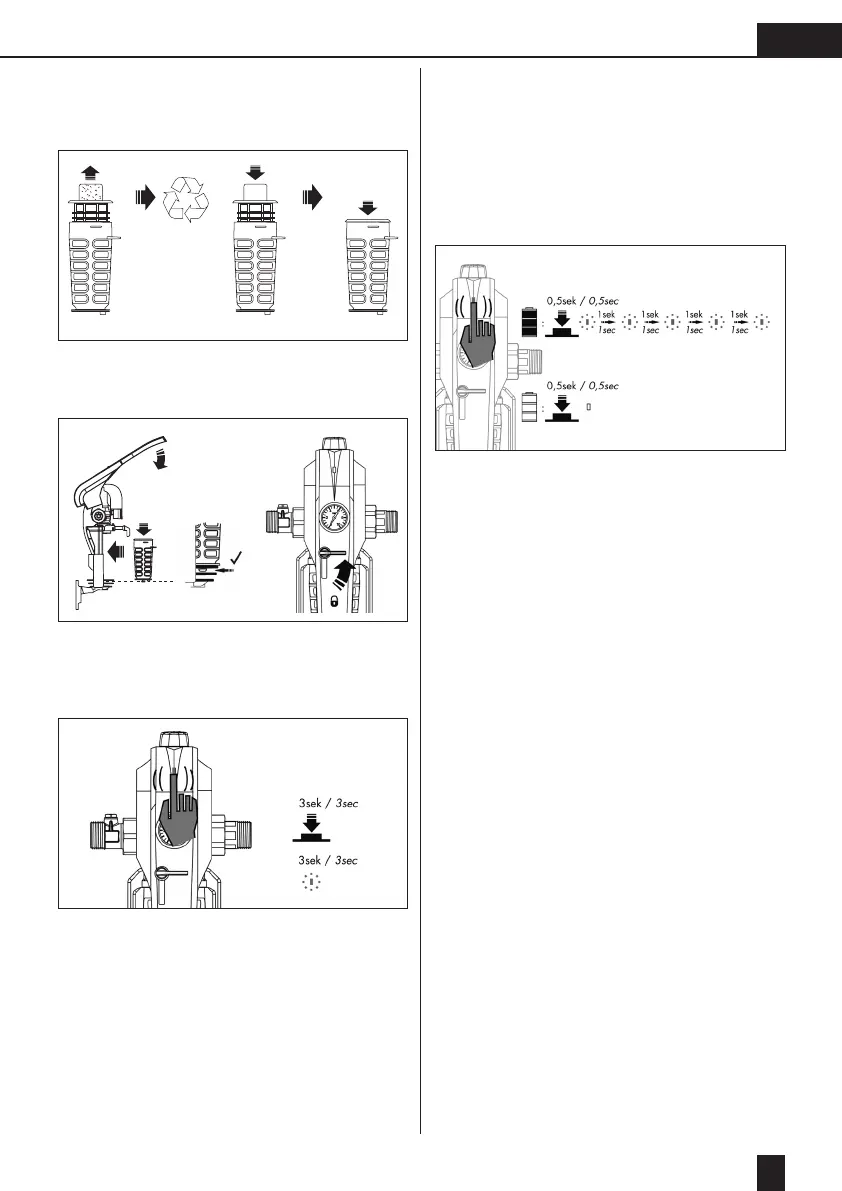
3. Dispose of the used lter element or – for
optimum hygiene – the complete hygienic vault
(environmentally-friendly plastic recycling).
4. Insert the new lter element or hygienic vault (A2),
close the lever (B2). Slowly release the stopcock/
unlocking device (6) (90° anti-clockwise) (C2).
5.
Reset lter change display (LED) - Reset: press LED
button for 3 seconds, then 3 seconds of continual
light as conrmation that reset has been
successful.
When reset is complete, the countdown runs
again from 6 months/182 days to 0.
6.
To check the batteries of the lter change display
(LED) and functional query.
Briey press the LED (< 3 secs.) ➔ 5 x rapid
ashing, when the change display is active and
the countdown runs from 6 months/182 days to 0.
This function is simultaneously also a battery
check. If no ashing signal occurs, the batteries
must be replaced.
A2
B2
C2
A2
B2



 To Next Page