27
EN
Checkthatthelterandushingwaterpipehave
been properly installed.
Slowly open the stop valves up- and downstream of
thelter.Deaeratethepipeworkatthenextbleed
pointdownstreamofthelter,anddrainwaterbriey.
Checkthesealsoftheinstallationandlterforleaks.
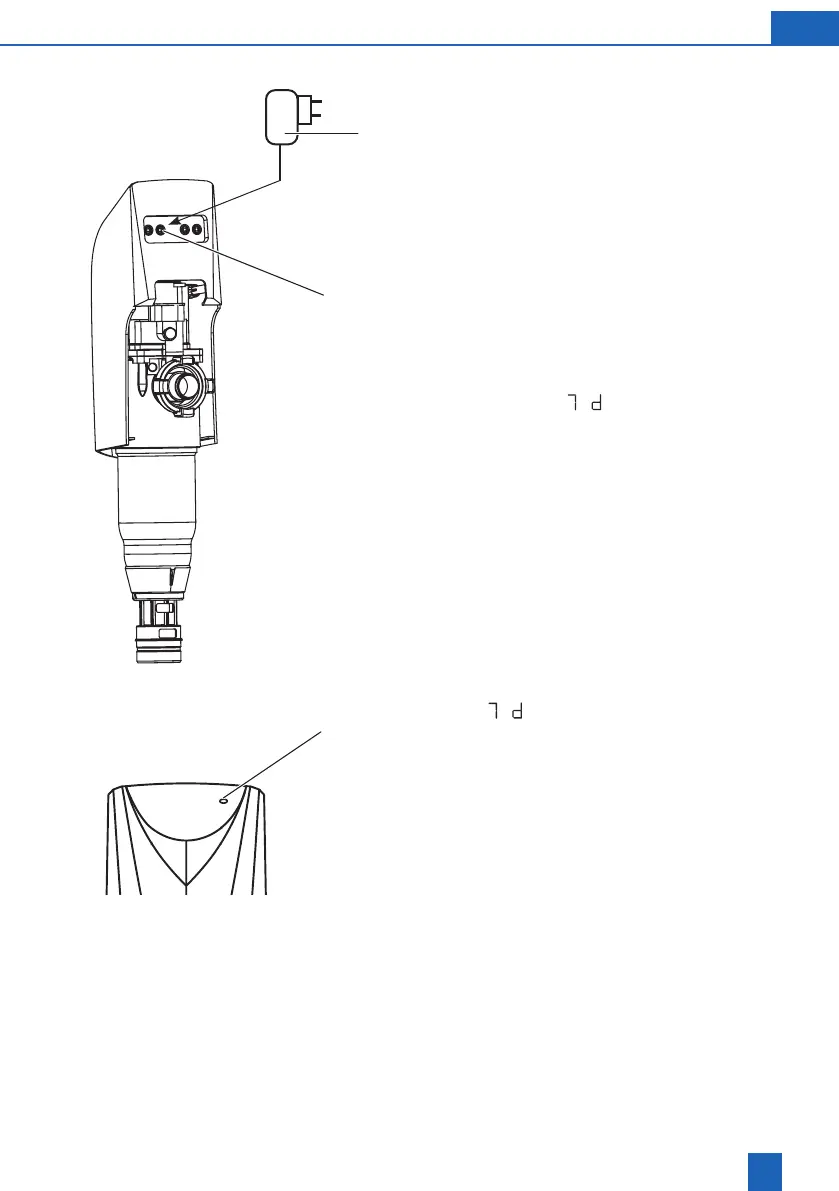
Insert the cable plug connector of the power supply
unitintothesocket(24V).
Plug in power supply (3) unit to main.The rst
back-washing cycle is performed automatically
(during backwashing the illuminated segments on
thedisplayturn).
The factory setting
(7days)appears.
The required backwash interval must be set on
thelter.
The setting is made with the Set key
PressSetfor5sec.
Display
(7days)appears
Displaydotsash;deviceisinprogrammingmode
PressingtheSetkeyagainstepsupthenumberof
h(hours)ord(days).
The hours h run from 1 - 24, followed by days d from
2 - 56, followed by the hours again etc.
PresstheSetkeyuntilthedesiredvaluehasbeen
set.
The value is saved 10 seconds after the last input.
The display dots disappear. The unit backwashes.
Thelterisreadyforuse.
24 V
3
Set






 To Next Page