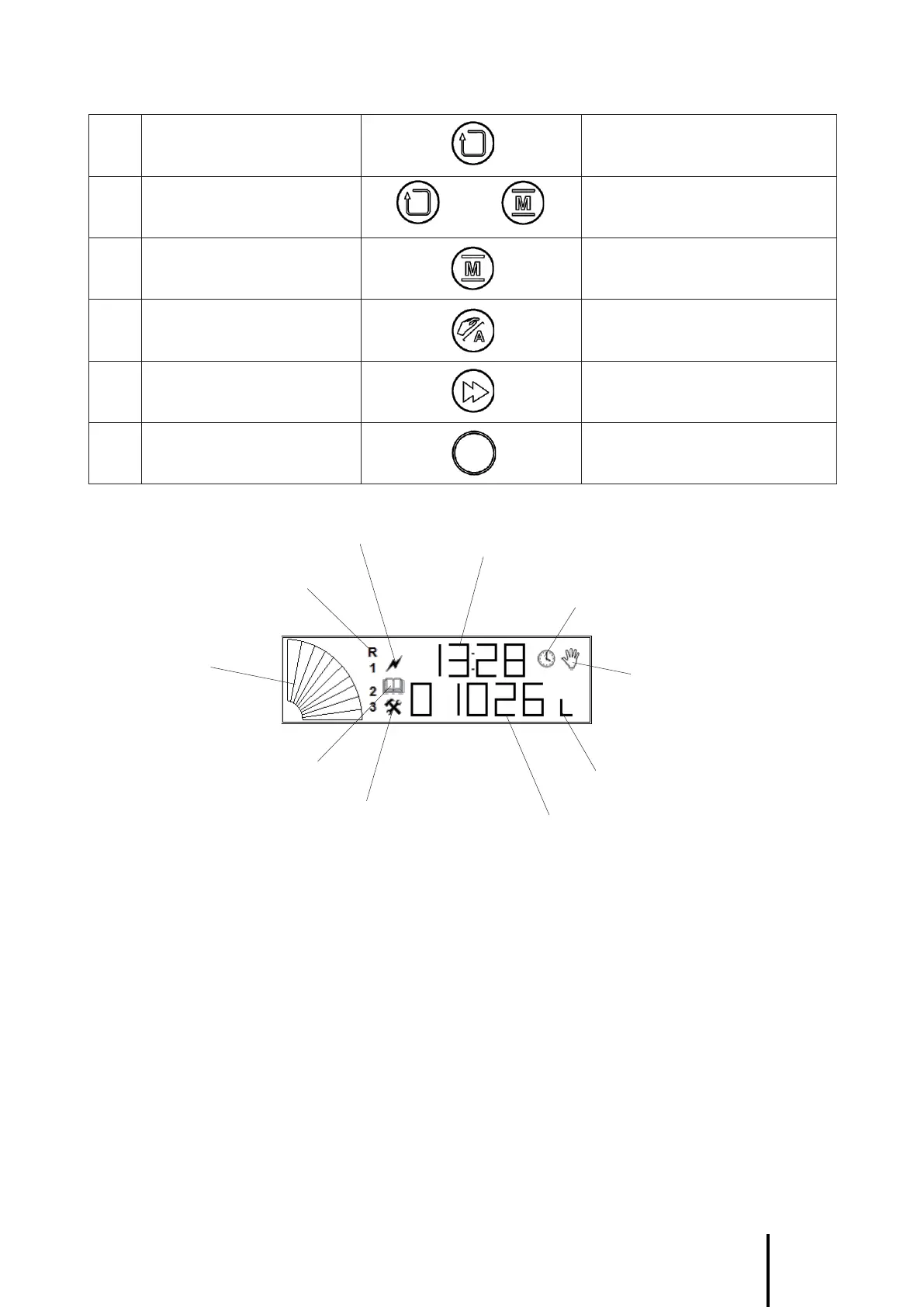
DISPLAY A5X
Electrolysis fault icon
Current time
Regeneration phases icon
Bargraph
Maintenance icon
ASS servicing icon
Time icon
Manual operation symbol
Units in liters icon
Remaining volume in liters
FIRST POWER ON THE CONTROL UNIT
When switched on the unit displays five zeroes with the first on the left flashing. It will remain in this configu-
ration until the operating mode for your appliance is entered and identified by a generic code.
ENTERING THE GENERIC CODE FOR THE OPERATING MODE
Enter the generic code for the selected operating mode. Once the 5-figure operating mode code is displayed,
Press the “hidden” button to confirm the selection. The next 2-line display states the current time and the
softener cycle programmed by default.
CAUTION : Each operating mode selection code described above corresponds to a well-defined program
in the A5X unit microprocessor.
Any code that is erroneous or that does not correspond to the list above can lead to malfunction of your
appliance and possibly to the loss of the BWT guarantee.



 To Next Page