4-1 Charging/Discharging Instructions 95
2. Guidance on charging operation
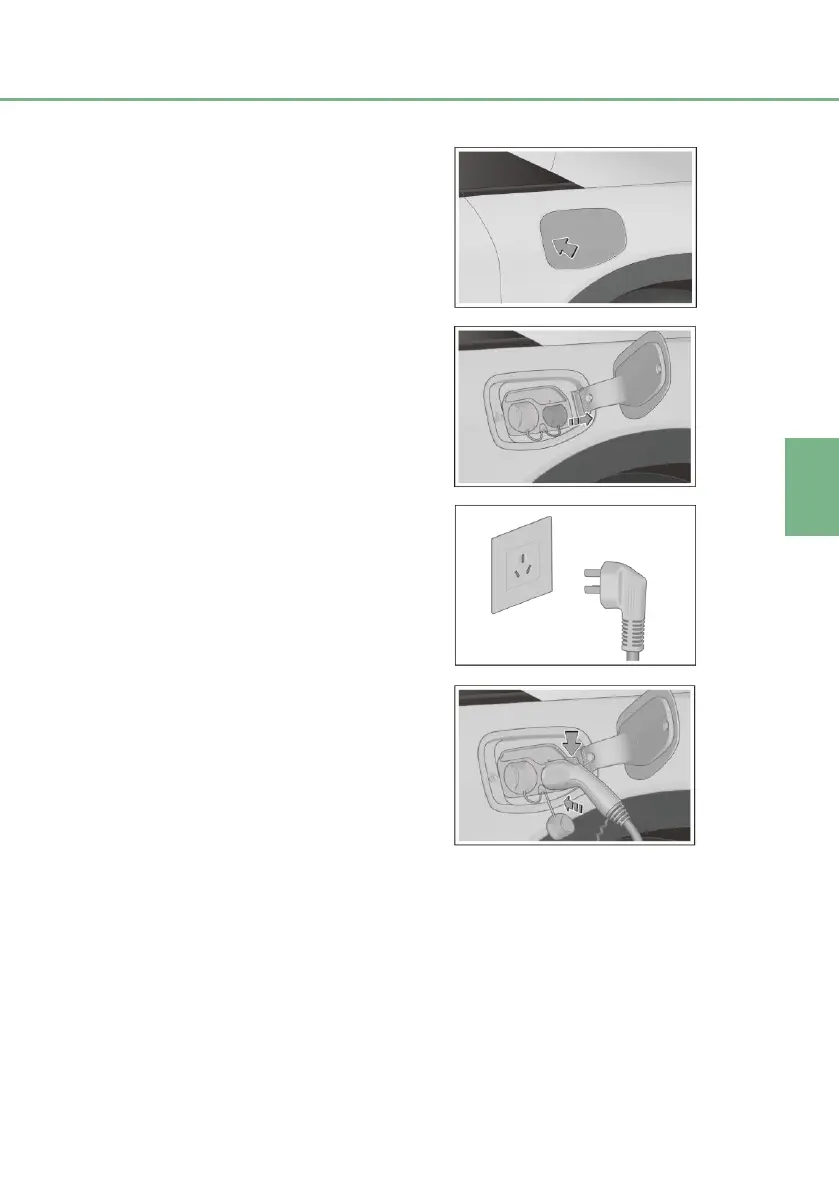
■ Set the vehicle power in OFF mode.
■ With doors unlocked, press the
charging port cap button to
automatically open the charging port
cap.
■ Open the plug cap for the charging
plug and the on-board socket; make
sure that the ends of the charging
plug head and socket are free of
obstructions.
■ Connecting power supply port:
Insert the power supply plug of
the 3-pin to 7-pin equipment
into the household socket. The
power indicator of the 3-pin to
7-pin equipment will stay on (in
red).
■ Connecting vehicle charging port:
Press the lock button (black)
on the charging plug, insert
the charging plug into the
vehicle socket, and then
release the lock button.
Connect the charging plug.
The charging plug connected
indicator on the combination
instrument or multimedia
system will illuminate. The
charging indicator of the 3-pin
to 7-pin equipment will flash
(in green).


 To Next Page