4-5 Driving assistance function
4-5 Driving assistanc e function
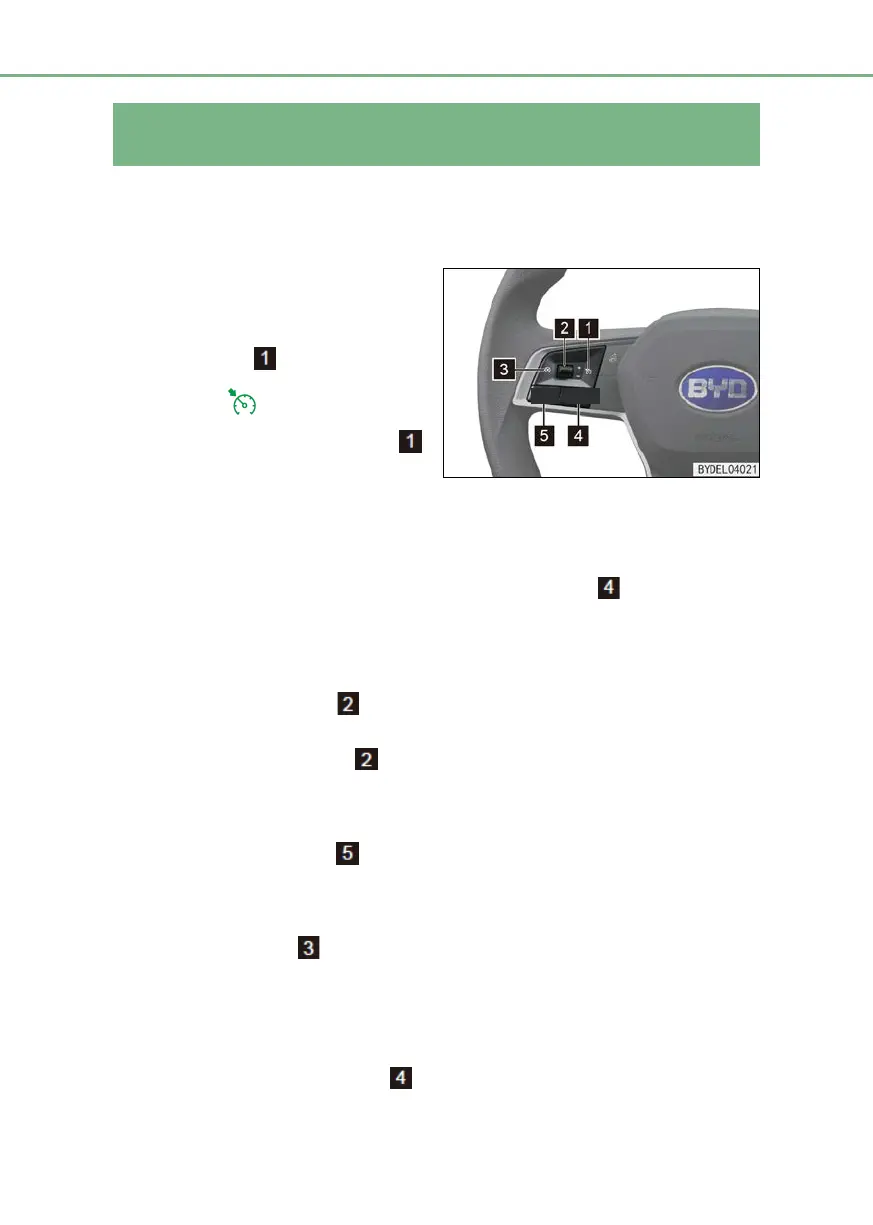
Cruise control (If fitted)
The cruise control can maintain the car at the preset speed of above 40km/h without
depressing the accelerator pedal. The function can be activated when driving on a straight
highway.
Turn-on/turn-
control system
■ Start the vehicle, and press the cruise
control switch
. In such case, the
indicator lamp on the combination
instrument turns on.
■ Press the cruise control switch
again or turn off the vehicle power
supply to turn off the cruise control
system.
Set
When the vehicle speed exceeds 40km/h, press the set button to set the current
vehicle speed as target cruise control system. In such case, the “SET” indicator lamp on the
instrument turns on to indicate the successful setting.
Adjustment of speed
■ Operate upward the roller . Press to increase the cruise control speed by a rate of
2km/h and press and hold to increase continuously.
■ Operate downward the roller
. Press to reduce the cruise control speed by a rate of
2km/h and press and hold to reduce continuously.
Resume
■ Press the Resume button to resume the set speed prior to the last turn-off cruise
control mode.
Deactivation of cruise control:
■ Pressing the button or depressing the brake pedal and shifting out of “D” can
deactivate the cruise control.
Overridden acceleration
Under the cruise control mode, depress the accelerator pedal to accelerate the vehicle. If no
operation is made after acceleration, the vehicle speed restores to the set speed prior to the
acceleration. Pressing the Set button
while depressing the accelerator pedal can set



 To Next Page