iNetVu™ Service Manual Page 52 of 109
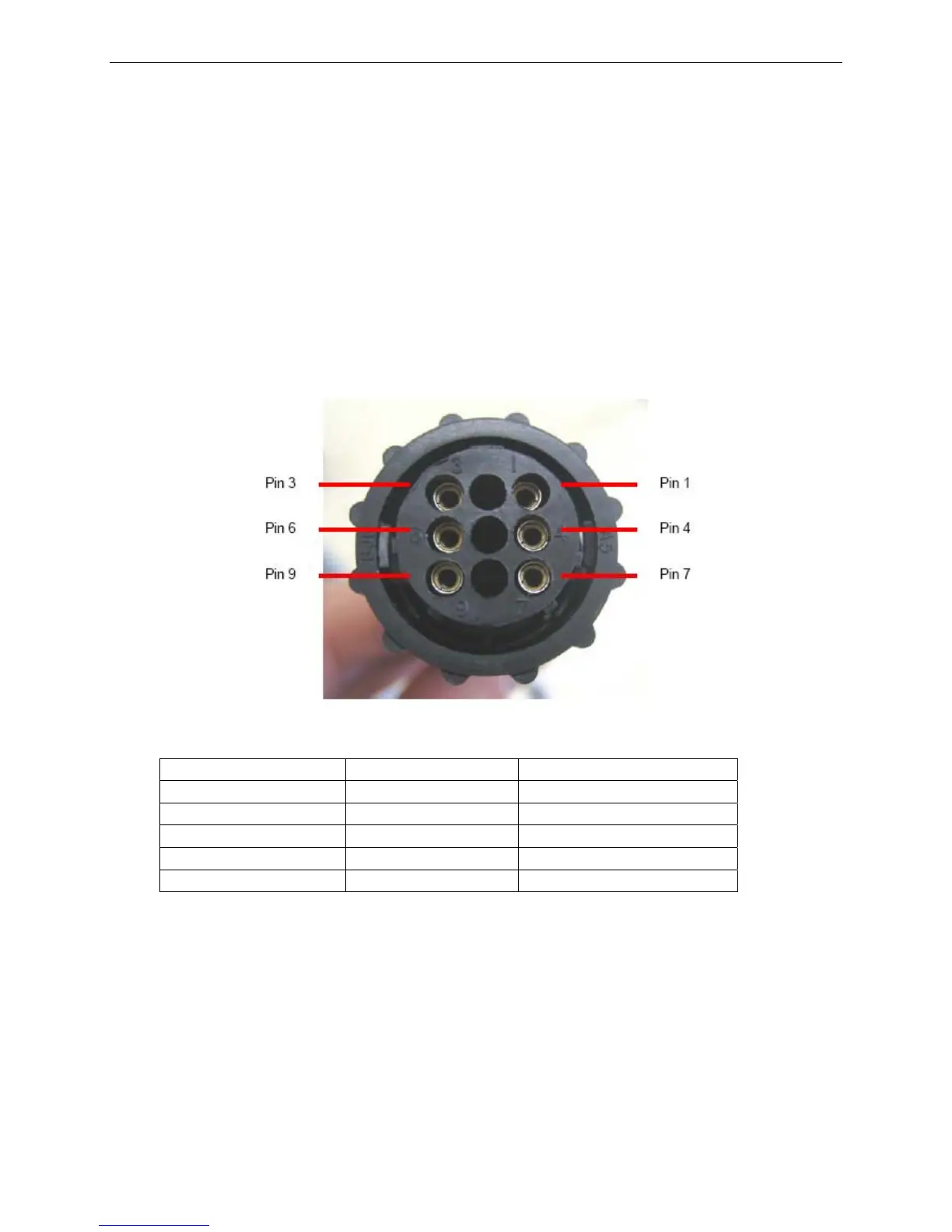
2) Connect the 12VDC power source to the appropriate leads (See table above) in
order to move the dish to the physical stow position in the following order.
a. Polarization
b. Azimuth
c. Elevation
7000/9000 Controllers
1) Disconnect Motor Control cable from the iNetVu™ 7000/9000 Controller.
Elevation UP (-) Pin 1 (+) Pin 3
Elevation DOWN (-) Pin 3 (+) Pin 1
Azimuth CCW (-) Pin 9 (+) Pin 7
Azimuth CW (-) Pin 7 (+) Pin 9
Polarization CCW (-) Pin 6 (+) Pin 4
Polarization CW (-) Pin 4 (+) Pin 6
2) Connect the 12VDC power source to the appropriate leads (See table above) in
order to move the dish to the physical stow position in the following order.
a. Polarization
b. Azimuth
c. Elevation
If the above procedure did not solve your problem then contact iNetVu support for further
assistance.



 To Next Page