iNetVu™ Service Manual Page 80 of 109
4.10. Installing BUC to iNetVu™ 980 Mobile Platform
This procedure describes the steps involved for installing a Block Up Converter (BUC)
to the iNetVu™ 950 / 980 Mobile Platform.
Required Materials:
iNetVu™ 980 Mobile Platform
BUC
Universal Transmitter Mounting Bracket Kit
Four (4) ¼ Flat Washers
Four (4) ¼.20 NYL Nuts
Four (4) S/S 4.50 inch Hex Bolts
Four (4) ¼ Split Washers (only if ¼.20 Nuts are not NYL)
Two (2) S/S Hex Bolt 5/16” x 3” (ISIS BUC ONLY)
Procedure:
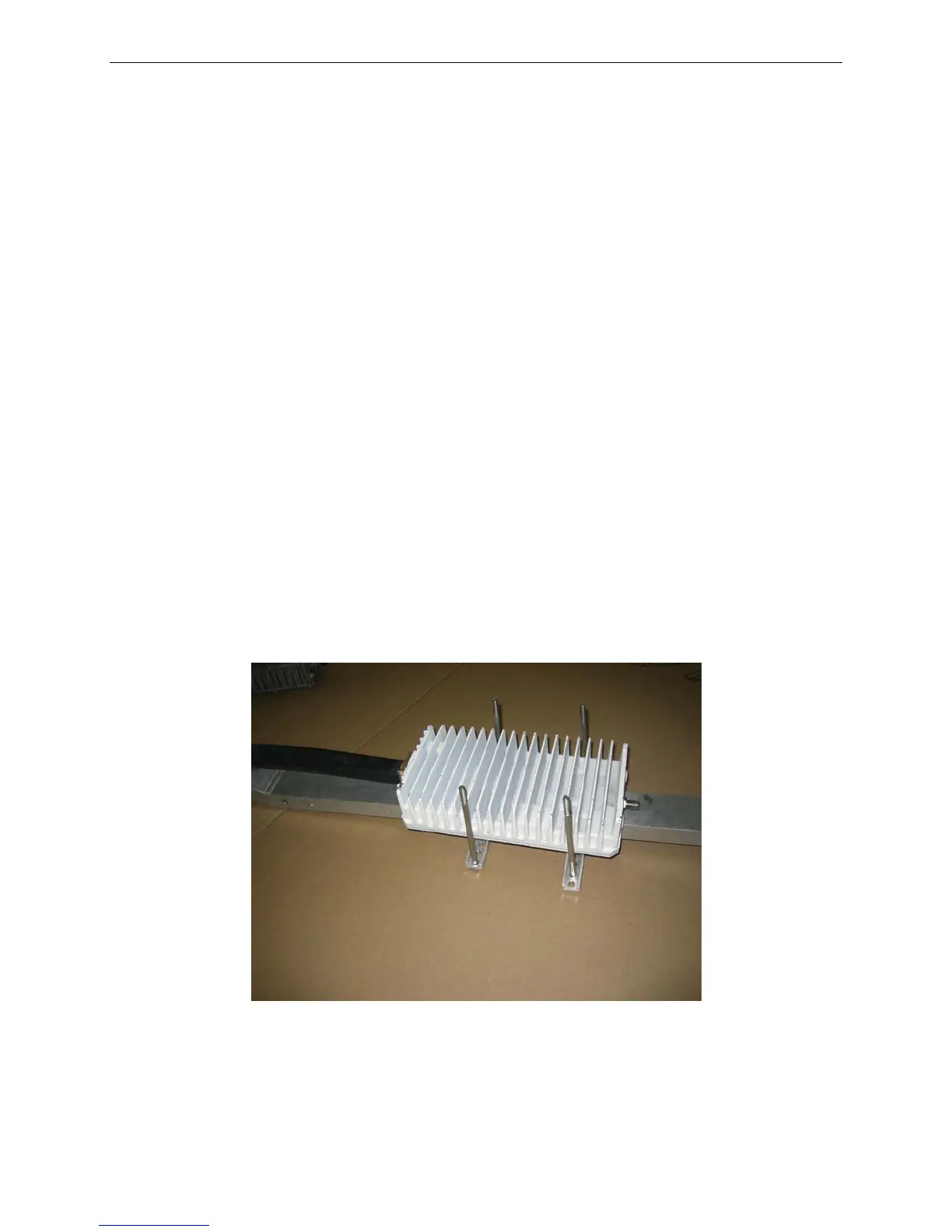
1. Place and secure the BUC on the underside of the Feed Arm.
2. Place two (2) brackets on the topside of the Feed Arm and insert two (2) 4.5” hex bolts
(along with their corresponding ¼ Flat Washers) into each bracket. Ensure that the coaxial
connector end is facing the reflector and the flat edges of the brackets are facing outwards.
Fig. 40: Inverted view of BUC and topside brackets
3. Ensure the hex bolts are securely placed for support. If you are using a larger BUC (2W and
up), you may need to use the outer holes of the bracket, to secure the BUC to the Feed
Arm.



 To Next Page