ENCORE VENTI Rev. 3 2021-10
www.cafection.com 800-561-6162
38
SERVICE & INSTALLATION MANUAL for Cafection's Encore Venti
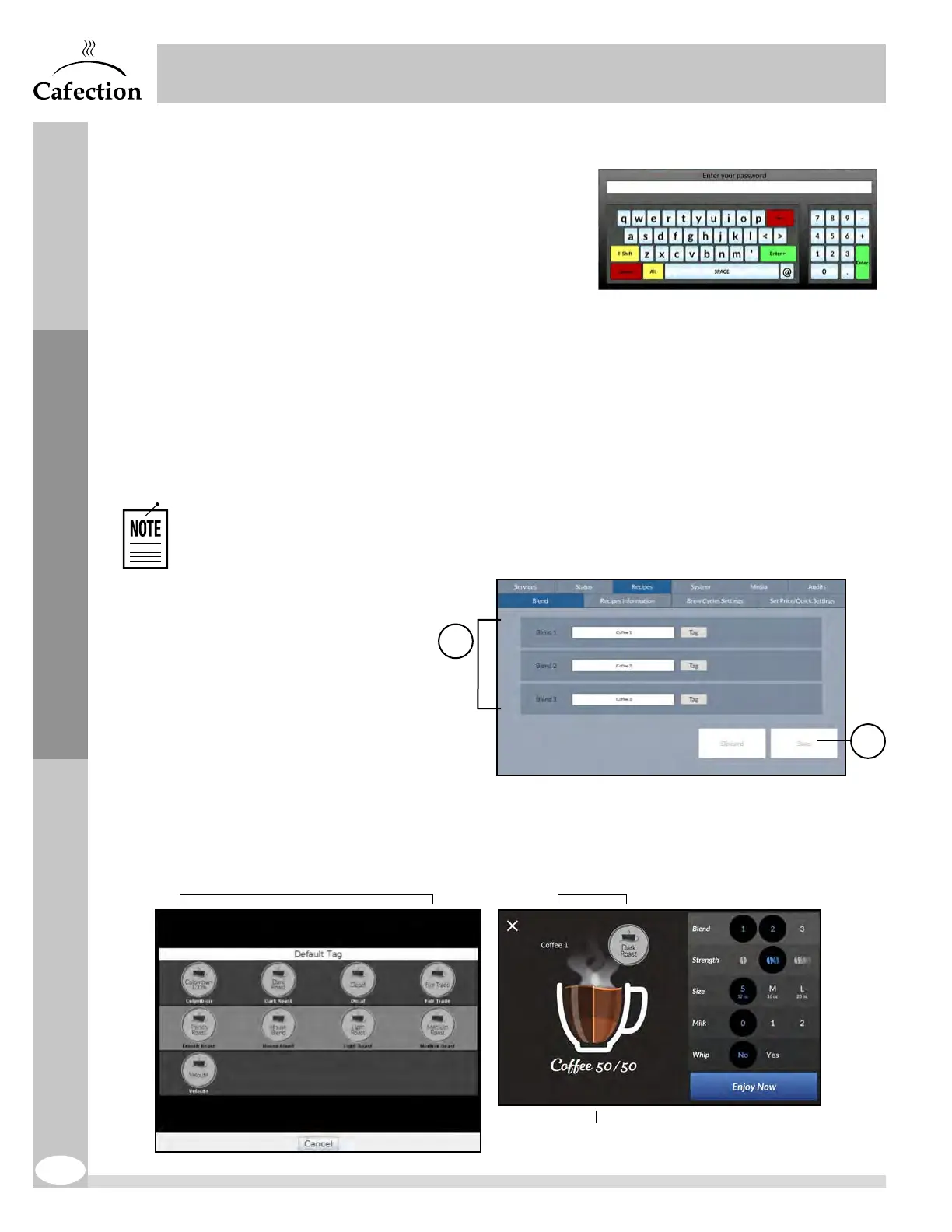
6.4 Password Pop-Up
This pop-up window will appear when pressing the
Recipes, System, Media or Audits tabs. The user
needs to type in his password using the alphanumeric
keyboard, then press on ENTER. Depending on the
password entered, the user will gain access to different
tabs.
6.5 Recipes Tab
To access the screen below, press the SW2 button (white) on the main board inside the brewer’s
door (see section3.6) and select the Recipes tab.
6.5.1 Blend Sub Tab
The Blend sub tab allows to edit blends names or labels. For each blend, it is possible to
display only one option (name or label) on the selection screen. Default blend names are
Coffee1, Coffee2 and Coffee3.
Coffee names and labels can be edited with Sophia (Optimum License required).
1. Use the "Label" button
to select a tag for the
associated blend. Use
the "Name" button to
edit the blend’s name
using the text box.
2. This button is used to
save any changes to
the blend settings. Any
unsaved changes will
be lost.
1
2
Recipe name
Blend's name or labelLabel list
Service Mode


 To Next Page