ENCORE VENTI Rev. 3 2021-10
www.cafection.com 800-561-6162
54
SERVICE & INSTALLATION MANUAL for Cafection's Encore Venti
Service Mode
6.7 Media Tab
While a beverage is prepared, a video plays on the screen. The Media tab is used to edit the video
playlists.
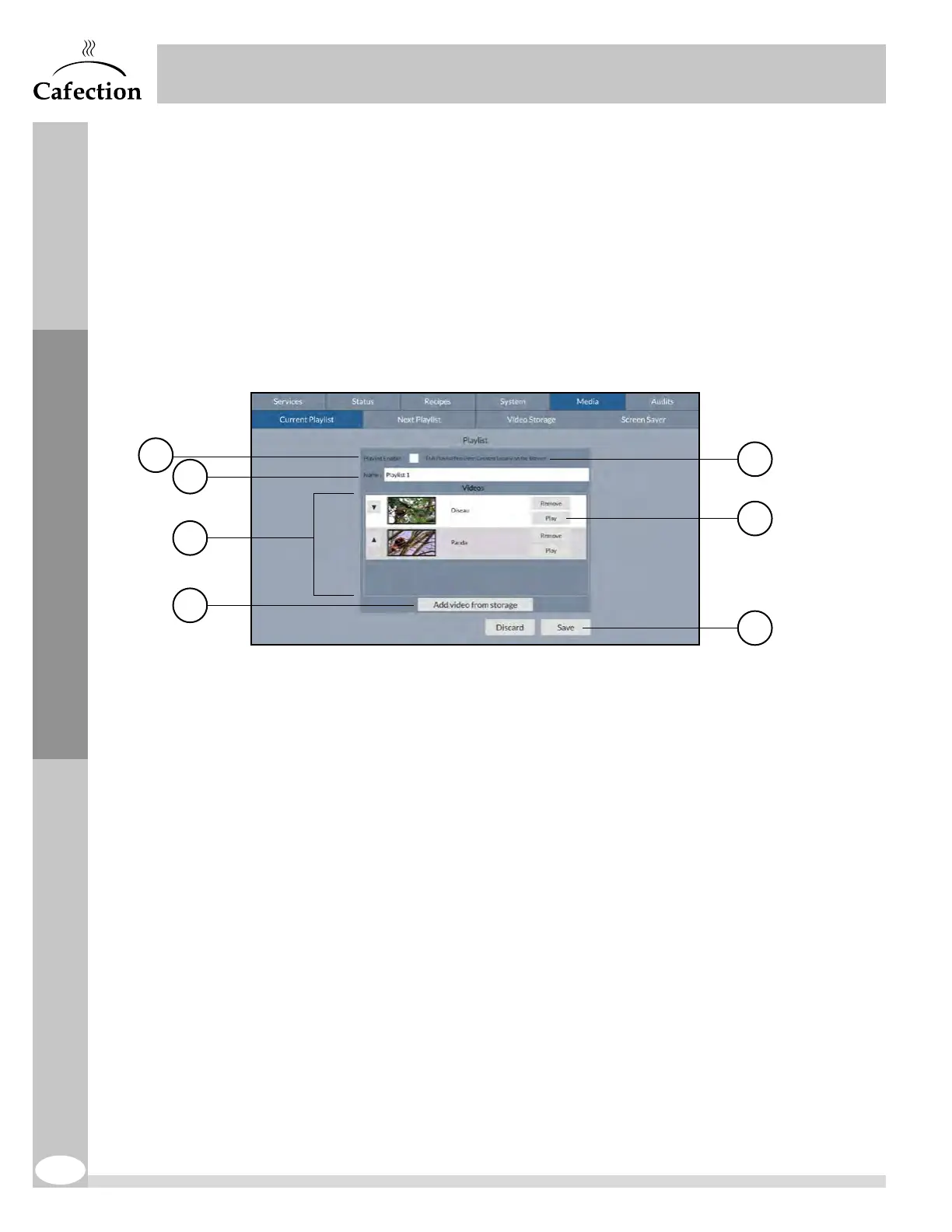
To access the screen below, press the SW2 button (see section 3.6) on the main board inside the
brewer's door and select the Media tab.
6.7.1 Current Playlist Sub Tab
The Current Playlist sub tab allows to edit the main playlist.
1. This checkbox is used to enable the current playlist.
2. This field is used to change the name of the playlist.
3. List of videos selected for the current playlist.
4. This button is used to add a video from the video storage on the brewer.
5. The source indicates where the playlist comes from. Personalized videos can be added
with Sophia (Optimum license required).
6. This button is used to see a preview of the video.
7. This button is used to save all parameters changes. Any unsaved changes will be lost.
7
5
6
1
2
3
4


 To Next Page