ENCORE VENTI Rev. 3 2021-10
www.cafection.com 800-561-6162
52
SERVICE & INSTALLATION MANUAL for Cafection's Encore Venti
Service Mode
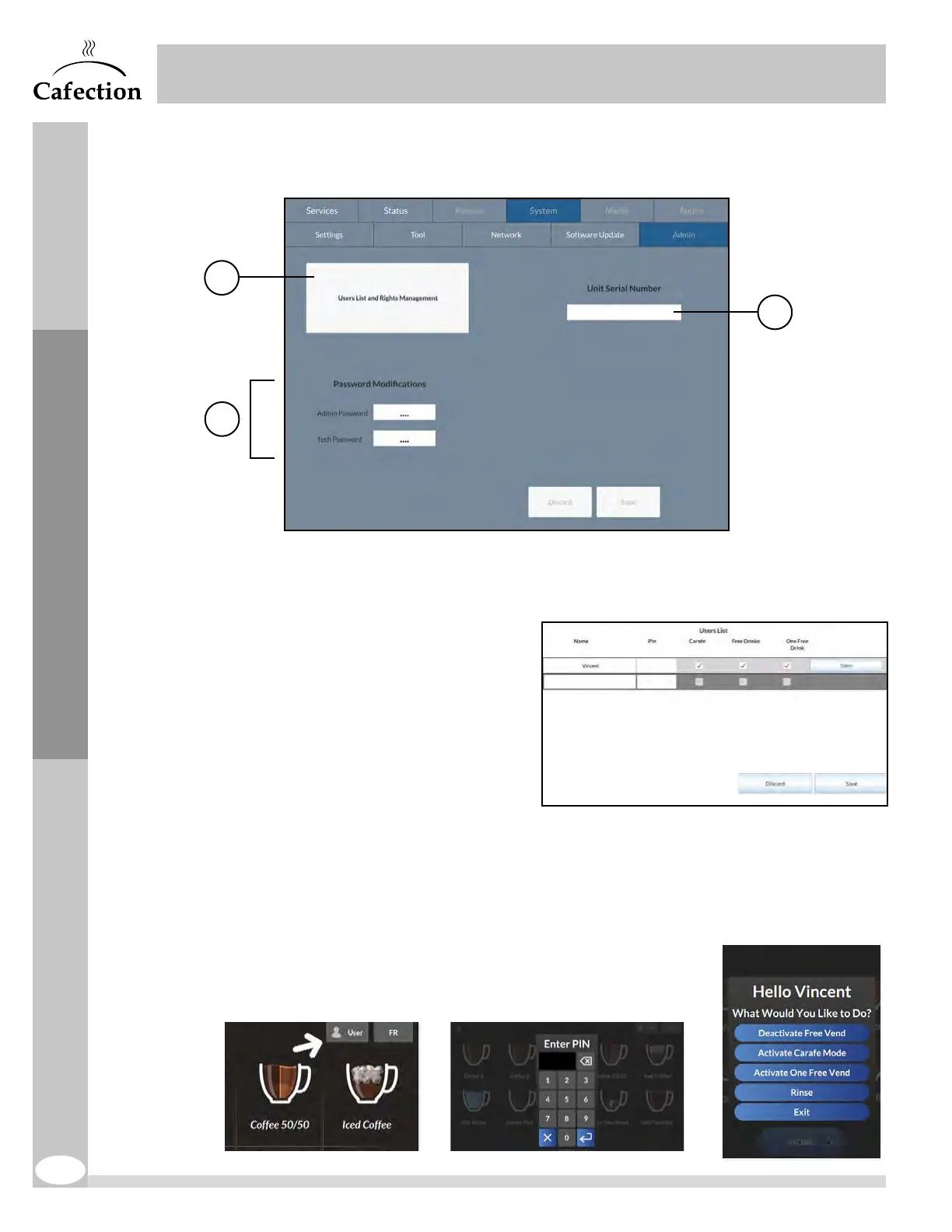
6.6.5 Admin Sub Tab
The Admin sub tab is available to level 4 users only (see section6.1).
1. This button is used to create a list of users authorized to activate Carafe mode,
FreeVend mode and/or order one free drink directly from the selection screen.
- To create a new user, click on a
blank field under the Name section
and enter the name of the user.
- Enter a PIN from 1 to 9999 (for a
minimum security, a PIN of 4digits
is recommended).
- Check the box for each
authorization that needs to be
granted to this user.
- Press on Save & Exit and save
changes.
If at least 1 user is created, a user icon appears on the selection screen (top right
corner). When the user presses on this button, a pop-up window with a numeric
keyboard appears. Once the user has entered a correct PIN, he will be able to activate
the authorization(s) he has been granted. If the user enters an incorrect PIN five times
in a row, the user icon will be locked. To unlock it, enter and
exit Service mode by pressing the SW2 button (see section
3.6) on the main board inside the brewer's door.
1
3
xxxx-xxxx-xxxx-xxxx
2


 To Next Page