ENCORE VENTI Rev. 3 2021-10
www.cafection.com 800-561-6162
56
SERVICE & INSTALLATION MANUAL for Cafection's Encore Venti
Service Mode
6.7.4 Screen Saver Sub Tab
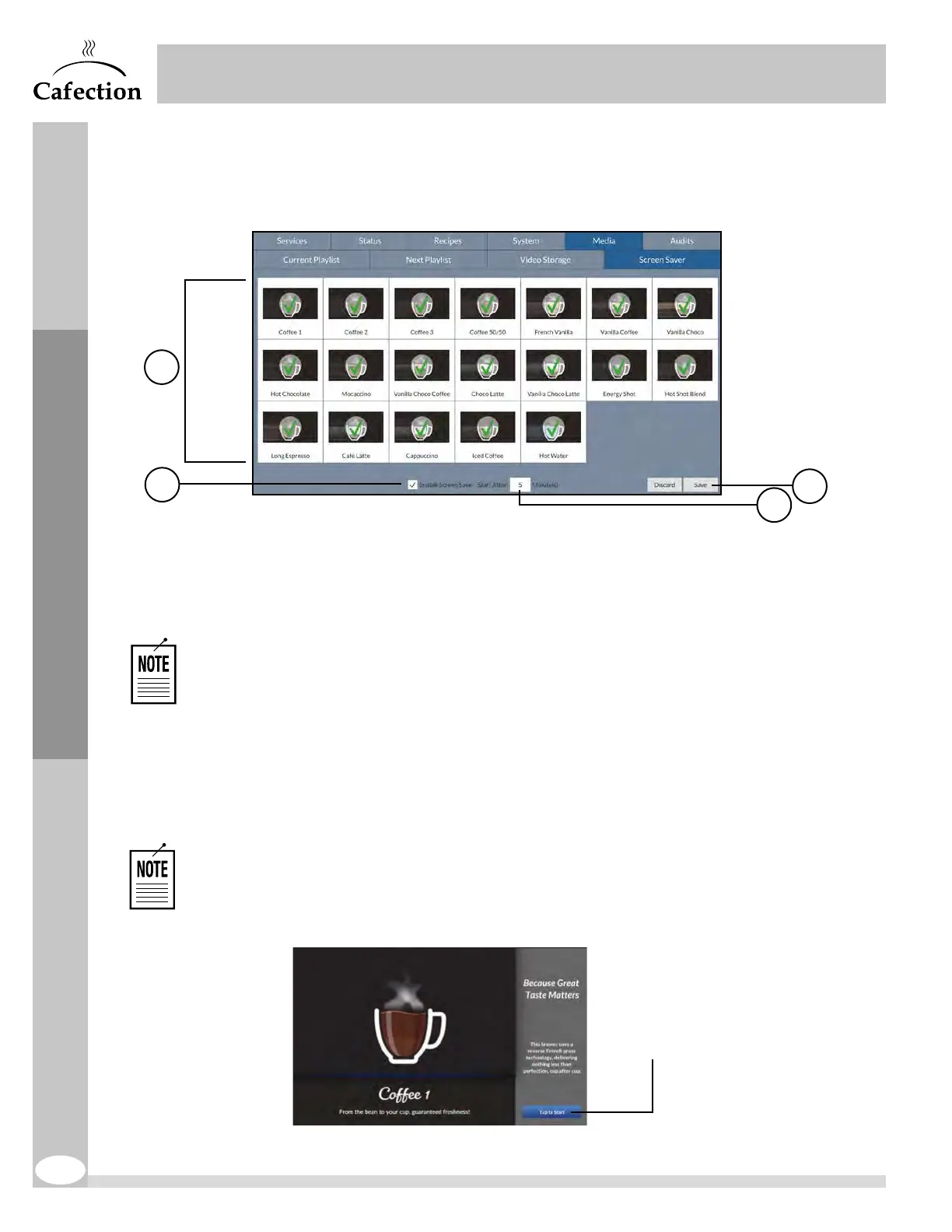
The Screen Saver feature is used to promote the brewer’s available products when the
machine is not in use. It can be edited in the Screen Saver sub tab.
1. Select the beverage(s) to be displayed while the screen saver is ON. A green
checkmark over a selection means it is selected.
2. This checkbox is used to enable or disable the Screen Saver feature.
If a blend’s name has been modified in the Blend sub tab (see section6.5.1), this
name will automatically be updated in the Screen Saver sub tab.
3. This field is used to set the period of inactivity (in minutes) required before the Screen
Saver feature is displayed.
4. This button is used to save any changes to the Screen Saver. Any unsaved changes
will be lost.
Use Sophia to edit the screen saver videos and interface (Optimum License
required).
Screen saver example
Tap this button to go
back to the selection
screen.
2
4
3
1


 To Next Page