Using Sentinel
CX3001 v7.0 © Calnex Solutions 39
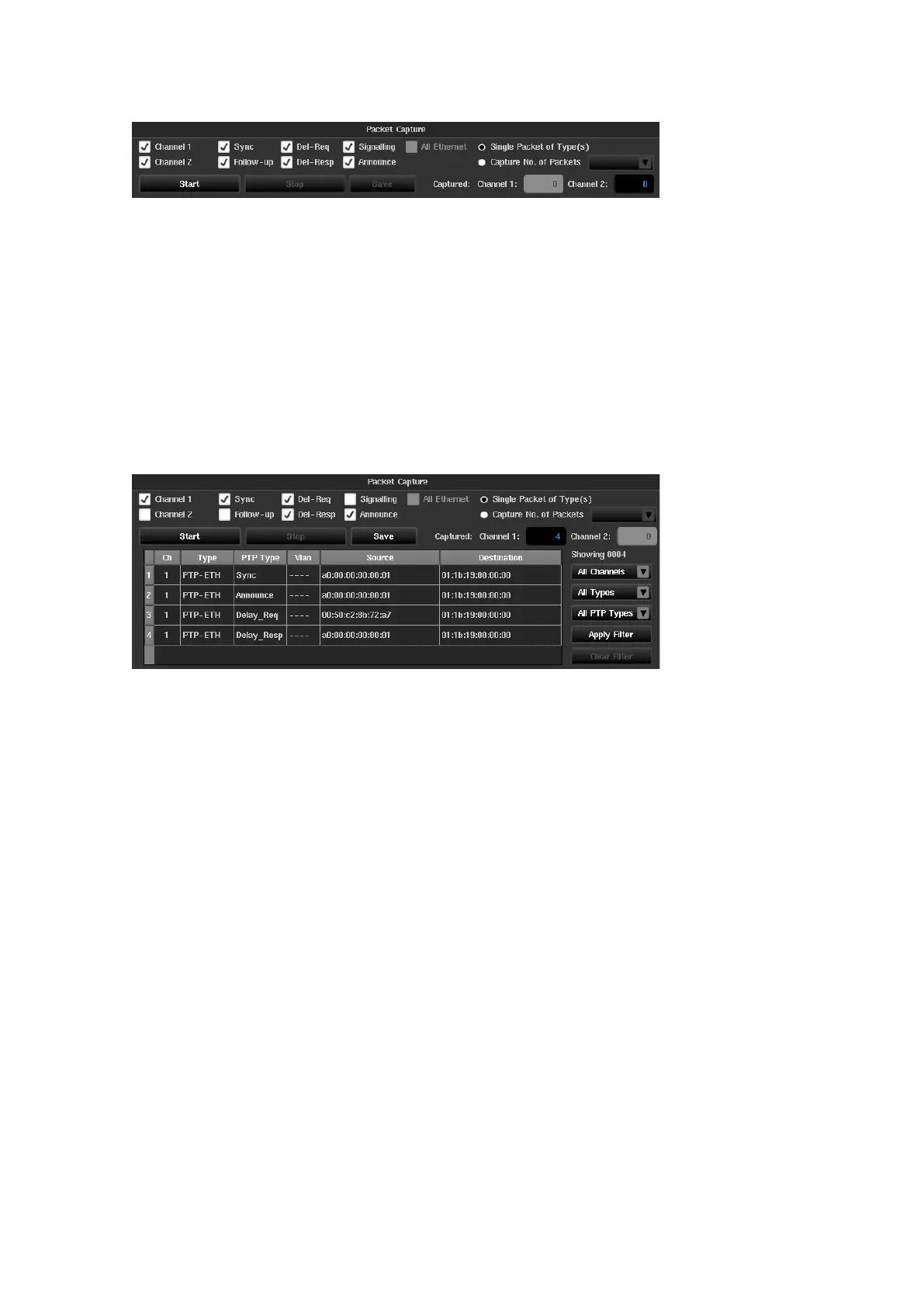
The following check boxes configure which PTP ports will be used and which types of Ethernet packets will be
captured:
Capture Slot
x
(
x
= 1, 2, C or E)
Selects which PTP ports will be used to capture packets
Sync, Follow-up, Del-Req, Del-
Resp, Signalling and Announce
Selects which type of PTP messages are captured
Captures all Ethernet packets
Capture can be configured to capture a single packet of each PTP message type, selected by the check boxes, or
to capture a specific number of packets.
The packet capture can be run by pressing the Start button. The number of packets captured on each PTP card
is displayed.
If Single Packet of Type(s) is selected the capture will end when a single packet of each of the types selected
has been captured. If Capture Number of Packets is selected the capture will end when the specified number
of packets of the specified types has been captured for each channel selected.
In either case the capture can be stopped by pressing the Stop button.
The previous example shows packet capture configured to capture one Sync, Delay Request, Delay Response and
Announce message using the PTP card in slot 1. 4 packets are indicated as being captured on Channel 1 and
Channel 2 is disabled so no packets have been captured.
Results can be filtered using the Channel, Type and PTP Type dropdown boxes to the right of the results
window.
1, 2, C
or
E
selects which PTP card is the source of the capture
PTP-UDP, PTP-ETH, ETH, IPv4, IPv6 or UDP
selects the type of packet to be displayed
Sync
,
Delay_Req
,
Delay_Resp
,
Follow_Up
,
Announce
,
Signalling
,
Management
,
Pdelay_Req
or
Pdelay_Resp
selects the type of PTP message to be displayed
Results are filtered by pressing the Apply Filter button. Filtering of results can be removed by pressing the
Clear Filter button. There are also options to select all types or all channels for each of the filters.



 To Next Page