CT-MCL01 l User’s Manual
29
Chapter 1: Product Introductions
Item Name Function Description
10 USB34 USB 3.0 Connectors
port USB3.1 Gen2
11 AUDIO1
Line-in port
(Light blue)
port connects a tape, CD,
or other audio sources.
12 AUDIO1 Microphone port (Pink)
port connects a microphone.
13 AUDIO1
Line-out port
(Lime)
port connects a headphone or
. In 4-channel, 6-channel, and 8
configuration, the function
port becomes Front Speaker Out.
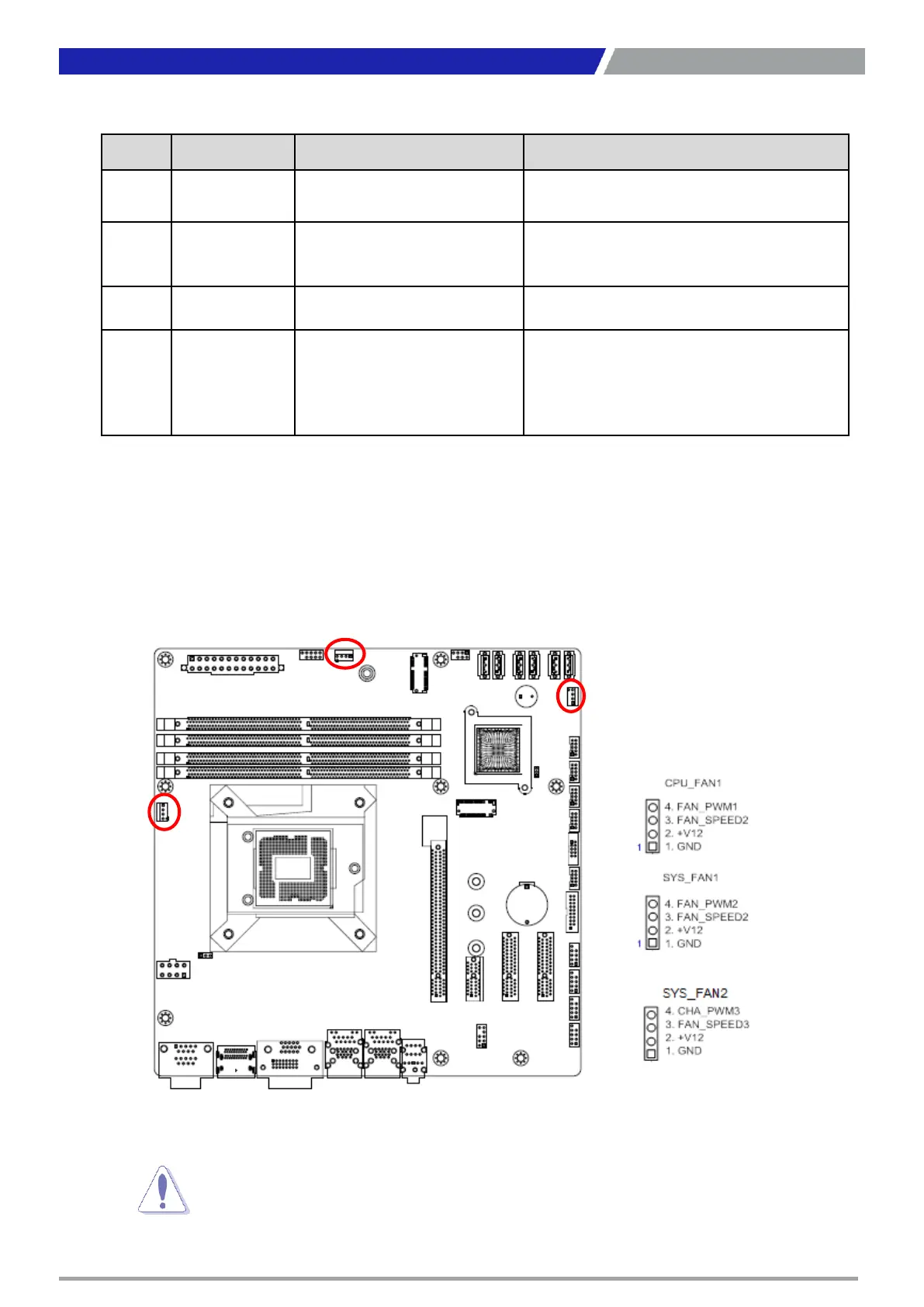
1.7.2 CPU and System fan connectors (CPU_FAN1, SYS_FAN1, SYS_FAN2)
The fan connectors support cooling fans of 280mA (3.36 W max.) at 4800rpm or a total of 1A~2.22A
(26.64W max.) at +12V. Connect the fan cables to the fan connectors on the motherboard, making sure
that the black wire of each cable matches the ground pin of the connector.
not forget to connect the fan cables to the fan connectors. Insufficient
inside the system may damage the motherboard components.
are not jumpers! DO NOT place jumper caps on the fan connectors.



 To Next Page