1212
1
2
3
4
Introduction
Contents at
a Glance
Downloading
Images
Camera
Settings
Remote
Shooting
Reference
Preferences
Index
4
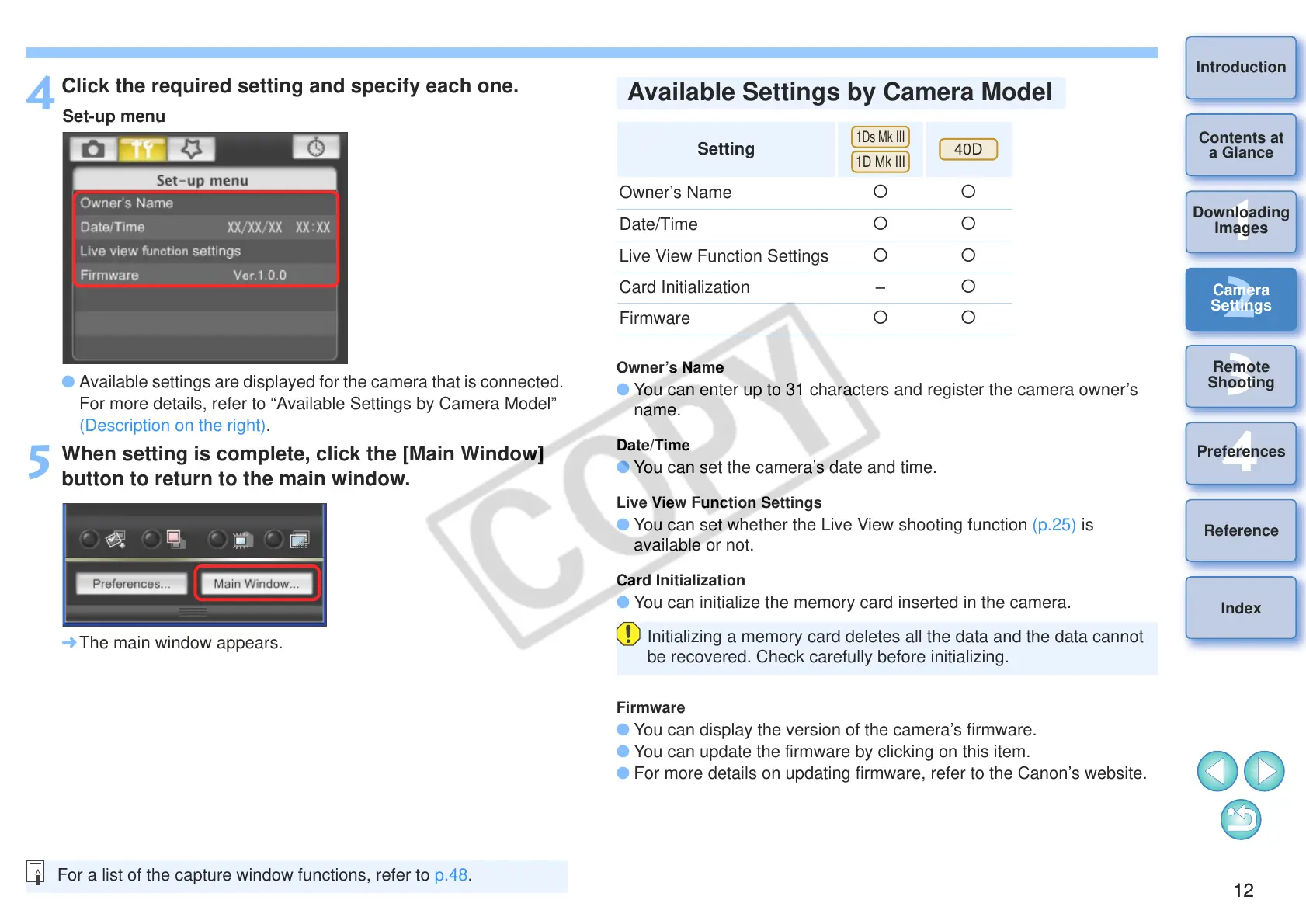
Click the required setting and specify each one.
O Available settings are displayed for the camera that is connected.
For more details, refer to “Available Settings by Camera Model”
(Description on the right).
5
When setting is complete, click the [Main Window]
button to return to the main window.
¿ The main window appears.
For a list of the capture window functions, refer to p.48.
Owner’s Name
O You can enter up to 31 characters and register the camera owner’s
name.
Date/Time
O You can set the camera’s date and time.
Live View Function Settings
O You can set whether the Live View shooting function (p.25) is
available or not.
Card Initialization
O You can initialize the memory card inserted in the camera.
Firmware
O You can display the version of the camera’s firmware.
O You can update the firmware by clicking on this item.
O For more details on updating firmware, refer to the Canon’s website.
Setting
Owner’s Name
{{
Date/Time
{{
Live View Function Settings {
{
Card Initialization – {
Firmware
{
{
Initializing a memory card deletes all the data and the data cannot
be recovered. Check carefully before initializing.
Available Settings by Camera Model








 To Next Page