1414
1
2
3
4
Introduction
Contents at
a Glance
Downloading
Images
Camera
Settings
Remote
Shooting
Reference
Preferences
Index
4
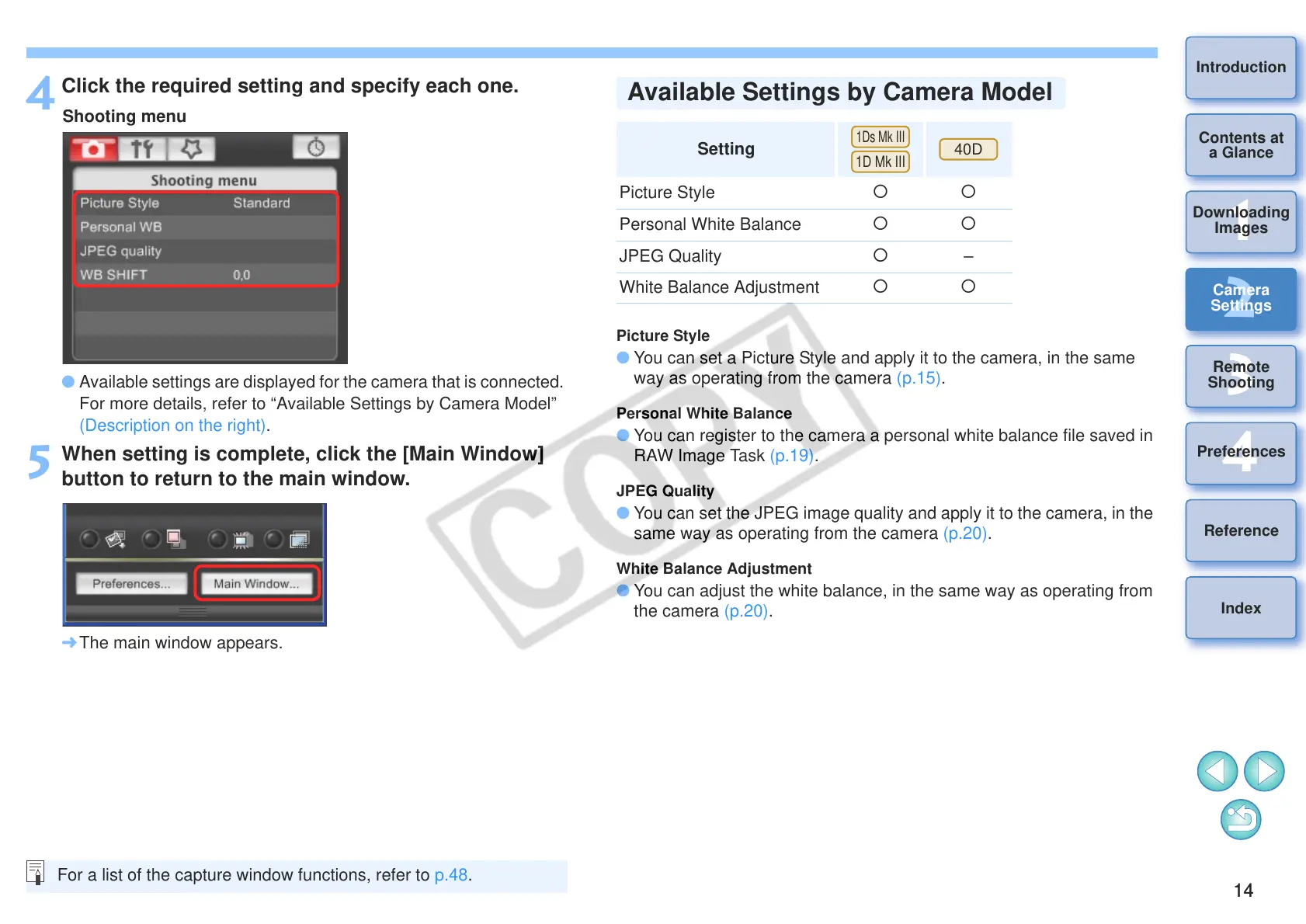
Click the required setting and specify each one.
O Available settings are displayed for the camera that is connected.
For more details, refer to “Available Settings by Camera Model”
(Description on the right).
5
When setting is complete, click the [Main Window]
button to return to the main window.
¿ The main window appears.
For a list of the capture window functions, refer to p.48.
Picture Style
O You can set a Picture Style and apply it to the camera, in the same
way as operating from the camera (p.15).
Personal White Balance
O You can register to the camera a personal white balance file saved in
RAW Image Task (p.19).
JPEG Quality
O You can set the JPEG image quality and apply it to the camera, in the
same way as operating from the camera (p.20).
White Balance Adjustment
O You can adjust the white balance, in the same way as operating from
the camera (p.20).
Setting
Picture Style
{{
Personal White Balance
{{
JPEG Quality {
–
White Balance Adjustment
{{
Available Settings by Camera Model








 To Next Page