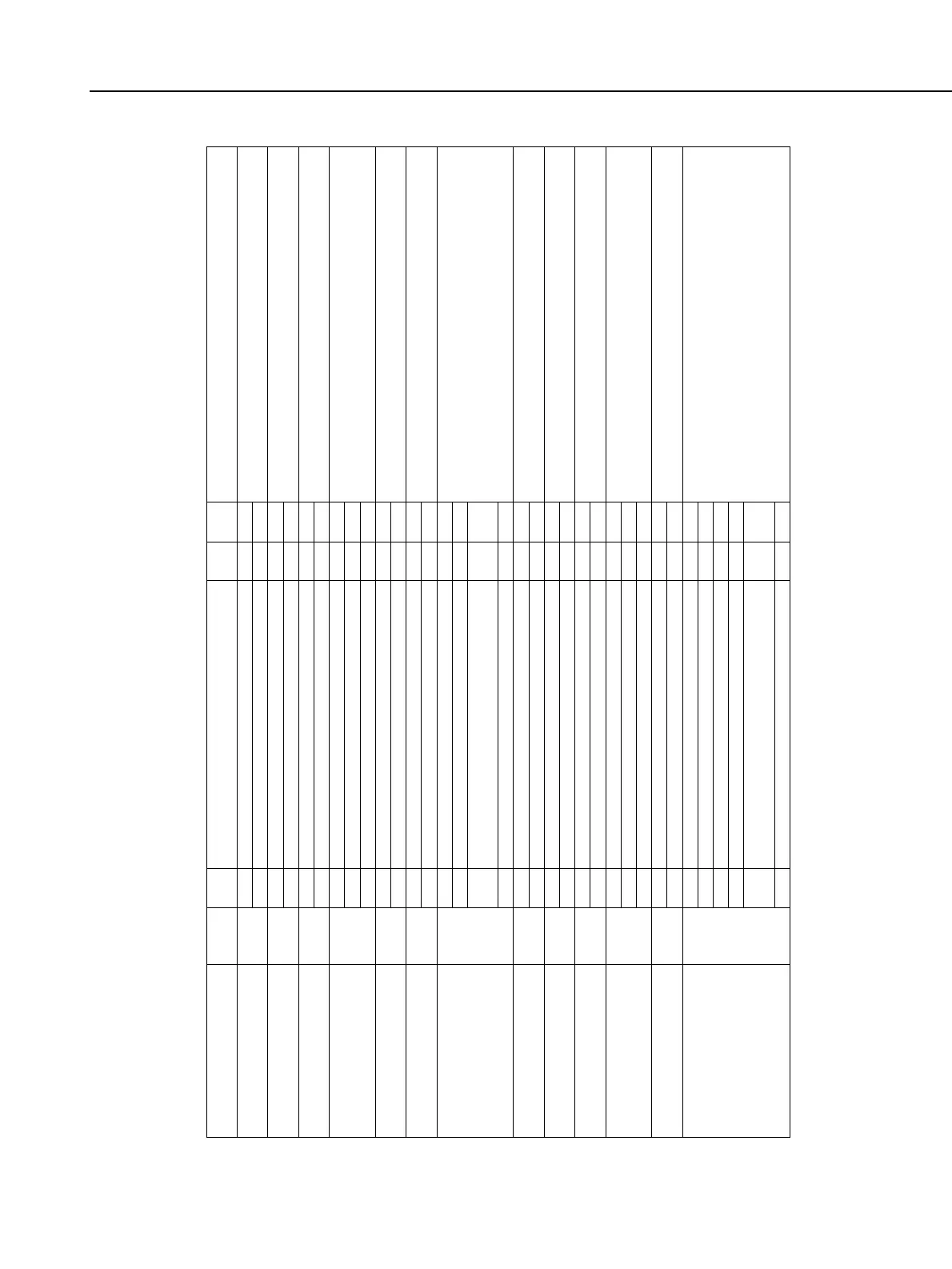
Function
Film rewind speed
Film leader position after film
rewind
DX-coded film speed setting
method
(
?) Shutter button and
(•) AE lock button functions
Mirror lockup
Shutter curtain sync
w/ built-in/external flash
AF-assist light emission /
Main flash firing
Partial metering linkage with
focusing point/FE lock
Flash sync speed in
aperture-priority AE mode
In-focus focusing point flashing
Focusing point selection
method
Switch to center focusing point
with focusing point selector
Lens AF stop button function
●
●
●
●
●
●
●
●
●
●
●
●
●
●
●
●
●
●
●
●
●
●
●
●
●
●
●
●
●
●
●
●
●
●
Custom
Function No.
C.Fn-1
C.Fn-2
C.Fn-3
C.Fn-4
C.Fn-5
C.Fn-6
C.Fn-7
C.Fn-8
C.Fn-9
C.Fn-10
C.Fn-11
C.Fn-12
C.Fn-13
Setting
0
1
0
1
0
1
0
1
2
0
1
0
1
0
1
2
3
0
1
0
1
0
1
0
1
2
0
1
0
1
2
3
4
5
Remarks
1: Useful when you need to replace the film quickly.
1: Convenient when you want to develop your own film.
1: Useful when you want to set the actual film speed. You need
not set the film speed each time you load film.
1: AE lock with shutter button pressed halfway.
2: Useful when you use AI Servo AF.
1: Useful for closeups, super telephoto shots, etc. A tripod is required. (Not
limited to self-timer and remote control operations like the EOS ELAN II E
1: When used with a slow sync speed, the subject's light trail can be captured.
(Effective with the built-in flash, SPEEDLITE 420EX, 380EX, and 220EX.)
The AF-assist light can be enabled or disabled and the main flash
can also be enabled or disabled to suit the shooting conditions.
1: Useful when the light level of the subject and background
differ greatly and you want to compose the shot properly.
1: Useful when you need not care about the background
exposure and just need the flash.
1: Useful if the lighting of the focusing point is distracting.
1: It makes focusing point selection easier.
2: Same method as with the EOS-1V, EOS-3
1:
Convenient when you want to start with the center focusing point whenever you select a focusing point manually.
C.Fn-11-1: Automatic focusing point selection is disabled.
1: AF operates while the button is held down and stops when the button is released. AF cannot be operated with
the camera.
2: Effective when metering has been activated with the camera.
3: Handy while you are using manual focusing point selection. Automatic focusing point selection takes effect
only while you hold down the button. Let go of the button and manual focusing point selection returns.
4: Holding down the button switches to the other AF mode. Let go and the original AF mode is restored. This does
not work for AI Focus AF.
5: This works when the Image Stabilizer switch has been turned on. AE is not executed.
Low speed (silent)
High speed
Rewinds film leader into the cartridge.
Leaves film leader outside the cartridge.
Enabled.
Disable
(
?): AF and AE start, (•): AE lock.
(
?): AE lock, (•): AF and AE start.
(
?): AF and AE start, (•): AF stop.
Disabled (Normal operation).
Enabled.
1st-curtain sync (Normal operation)
2nd-curtain sync
Built-in/external flash: Emits AF-assist/Fires main flash.
Built-in/external flash: No AF-assist/Fires main flash.
Built-in flash: No AF-assist, External flash: AF-assist emitted
Built-in/external flash: Fires main flash.
Built-in/external flash: Emits AF-assist/No main flash.
Disabled (Partial metering and FE lock at center focusing point).
Enabled.
Set automatically.
Set to 1/125 sec.
Enabled (superimposed).
Disabled.
Focusing point selector and keys
Direvtly with keys
Focusing point selector and Main/Quick Control Dials
Disabled.
Enabled. (Starts from center focusing point)
AF stop.
AF start.
AE lock during metering.
Focusing point selection mode switching (Auto/Manual)
AF mode switching (between One-Shot AF and AI Servo AF)
Start Image Stabilizer.
Silent
From EOS
ELAN II E /
EOS 50 E
New



 To Next Page