EasyManua.ls Logo

Canon EOS A2 - Button & Dial Operation; Primary Controls

Canon EOS A2
72 pages
Print Icon
To Next Page IconTo Next Page
To Previous Page IconTo Previous Page
Loading...
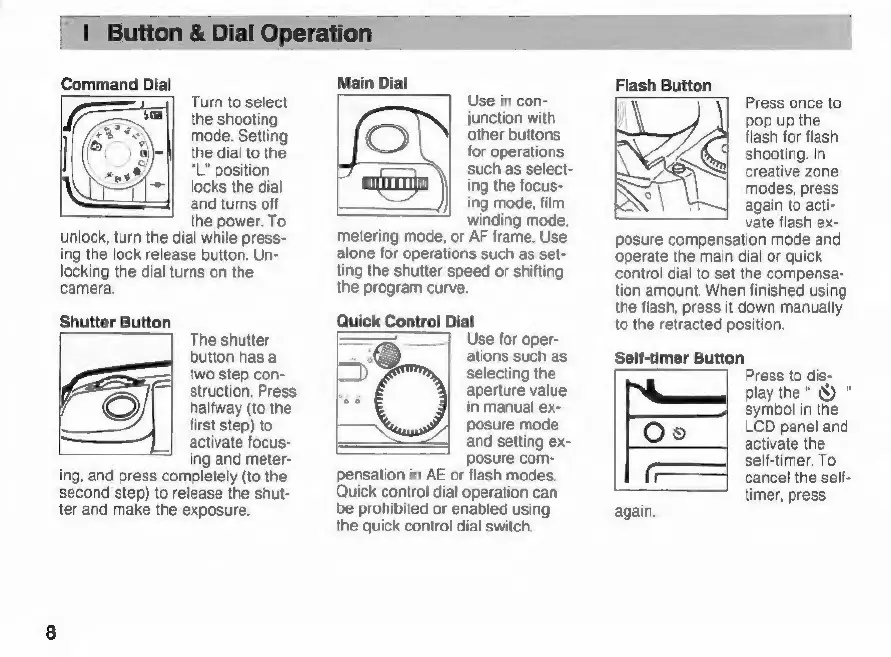
Turn
to
select
the
shooting
mode.
Setting
the
dial
to
the
“L"
position
locks
the
dial
and
turns
off
the
power.
To
unlock,
turn
the
dial
while
press-
ing
the
lock
release
button.
Un-
locking
the
dial
turns
on
the
camera.
Shutter
Button
The
shutter
button
has
a
|
two
step
con-
struction.
Press
©
halfway
(to
the
first
step)
to
activate
focus-
ing
and
meter-
ing,
and
press
completely
(to
the
second
step)
to
release
the
shut-
ter
and
make
the
exposure.
Main
Dial
Use
in
con-
junction
with
other
buttons
for
operations
such
as
select-
ing
the
focus-
ing
mode,
film
winding
mode,
metering
mode,
or
AF
frame.
Use
alone
for
operations
such
as
set-
ting
the
shutter
speed
or
shifting
the
program
curve.
Quick
Control
Dial
Use
for
oper-
ations
such
as
selecting
the
aperture
value
in
manual
ex-
posure
mode
and
setting
ex-
posure
com-
pensation
in
AE
or
flash
modes.
Quick
control
dial
operation
can
be
prohibited
or
enabled
using
the
quick
control
dial
switch.
5
Flash
Button
Press
once
to
pop
up
the
flash
for
flash
shooting.
In
A
SAY
creative
zone
modes,
press
again
to
acti-
vate
flash
ex-
posure
compensation
mode
and
operate
the
main
dial
or
quick
control
dial
to
set
the
compensa-
tion
amount.
When
finished
using
the
flash,
press
it
down
manually
to
the
retracted
position.
Self-timer
Button
Press
to
dis-
play
the"
Ù
"
symbol
in
the
LCD
panel
and
©
[0]
2
activate
the
self-timer.
To
‘|
cancel
the
self-
timer,
press
again.

Related product manuals