3-2
Copying
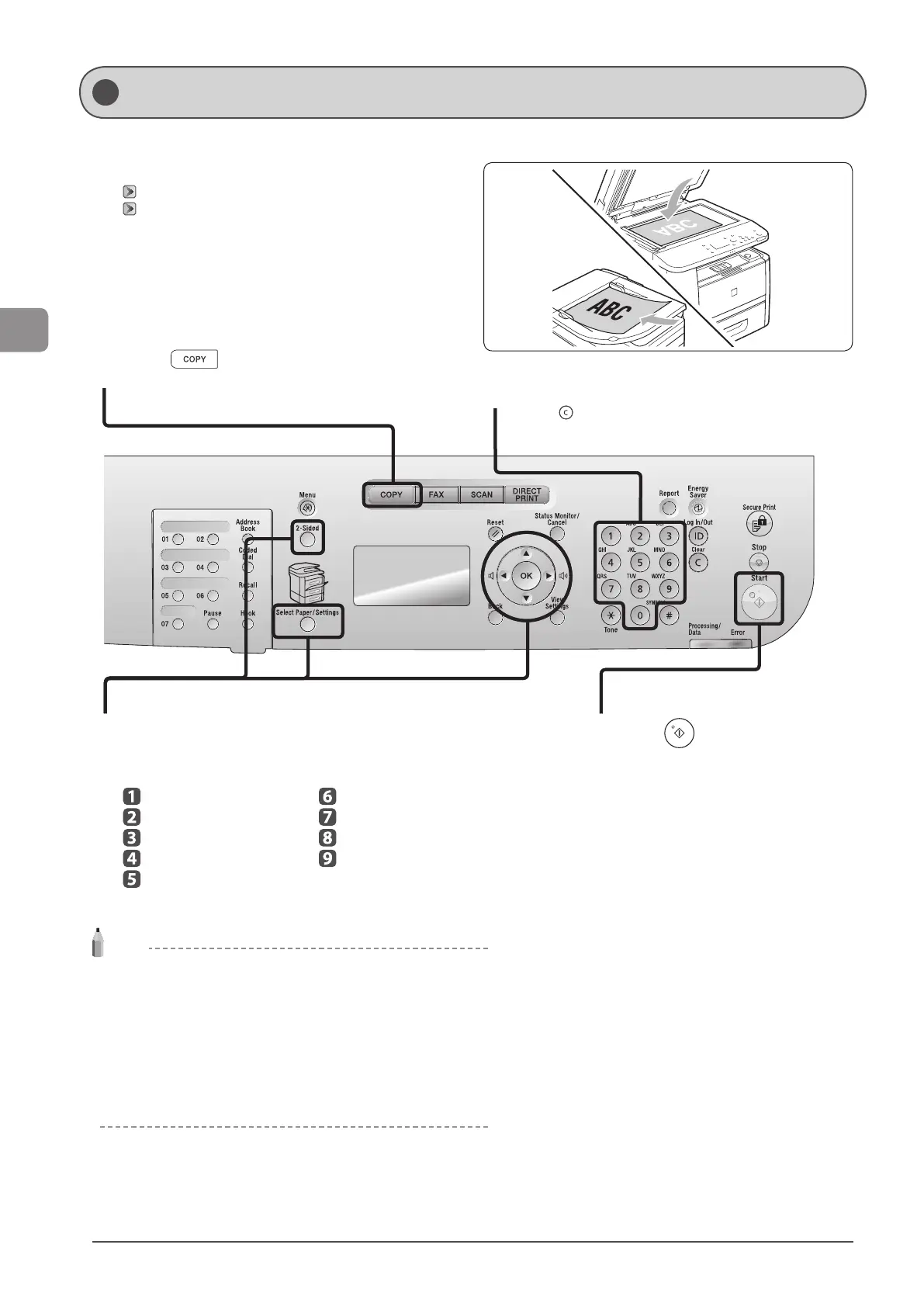
This section describes the basic procedure for copying.
1
Place your document.
“Placing Documents” (→P. 2-4)
“Supported Document Types” (→P. 2-2)
* Up to 50 documents can be loaded into the feeder.
2
Press [ ].
3
Specify the copy settings as needed.
You can specify up to 9 items.
(for details, see P.3-4 to P.3-8.)
Paper select
Density
Document Type
2-Sided
Enlarging/Reducing
N on 1
Collating
Frame erase
Sharpness
NOTE
Copy Settings
• When you combine multiple settings for use, see “Combination of
Copy Settings” (→P. 3-4).
• The settings specified here are effective only for the current operation.
To make the settings effective for all the copy operations, see
“Changing the Default Settings” (→P. 3-12).
• Register your frequently used settings into the Mode Memory. It is
useful. See “Registering and Using Combination of Copy Settings
(Mode Memory)” (→P. 3-10).
4
Enter the copy quantity (1 to 99) using numeric
keys.
* Press [ ] (Clear) to cancel the entered quantity.
5
Press [ ] (Start).
Basic Copy Operations












 To Next Page