6-3
Using the Fax Functions
Changing the Scan Settings (Fax)
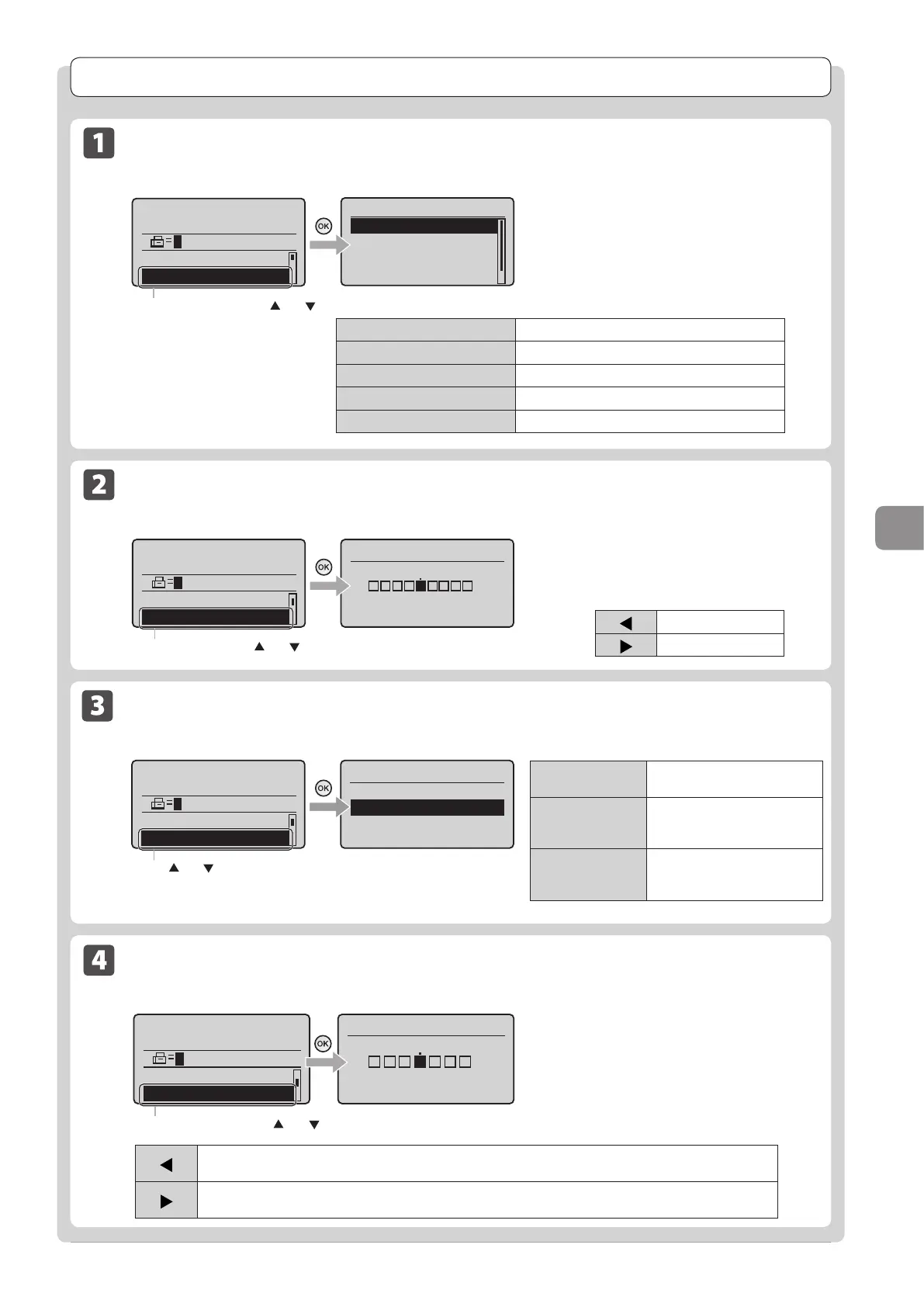
Resolution Settings
Fax mode screen Setting screen
Resolution
200 x 100 dpi (Norma
200 x 200 dpi (Fine)
200 x 200 dpi (Phot
...
200 x 400 dpi (Supe
...
Specify destination.
01/01/2011 12:52AM
RX Mode: Auto
Resolution: 200 x 10
Select <Resolution> using [ ] or [ ]
Specify the resolution.
Higher resolutions result in better image quality
but require longer transmission times.
<200 x 100 dpi (Normal)>
For faxes that contain text
<200 x 200 dpi (Fine)>
For faxes that contain fine text
<200 x 200 dpi (Photo)>
For faxes that contain photographs
<200 x 400 dpi (Superfine)>
Achieves an even finer resolution than (Fine)
<400 x 400 dpi (Ultrafine)>
Achieves an even finer resolution than (Superfine)
Density Settings
Fax mode screen Setting screen
Specify destination.
01/01/2011 12:52AM
Resolution: 200 x 1
...
Density: 0
Density
- +
+
-
Select <Density> using [ ] or [ ]
Specify the density.
[ ]
Decrease the density.
[ ]
Increase the density.
Sharpness Settings
Fax mode screen Setting screen
Specify destination.
01/01/2011 12:52AM
2-Sided Original: O
...
Sharpness: 0
Sharpness
- +
+
-
Select <Sharpness> using [ ] or [ ]
Adjust this setting to emphasize the outline of
the image or decrease the contrast.
[ ]
To clearly capture halftone photos, adjust this setting to the appropriate level on the <-> scale.
This can counteract the effect of moiré patterns (uneven gradation and striped patterns).
[ ]
To clearly capture text or lines, adjust this setting to the appropriate level on the <+> scale. It is best suited for
scanning blueprints and very weak pencil manuscripts.
2-Sided Original
Set the scan settings for 2-sided original documents.
Specify destination.
01/01/2011 12:52AM
Density: 0
2-Sided Original: 0f
+
-
Press [ ] or [ ] to select <2-Sided Original>.
2-Sided Original
Off
Book Type
Calendar Type
<Off>
The direction of 2-sided original
documents are not set.
<Book Type>
Select this setting if the top and
bottom of the images are the
same on both pages.
<Calendar Type>
Select this setting if the top and
bottom of the images on each
page are opposite each other.












 To Next Page