3-8
Copying
Copy Settings
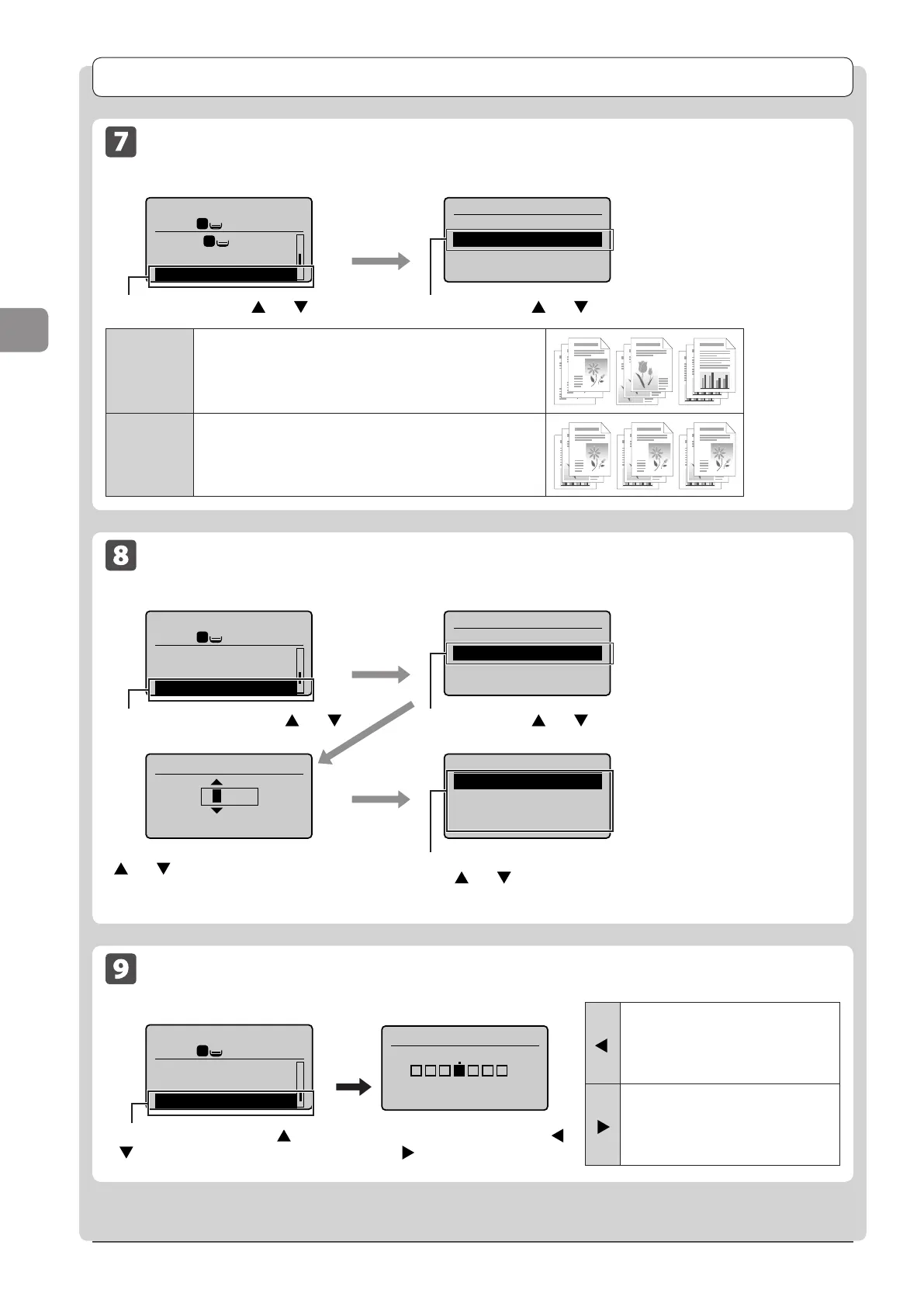
Collating Copies
Copy mode screen Setting screen
Copy: Press Start
100% LTR
Paper: LTR:Plain
N on 1: Off
Collate: Off
1
1
1
Collate
Off
On
<Off>
Printouts of a complete job are grouped.
For example, if you are copying three copies of a three-page
document, printouts of a complete job are grouped and arranged
in this page order: “1, 1, 1”, “2, 2, 2”, “3, 3, 3.”
<On>
Printouts of a complete job are collated.
For example, if you are copying three copies of a three-page
document, printouts of a complete job are grouped and arranged
in this page order: “1, 2, 3”, “1, 2, 3”, “1, 2, 3.”
Select <On> using [ ] or [ ] →[OK]Select <Collate> using [ ] or [ ] →[OK]
Emphasizing the Outline of an Image (Sharpness)
Copy mode screen Setting screen
Copy: Press Start
100% LTR
Collate: On
Erase Frame: Off
Sharpness: 0
1
1
+
-
Sharpness
- +
[
]
To clearly capture halftone photos,
adjust this setting to the appropriate
level on the <-> scale. This can
counteract the effect of moiré patterns
(uneven gradation and striped patterns).
[
]
To clearly capture text or lines, adjust
this setting to the appropriate level on
the <+> scale. It is best suited for
copying blueprints and very weak
pencil manuscripts.
Select <Sharpness> using [ ] or
[ ] →[OK]
Adjust the sharpness using [
]
or [
]→[OK]
Erasing Dark Borders or Frame Lines ( Frame Erase)
Copy mode screen Setting screen
Copy: Press Start
100% LTR
N on 1: Off
Collate: On
Erase Frame: Off
1
1
Erase Frame
Off
On
Specify Frame Width
(1/16-1_15/16)
0_1/8 "
Scan Size
LTR
LGL
STMT
Select <On> using [ ] or [ ] →[OK]
Select the size of the original document
using [
] or [ ] →[OK]
Select <Erase Frame> using [ ] or [ ]
→[OK]
Select the frame width to be erased using
[
] or [ ] →[OK].
* You can also enter the frame width to be
erased using the numeric keys.












 To Next Page