3-7
Copying
Copy Settings
Enlarging/Reducing Copies
Copy mode screen Setting screen
1
1
Copy: Press Start
100% LTR
Original Type: Text
...
2-Sided: Off
Copy Ratio: 100% Dir
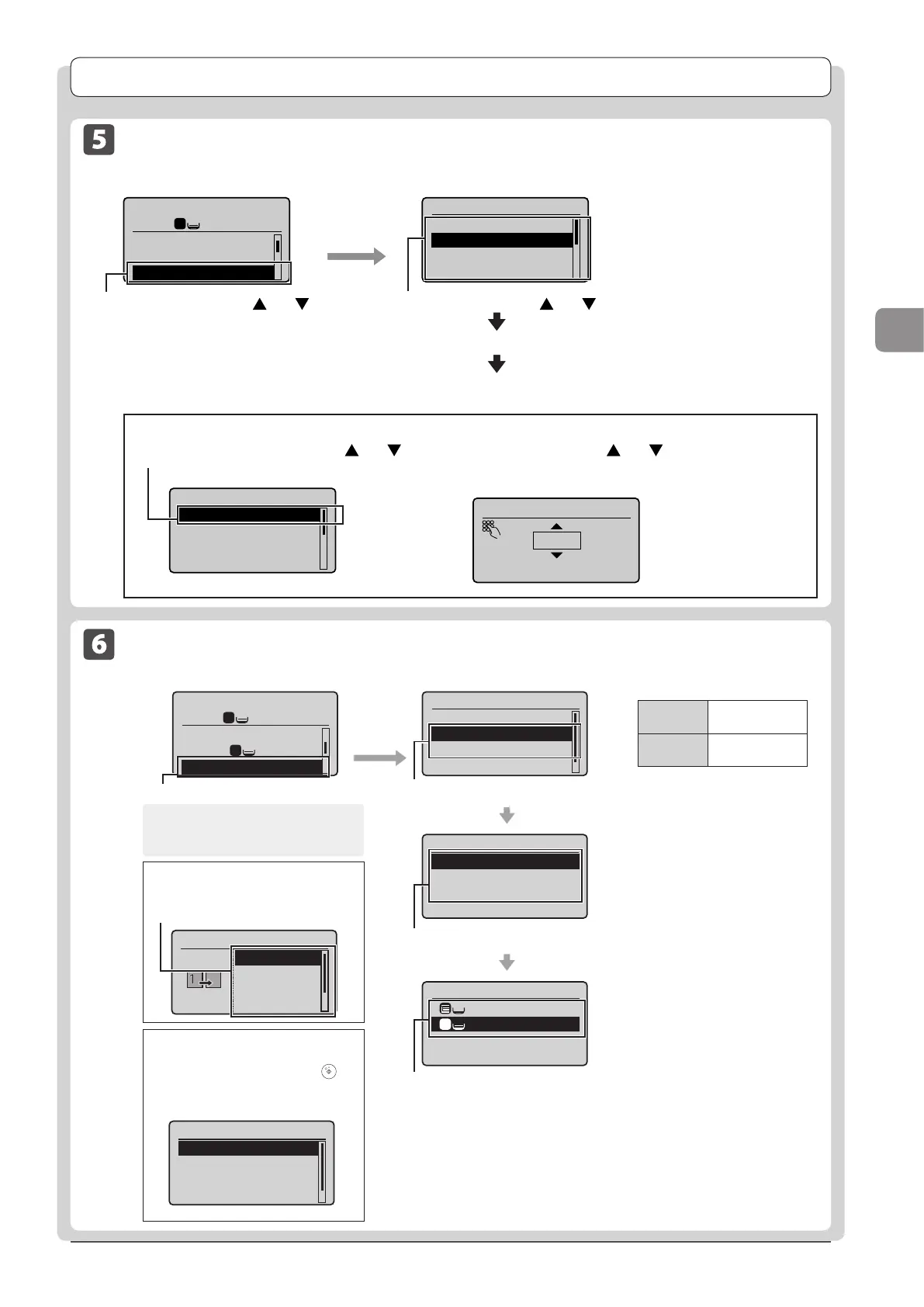
Copy Ratio
Custom Ratio
100% Direct
400% Max
200%
Select the copy ratio using [ ] or [ ] →[OK]
“Loading Paper” (→P. 2-9)
“Setting the Paper Size and Type” (→P. 2-14)
Enlarge or reduce copies using preset
copy ratios or custom copy ratios. For
example, you can copy Statement to
Letter size paper using a preset ratio,
or set any copy ratio from 25% to
400% in 1% increments.
To set a copy ratio in 1% increments
(1) Select <Custom Ratio> using [
] or [ ]
→[OK]
Copy Ratio
Custom Ratio
100% Direct
400% Max
200%
(2) Specify the ratio using [ ] or [ ] →[OK]
You can also enter the copy ratio using the numeric Keys
for D1370/D1350.
Custom Ratio
100 %
(25-400)
Select <Copy Ratio> using [ ] or [ ]
→[OK]
Output Size
LTR:Plain
LTR:Plain
1
Select Layout
2 on 1 (1)
2 on 1 (2)
4 on 1 (1)
4 on 1 (2)
N on 1
Off
2 on 1
4 on 1
ID Card Copy
Setting screenneercsedomypoC
Select <2 on 1> or <4 on 1> using [▲] or [▼]→[OK]
Select the size of the document using [▲] or [▼]→[OK]
Select a output size using [▲] or [▼]→[OK]
To specify the layout
(1) Select <Select Layout> using [▲] or [▼]
→ [OK]
(2) Select the layout using [
▲] or [▼] → [OK]
When your document is placed on
the platen glass
(1) Set the next document and press []
(Start).
(2) Select <Start Copying> using [▲] or [▼]
and press [OK].
* Repeat these steps until all documents are scanned.
About margins on the document
To copy in the N on 1 mode, margins are
created on the output.
Select <N on 1> using [▲] or [▼]→[OK]
Copy: Press Start
100% LTR
Copy Ratio: 100% Di
...
Paper: LTR:Plain
N on 1: Off
1
1
1
Scan Size
LTR
LGL
STMT
Scan Next: Press Start
<Start Copying>
<Cancel>
SheetxCopy:1x1
Density: 0
+
-
Copying Multiple Documents onto One Sheet (N on 1)
<2 on 1>
Copy two pages
onto one sheet.
<4 on 1>
Copy four pages
onto one sheet.












 To Next Page