Home
Canon
Printer
ImageCLASS MF4270
Page 186
Canon ImageCLASS MF4270 - Page 186
248 pages
Manual
Save Page as PDF
To Next Page
To Next Page
To Previous Page
To Previous Page
Loading...
10-29
Maintenance
13
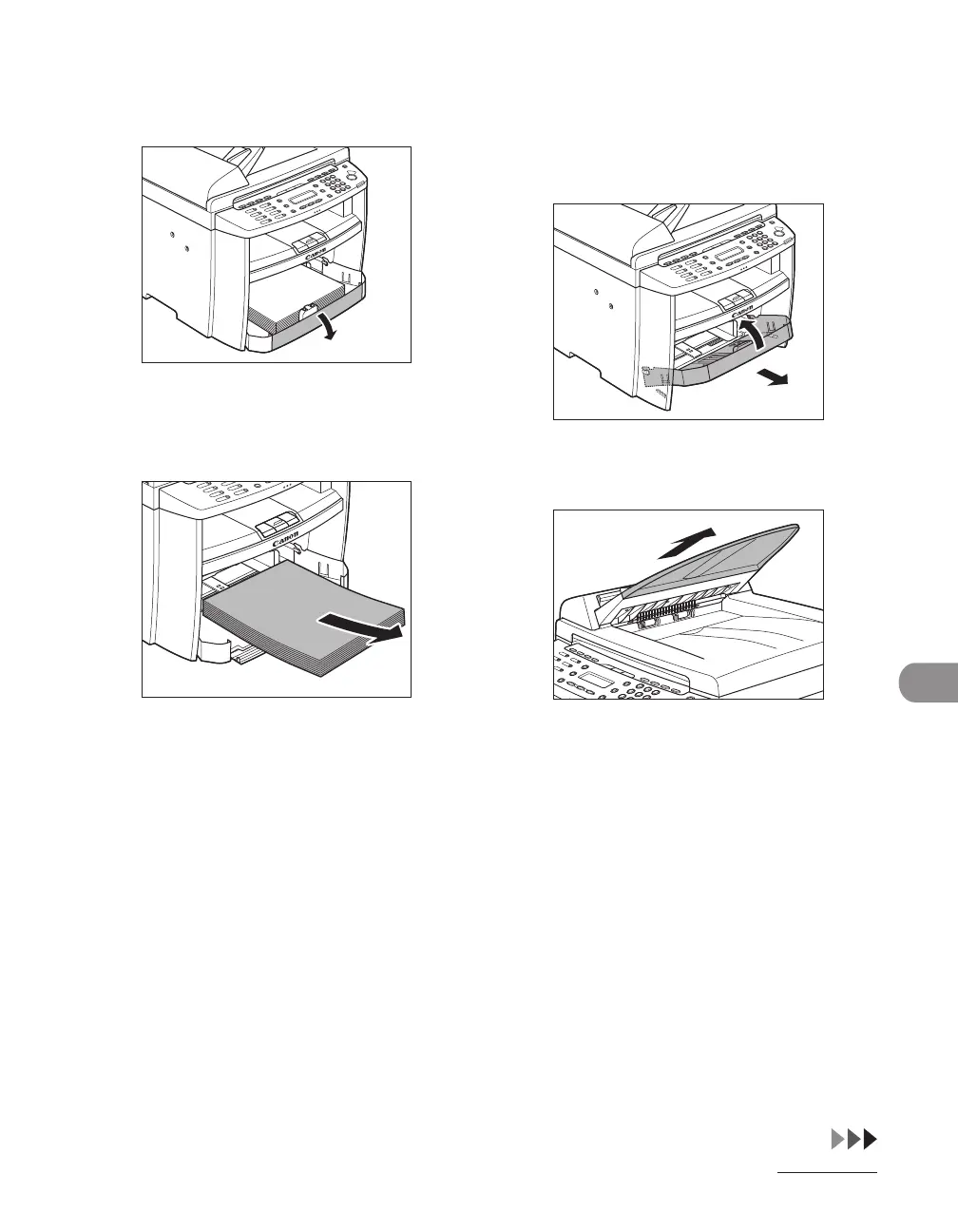
Open the front panel of the paper
cassette.
14
Remov
e the paper from the paper
cassette.
15
Remov
e the paper cassette by
lifting up the front-end of the
paper cassette and pulling it
forward.
16
Detach the Document feeder tr
ay
.
185
187
Table of Contents
Main Page
Manuals for the Machine
2
What Can I Do with this Machine
3
Fax Features
5
Printer Feature
7
System Manager Settings
9
Table of Contents
10
Preface
18
Important Safety Instructions
18
Handling and Maintenance
18
Location
19
Power Supply
21
Telephone Equipment
21
Customer Support (U.S.A.)
21
Customer Support (Canada)
22
How to Use this Guide
23
Symbols Used in this Manual
23
Legal Notices
24
Trademarks
24
Copyright
25
Disclaimers
25
For CA, USA Only
25
Legal Limitations on the Usage of Your Product and the Use of Images
26
Users in the U.S.A
27
Pre-Installation Requirements for Canon Facsimile Equipment
27
Connection of the Equipment
28
In Case of Equipment Malfunction
28
Rights of the Telephone Company
29
FCC Notice
29
Users in Canada
31
Pre-Installation Requirements for Canon Facsimile Equipment
31
Notice
32
Laser Safety
34
CDRH Regulations
34
1 Before Using the Machine
36
Machine Components
37
Operation Panel
40
Main Operation Panel
40
Fax Operation Panel
43
LCD (Standby Mode)
44
Copy Mode
44
Scan Mode
44
Fax Mode
44
Toner Cartridge
45
Maintaining the Toner Cartridge
46
Checking the Toner Level
48
Telephone Line Setting
49
Setting the Telephone Line Type
49
Timer Settings
51
Setting the Sleep Mode
51
Setting the Daylight Saving Time
53
2 Document and Paper
58
Document Requirements
59
Scanning Area
61
Loading Documents
62
On the Platen Glass
62
In the ADF
64
Paper Requirements
66
Printable Area
68
Loading Paper
69
Into the Multi-Purpose Tray
69
Setting Paper Size and Type
72
3 Copying
76
Basic Copying Method
77
Scan Settings
79
Image Quality
79
Density
80
Zoom Ratio
82
Collate Copy
85
On 1 Combination
87
Two-Sided Copy
89
Printing a Sample Page
91
Canceling Copy Jobs
92
4 Sending Faxes
94
Basic Sending Method
95
Scan Settings
97
Image Quality
97
Density
98
Storing/Editing Address Book
99
Storing/Editing One-Touch Speed Dialing Keys/Coded Speed Dialing Codes
100
Storing/Editing One-Touch Speed Dialing Keys
100
Coded Speed Dialing Codes
100
Storing/Editing Recipients for Group Dialing
106
Specifying Recipients
115
Using One-Touch Speed Dialing Keys
115
Using Coded Speed Dialing Codes
117
Group Dialing
119
Using Address Book Key
121
Manual Sending
125
Canceling TX Jobs
128
Checking and Deleting TX Jobs
129
Checking Transmission Results
129
Checking and Deleting Fax Documents Stored in Memory
130
5 Receiving Documents
132
Basic Receiving Method
133
Standby Mode
134
Canceling RX Jobs
135
Checking Reception Results
136
6 Printing
138
Printing Documents
139
Collate Printing
141
On 1 Combination
142
Two-Sided Printing
143
Checking and Deleting Print Jobs
144
7 Scanning
146
Scanning to a Computer (USB Connection Only)
147
Canceling Scan Jobs
149
Canceling Scan Jobs to a Computer
149
8 PC Faxing
150
9 Remote UI
154
10 Maintenance
158
Cleaning the Machine
159
Exterior
159
Interior
160
Fuser Roller
164
Scanning Area
165
Replacing the Toner Cartridge
167
Redistributing Toner
168
Replacing the Toner Cartridge with a New One
171
Recycling Used Cartridges
176
The Clean Earth Campaign
176
U.s.a. Program
178
Canada Program-Canada Programme
181
Transporting the Machine
183
11 Troubleshooting
188
Clearing Jams
189
Document Jams
190
Paper Jams
191
LCD Messages
199
Error Codes
206
If <LOAD CORRECT PAPER> Is Displayed
208
Re-Loading the Paper
208
Changing the Paper Size Setting
209
If a Power Failure Occurs
211
If You Cannot Solve a Problem
212
Customer Support (U.S.A.)
212
Customer Support (Canada)
212
12 Machine Settings
214
Printing USER DATA LIST
215
Machine Settings
215
Accessing the Setting Menu
217
Setting Menu
219
Paper Settings
219
Volume Control
220
Broadcast
220
Common Settings
221
Copy Settings
222
Fax Settings
223
Fax Settings
224
Address Book Set
227
Printer Settings
228
Timer Settings
228
Adjust./Cleaning
229
Report Settings
230
System Settings
231
13 Appendix
236
Specifications
237
General
237
Copier
238
Printer
239
Facsimile
239
Telephone
241
Index
242
Other manuals for Canon ImageCLASS MF4270
Reference Guide
272 pages
Starter Guide
38 pages
Related product manuals
Canon imageCLASS MF449x
72 pages
Canon imageCLASS MF414dw
55 pages
Canon imageCLASS MF416dw
55 pages
Canon imageCLASS MF445dw
72 pages
Canon imageCLASS MF449dw
72 pages
Canon imageCLASS MF419dw
55 pages
Canon imageCLASS MF455dw
6 pages
Canon imageCLASS MF4370dn
252 pages
Canon imageCLASS MF4100 Series
18 pages
Canon imageCLASS MF4800 Series
52 pages
Canon imageCLASS MF4700 Series
52 pages
Canon imageclass MF227DW
64 pages












 To Next Page