12-9
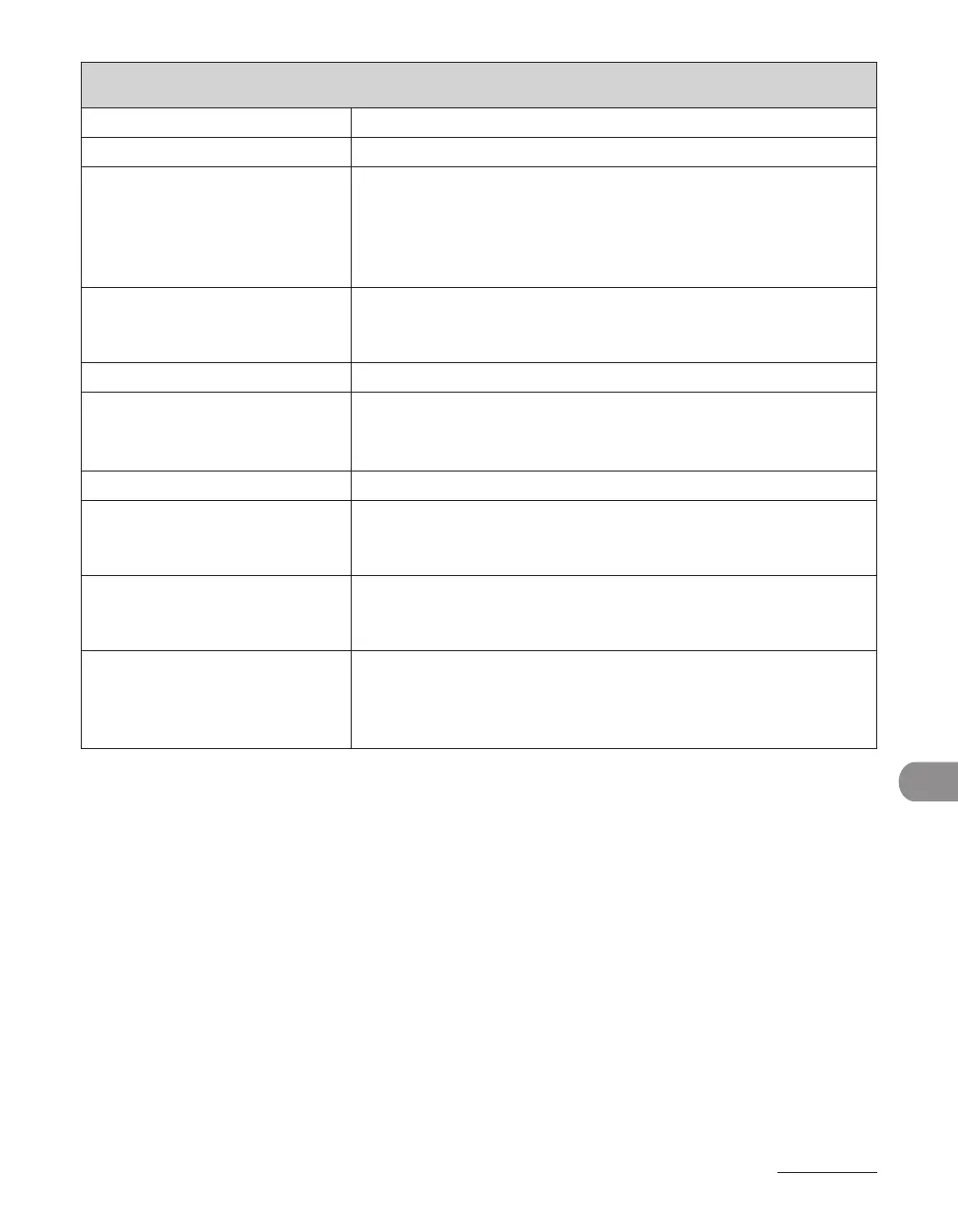
Machine Settings
COPY SETTINGS
Setting Item Description
1. STANDARD SETTINGS Sets the default setting for copying.
1. IMAGE QUALITY Sets the document type for copying.
TEXT/PHOTO
TEXT
PHOTO
TEXT/PHOTO+
–
–
–
–
2. DENSITY Sets the density for copying.
MANUAL (1–9 (5))
AUTO
–
–
3. ZOOM RATIO Sets the zoom ratio for copying.
PRESET RATIO Selects the zoom from the preset ratios.
(100%, 129% STMT LTR, 200% MAX., 50% MIN., 64%, 78% LGL
LTR)
MANUAL Enters the zoom ratio by 1% increments. ((50%–200% (100%))
4. AUTO COLLATE Sets whether to collate the copies automatically.
OFF
ON
–
–
5. 2-SIDED Sets whether to make the two-sided copies automatically.
OFF
ON: CALENDAR TYPE, BOOK TYPE
–
–
2. PAPER SIZE GROUP Selects a paper size group for your machine.
INCHES
A
AB
–
–
–












 To Next Page