Status Monitor
Status Monitor
The Features of imagePROGRAF Status Monitor .............................................................................................. 293
Job Management Using imagePROGRAF Status Monitor ................................................................................. 294
The Features of imagePROGRAF Status Monitor
The Features of imagePROGRAF Status Monitor
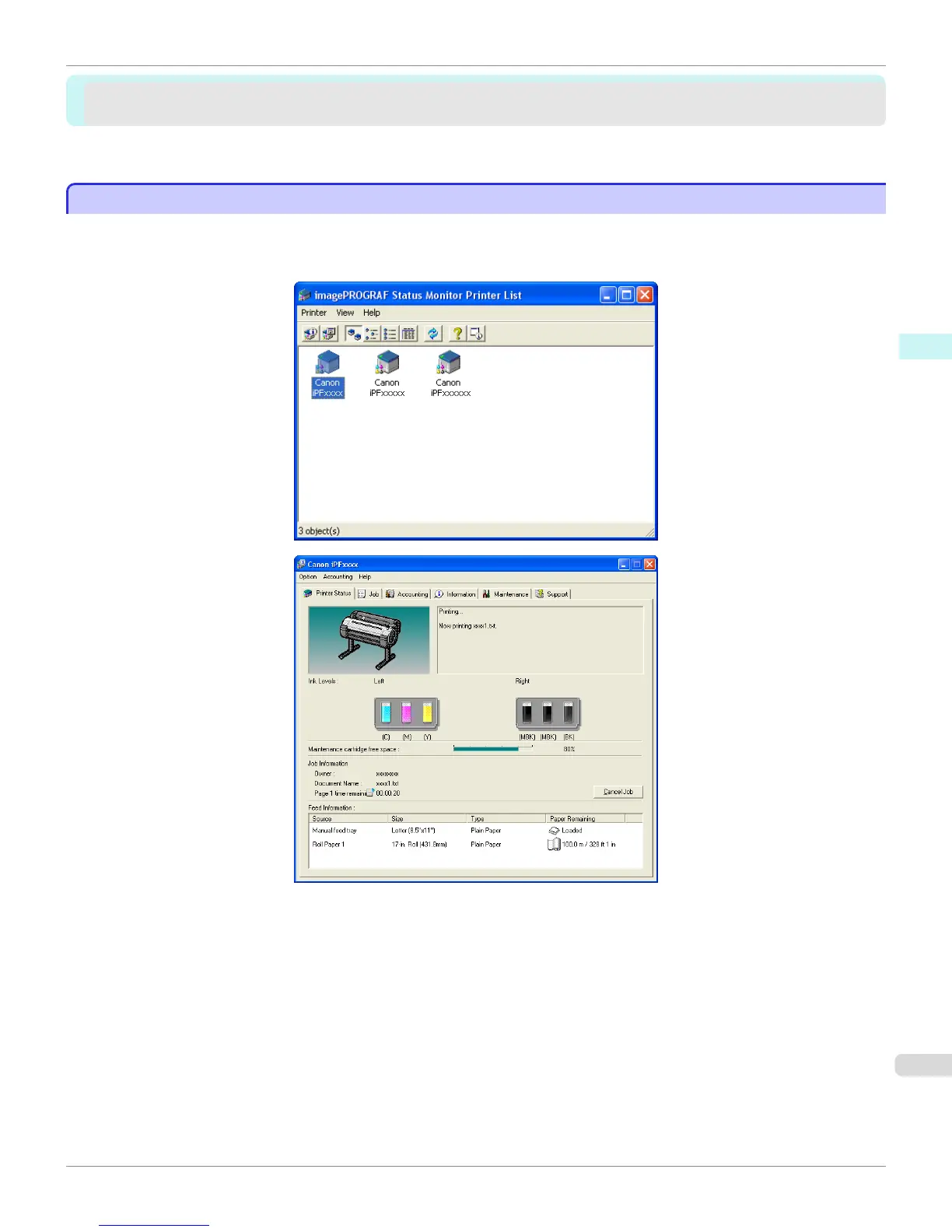
imagePROGRAF Status Monitor is a utility for checking the printer status and managing print jobs.
Two screens are available in imagePROGRAF Status Monitor : Printer List shows a list of printers, and Status Moni-
tor shows details for each printer.
•
You can view a list of the printers for which printer drivers have been installed on your computer, printers connec-
ted to your computer, and printers found on the network.
•
If a printer error occurs, you can investigate the corrective action immediately.
•
Printer status can be checked in real time on a computer monitor.
•
Displays the ink level of every color in the printer. An icon and warning message will notify you when ink levels are
low.
•
The type of paper loaded in each media source is identified. You can also check to see if paper has run out.
•
This way, the utility enables you to check printer information and take care of printer maintenance for optimal print-
ing results.
iPF760
The Features of imagePROGRAF Status Monitor
User's Guide
Windows Software Status Monitor
293



 To Next Page
 Loading...











