Chapter 1
19
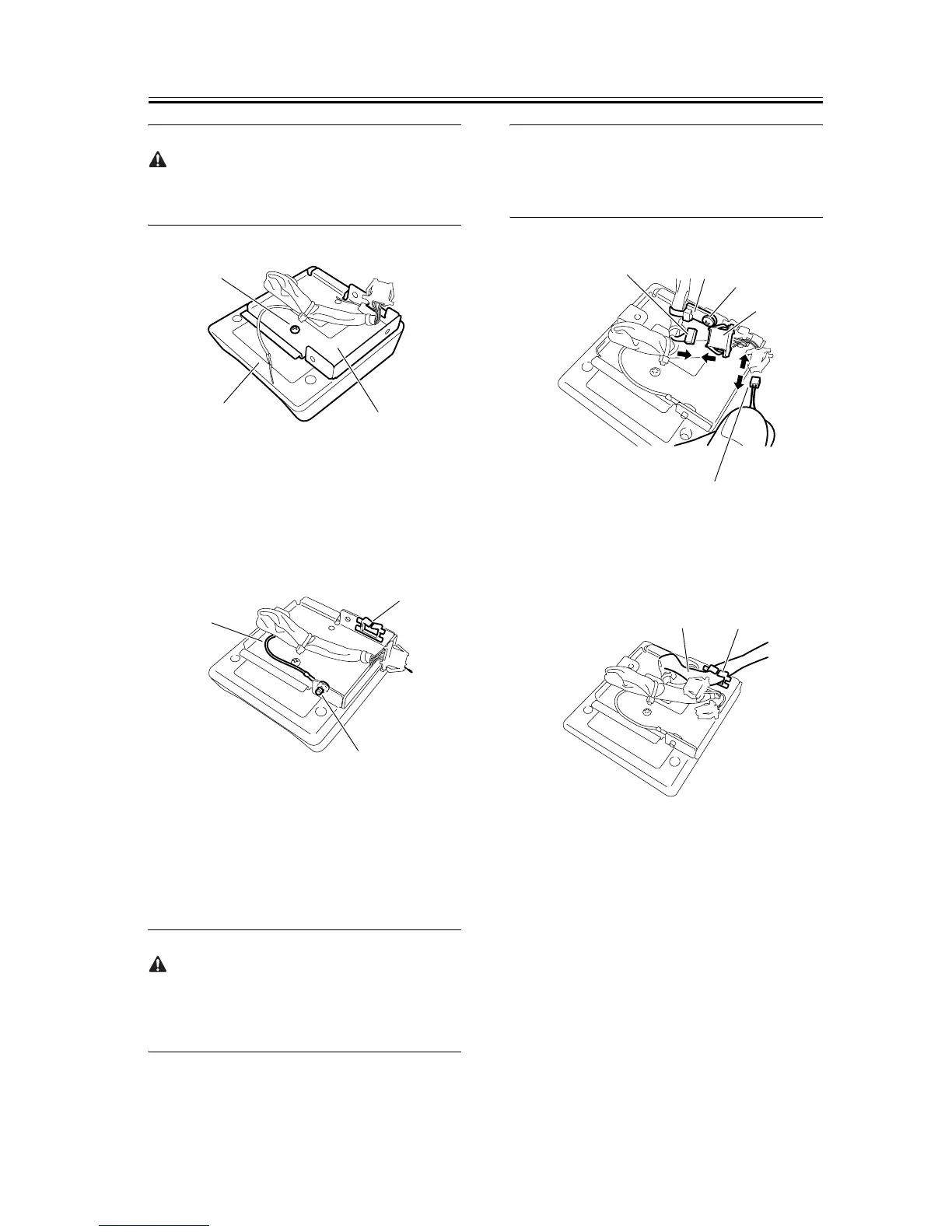
When inserting the card reader [2] harness and ground
cable, take care not to cut or damage them.
F-1-39
6) Using the supplied binding screw (M4x6) [1], con-
nect the ground cable to the reader mount. Attach
the supplied edge saddle [3] to the card reader
mount.
F-1-40
7) Connect the connector [1] of the supplied repeating
harness B to the connector [2] on the card reader.
Using the supplied binding screw (M4x6), secure
the repeating harness B clamp [4]. Disconnect the
shorting connector [5].
If the shorting connector [5] is not disconnected, a
malfunction or error can result. Therefore, the short-
ing connector must be disconnected.
MEMO:
The removed shorting connector is no longer neces-
sary.
F-1-41
8) Secure the repeating harness B [1] with the wire
saddle [2].
F-1-42
9) Remove the two blind seals [1] from the reader left
cover.
[1]
[3]
[2]
[1]
[3]
[2]
[2]
[3]
[4]
[1]
[5]
[2]
[1]










 To Next Page