Additional Information 141
/ Playback Setup
[Data Code]: Displays the date and/or time when the scene was recorded.
[ Camera Data]: Displays the aperture (f-stop) and shutter speed used
when recording the scene.
[USB Connection Type]: Select the connection protocol to use when con-
necting the camcorder to an external device using the supplied USB
cable.
[ DVD Burner]: To connect exclusively to the optional DW-100 DVD
Burner.
[ Computer/Printer]: To connect to a computer, printer or similar USB
peripheral.
[ Connect and Set]: To make the selection from a screen that appears
at the time of the connection to the external device.
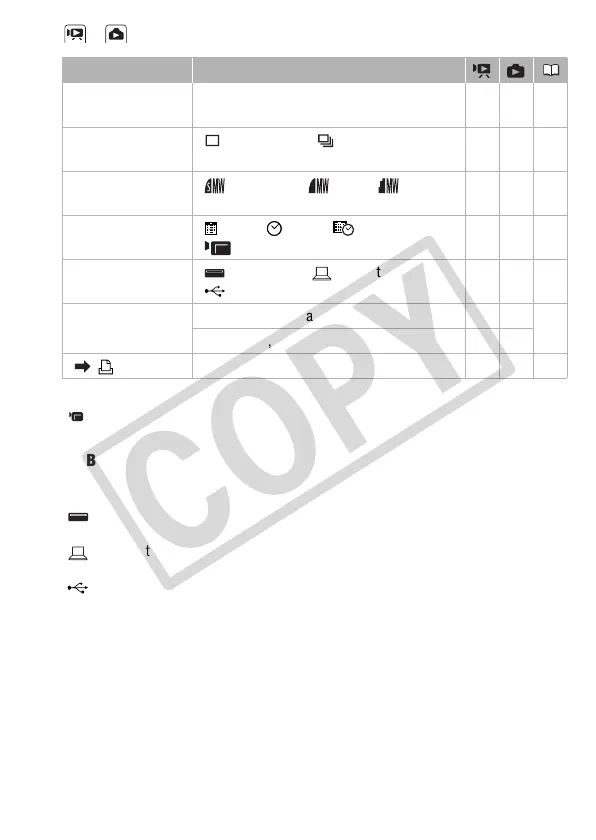
Menu item Setting options
[Rec Media for
Photos]
[Built-in Mem.], [Mem. Card] z –39
[Photo Capture from
Video]
[ Single Photo], [ Photo Sequence] z – 103
[Photo Capture
Quality]
[ Super Fine], [Fine], [ Normal] z – 103
[Data Code] [ Date], [ Time], [ Date and Time],
[ Camera Data]
z ––
[USB Connection
Type]
[ DVD Burner], [ Computer/Printer],
[ Connect and Set]
zz –
[Add Recordings to
Disc]
[All Scenes], [Remaining Scenes], [Playlist] z – 122
[All Photos], [Transfer Orders] – z
[ Print] – – z 115











 To Next Page