Introduction 17
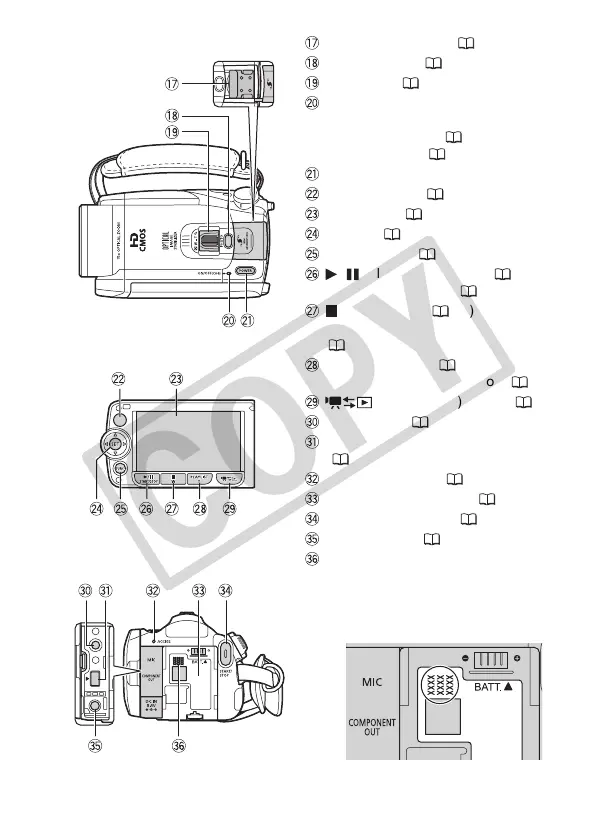
Mini advanced shoe ( 80)
PHOTO button ( 90)
Zoom lever ( 43)
ON/OFF (CHG) (charge) indicator:
Green – ON
Orange – Standby ( 44)
Red – Charging ( 23)
POWER button
Remote sensor ( 26)
LCD screen ( 28)
Joystick ( 32)
FUNC. button ( 33, 133)
/ (play/pause) button ( 46)/
START/STOP button ( 41)
(stop) button ( 46)/
Zoom out W (wide-angle) button
( 43)
PLAYLIST button ( 84)/
Zoom in T (telephoto) button ( 43)
(camera/play) button ( 31)
MIC terminal ( 81)
COMPONENT OUT terminal
( 116, 118)
ACCESS indicator ( 41, 90)
Battery attachment unit ( 23)
START/STOP button ( 41)
DC IN terminal ( 23)
Serial number
The serial number label is located in
the battery attachment unit. Remove
the battery pack to find it.
LCD panel
Top view
Back view











 To Next Page