49
Before You Start
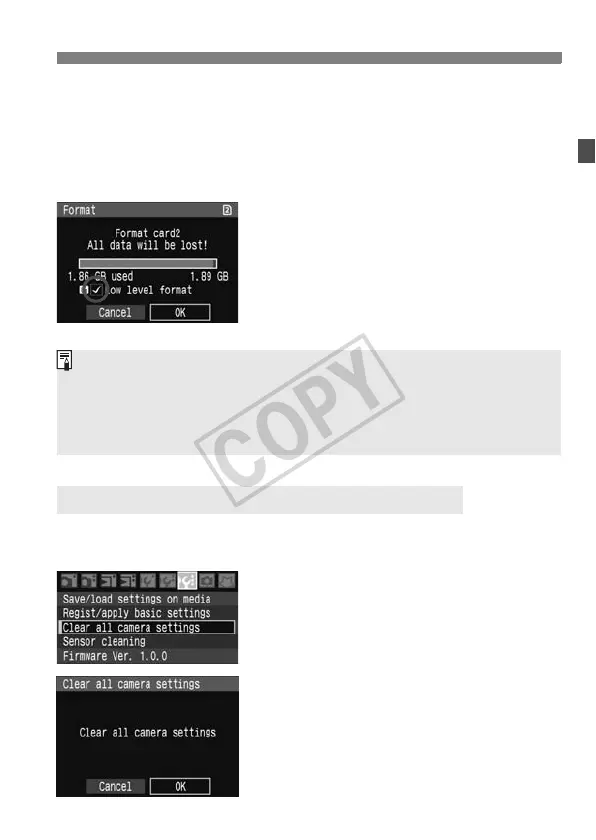
About Low-level Formatting
When [g] SD card is selected, low-level formatting is possible. If the
writing speed to the SD card is slower than usual or if you want to
completely erase the data in the SD card, checkmark [Low level
format] and format the card.
Press the <L> button.
In step 3 on the preceding page,
press the <L> button.
X The [Low level format] option will be
checkmarked <X>.
With <X> displayed, select [OK] to
start the low-level formatting.
The camera’s shooting settings and menu settings can be reverted to
the default.
1
Select [Clear all camera settings].
Under the [7] tab, select [Clear all
camera settings], then press <0>.
2
Select [OK].
Turn the <5> dial to select [OK],
then press <0>.
X The camera’s default settings will be
as shown on the next page.
3 Reverting Camera Settings to the Default
Since low-level formatting will erase all recordable sectors in the SD
card, the formatting will take slightly longer than normal formatting.
You can stop the low-level formatting by selecting [Cancel]. Even in this
case, normal formatting will have been completed and you can use the
SD card as usual.















 To Next Page