52
You can set the image size (recorded pixels), image type (JPEG, RAW,
sRAW), and JPEG quality (compression rate).
3/4/5/6 will record the image in the JPEG. In the 1/9 mode,
the image will require processing with the software provided. 9 is a
small RAW image which is one-fourth (approx. 5.2 megapixels) the size
of a normal RAW image.
Also, RAW/sRAW and JPEG images can be recorded at the same time
on the memory card.
1
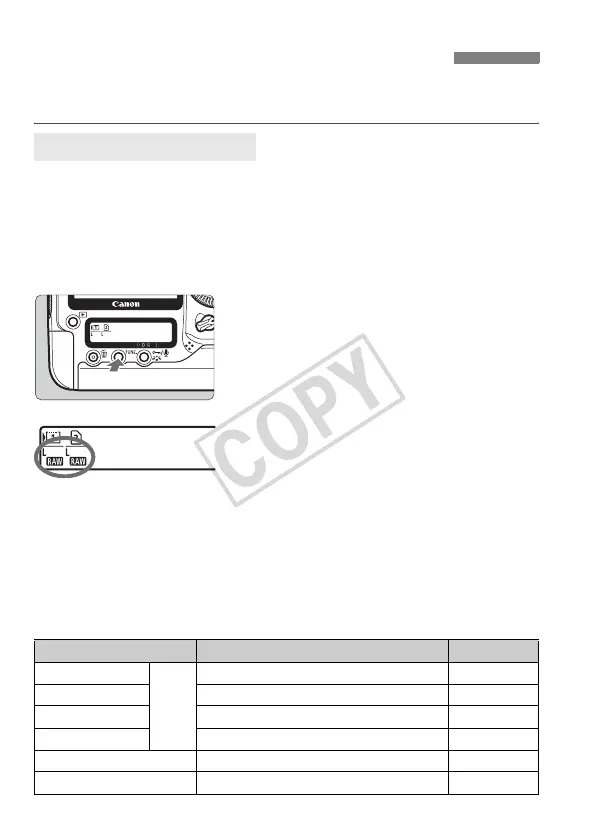
Press the <B> button. (9)
Press the <B> button once or
twice to display the card and image
size on the rear LCD panel.
2
Select the image size.
Turn the <5> dial to select the
image size.
If
1
or
9
and
3
/
4
/
5
/
6
are
displayed at the same time, the RAW or
sRAW and JPEG image will be
recorded simultaneously on the card.
Turn the <6> dial to select the card
to record or playback images. (p.73)
Setting the Image-recording Quality
Selecting the Image Size
Image size/Card z WB
Image Size Guide
Image size Pixels Print Size
3 (Large)
JPEG
Approx. 21.0 megapixels (5616x3744) A2 or larger
4 (Medium1) Approx. 16.6 megapixels(4992x3328) Around A2
5 (Medium2) Approx. 11.0 megapixels (4080x2720) Around A3
6 (Small) Approx. 5.2 megapixels (2784x1856) Around A4
1 (RAW) Approx. 21.0 megapixels (5616x3744) A2 or larger
9 (Small RAW) Approx. 5.2 megapixels (2784x1856) Around A4














 To Next Page