PC-D320/PC-D340/FAX-L400 Chapter 3: Assembly and Disassembly
3-5
2. DISASSEMBLY/ASSEMBLY
As a rule, refer to the Parts Catalog for instructions on how to disassemble and assemble the
machine. The discussions that follow are limited to those components that are thought to require
replacement relatively more often than others.
2.1 Disassembly Procedure
2.1.1 Document feed section
Separation Roller Ass’y, Separation Guide Unit, Document Feed Roller
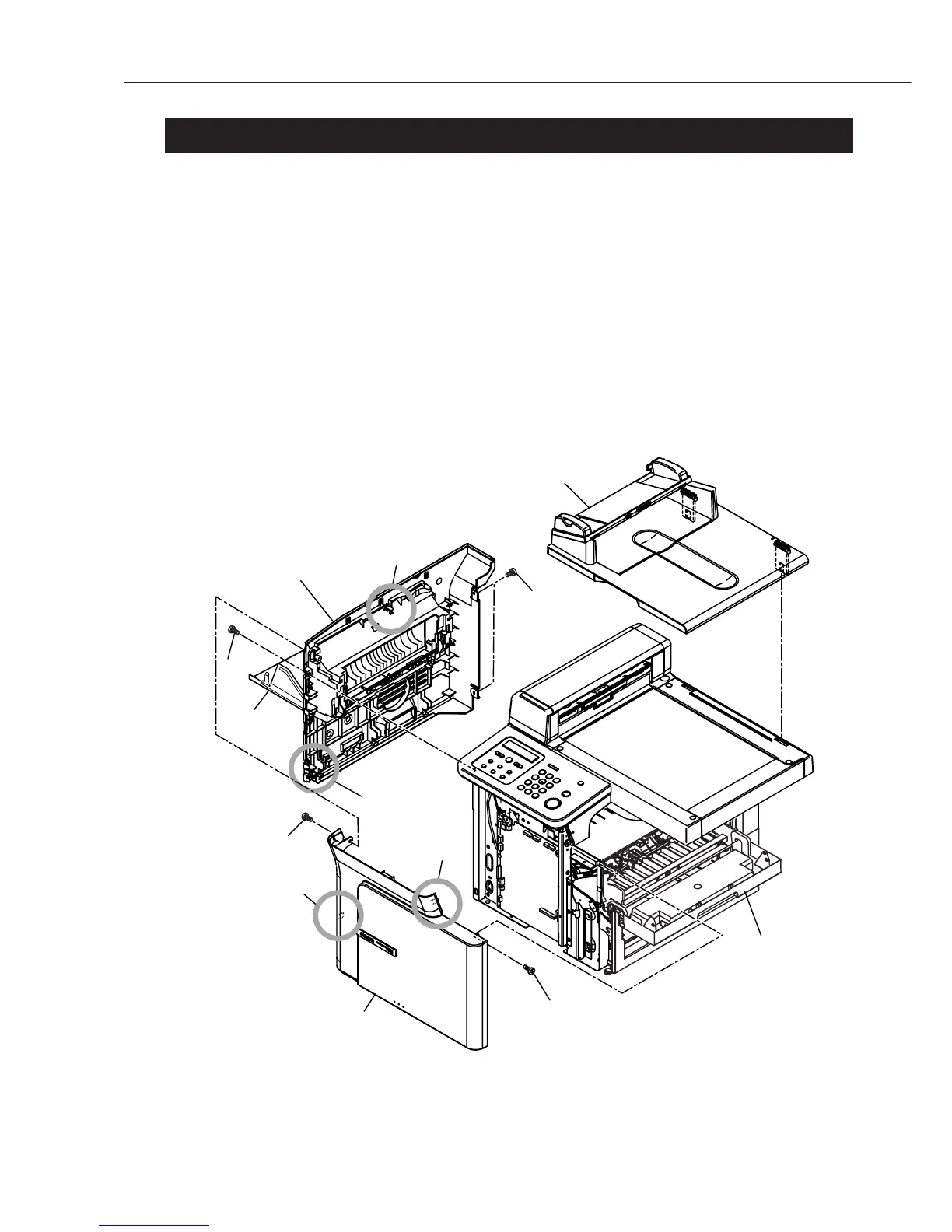
(1) Open the cartridge cover and the face-up cover; remove the 2 screws (a). Remove the
front cover while detaching the 2 claws.
(2) Remove the 3 screws (b), and remove the left cover ass’y while detaching the 2 claws.
(3) Remove the pressure plate unit by lifting up.
Figure 3-2 Document Feed Section 1
a
b
b
Front cover
Left cover ass'y
Face-up
cover
Claw
Claw
Cartridge
cover
a
Pressure plate unit
Claw
Claw



 To Next Page