10
Getting Started
Components Guide
For more information, refer to the listed page.
Front View
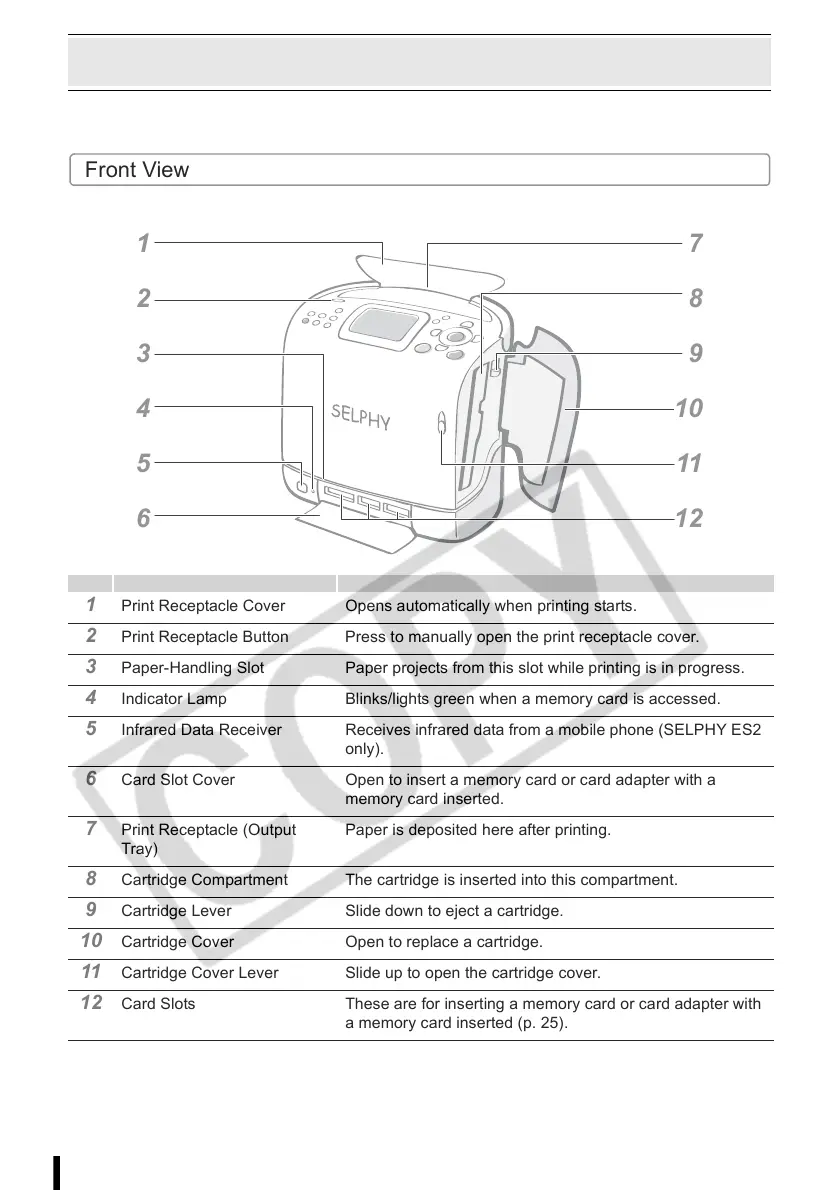
1 Print Receptacle Cover Opens automatically when printing starts.
2 Print Receptacle Button Press to manually open the print receptacle cover.
3 Paper-Handling Slot Paper projects from this slot while printing is in progress.
4 Indicator Lamp Blinks/lights green when a memory card is accessed.
5 Infrared Data Receiver Receives infrared data from a mobile phone (SELPHY ES2
only).
6 Card Slot Cover Open to insert a memory card or card adapter with a
memory card inserted.
7 Print Receptacle (Output
Tray)
Paper is deposited here after printing.
8 Cartridge Compartment The cartridge is inserted into this compartment.
9 Cartridge Lever Slide down to eject a cartridge.
10 Cartridge Cover Open to replace a cartridge.
11 Cartridge Cover Lever Slide up to open the cartridge cover.
12 Card Slots These are for inserting a memory card or card adapter with
a memory card inserted (p. 25).
1
2
3
4
5
6
1
11
1














 To Next Page