Components Guide
14
Getting Started
Information Views
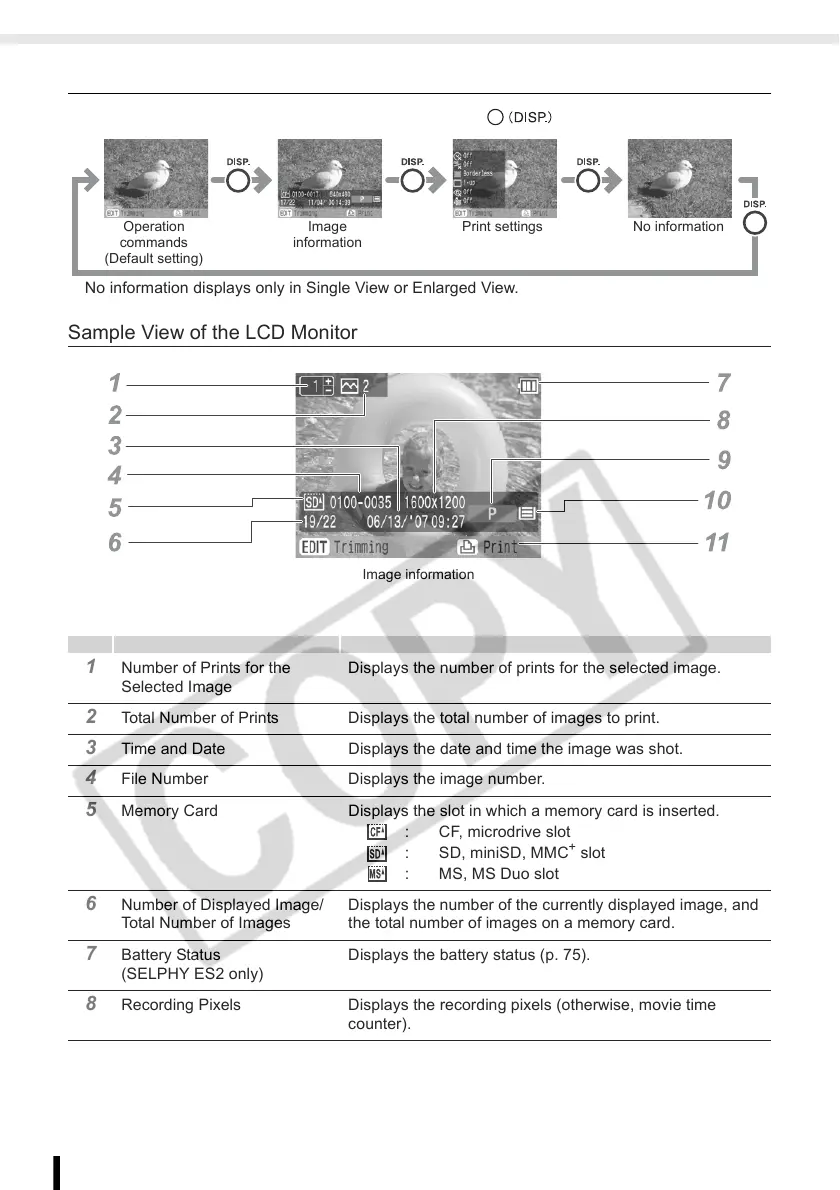
You can switch the image information views by pressing .
No information displays only in Single View or Enlarged View.
Sample View of the LCD Monitor
1 Number of Prints for the
Selected Image
Displays the number of prints for the selected image.
2 Total Number of Prints Displays the total number of images to print.
3 Time and Date Displays the date and time the image was shot.
4 File Number Displays the image number.
5 Memory Card Displays the slot in which a memory card is inserted.
: CF, microdrive slot
: SD, miniSD, MMC
+
slot
: MS, MS Duo slot
6 Number of Displayed Image/
Total Number of Images
Displays the number of the currently displayed image, and
the total number of images on a memory card.
7 Battery Status
(SELPHY ES2 only)
Displays the battery status (p. 75).
8 Recording Pixels Displays the recording pixels (otherwise, movie time
counter).
No informationOperation
commands
(Default setting)
Image
information
Print settings
Image information














 To Next Page