2-5
VBAdmin Tools
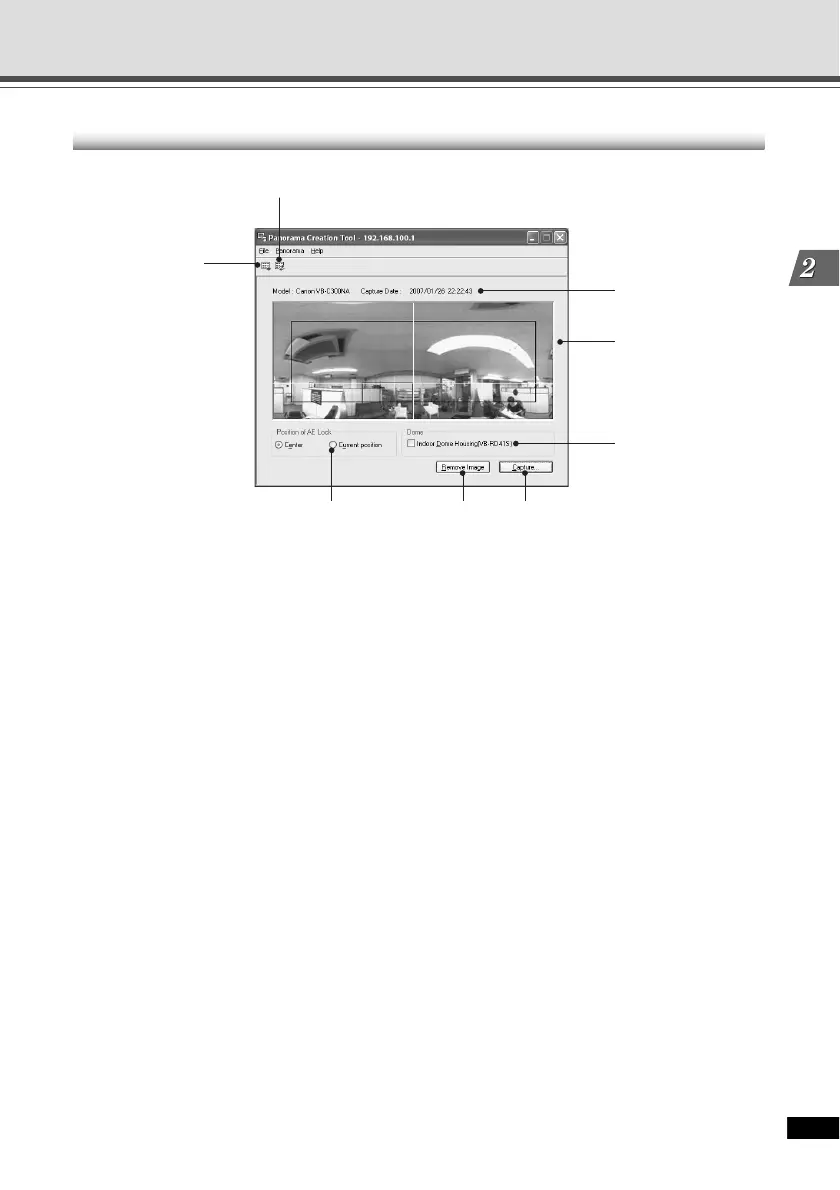
Panorama Creation Tool Display Screen
1 Show Registered Panorama Image button
Displays panorama image registered in the VB-C300.
2 Register Panorama Image button
Register panorama image currently displayed in the panorama creation tool.
3 Display Camera model and Capture Date
Displays the model of camera currently connected and the date the panorama image was
taken, if it has been captured.
4 Panorama image
Shows the panorama image that was captured.
5 Capture button
Captures panorama image.
6 Remove Image button
Deletes panorama image.
7 Position of AE Lock
Switch the AE lock position between the center of the panorama image and current camera
position. The AE lock function sets the exposure level based on the specified position.
8 Indoor Dome Housing(VB-RD41S)
Check this option to prevent the VB-C300 from capturing areas obstructed by the optional
indoor dome housing (VB-RD41S-C/S).
3
4
567
8
2
1
Panorama Creation Tool





 To Next Page