Performing Operations and Settings in the Admin Viewer
133
Admin Viewer/VB Viewer
6
Performing Operations and Settings
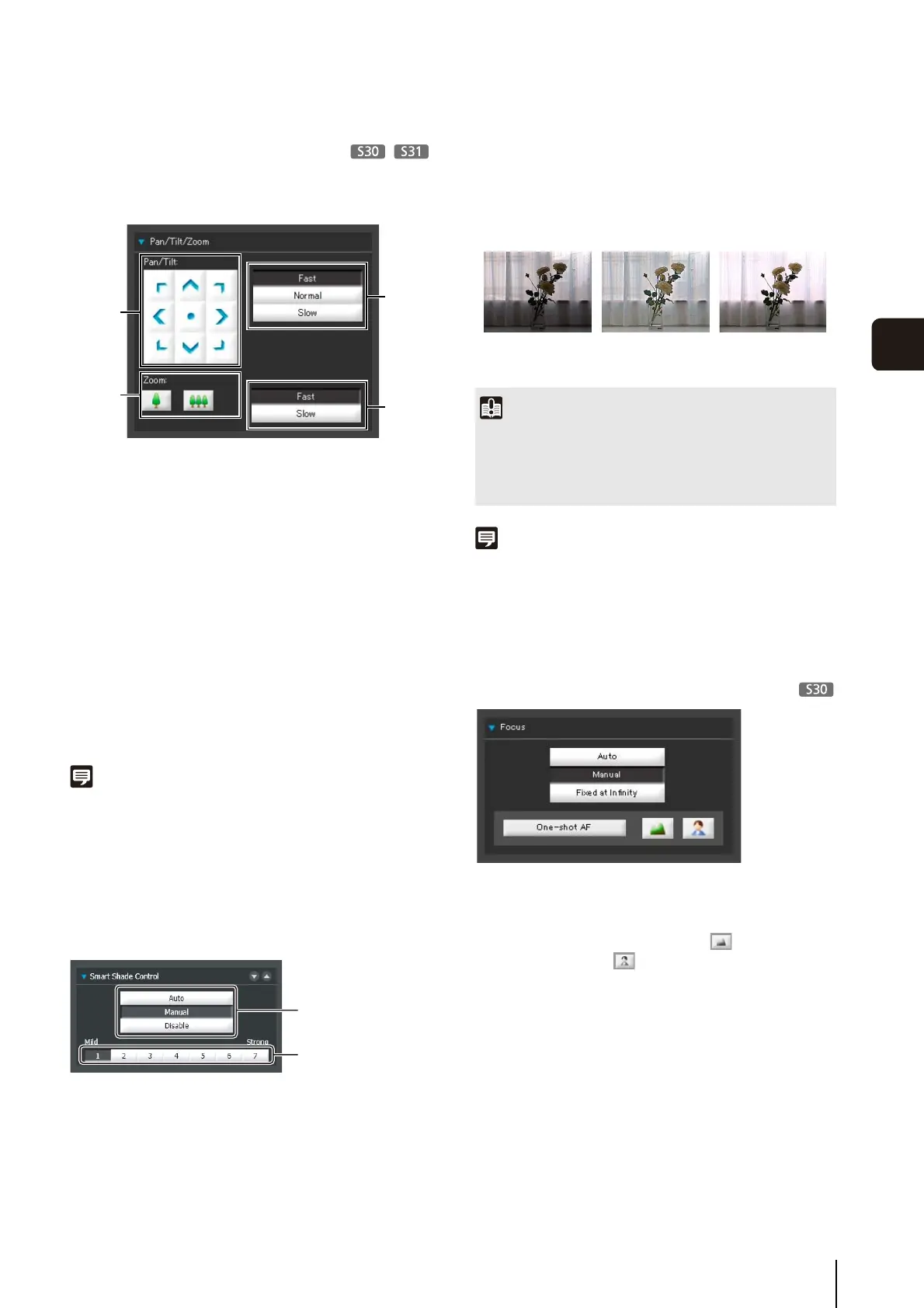
Click the camera control buttons to set the pan, tilt and
zoom operations as well as the speed.
(1) [Pan/Tilt] button
Move pan and tilt in the direction of the arrows.
Operation will continue as long as you are holding
down the button and will stop when you release it.
Clicking the center button will make the camera face
straight forwards.
(2) [Zoom] buttons
Zooms in or out. Operation will continue as long as
you are holding down the button and will stop when
you release it.
(3) [Pan/Tilt] Speed
Select a speed from [Fast], [Normal] and [Slow].
(4) [Zoom] Speed
Set the speed to [Fast] or [Slow].
Note
Changing the [Pan/Tilt] speed or [Zoom] speed will not change
the speed of the slider, or of the pan, tilt or zoom in panorama.
Setting the Smart Shade Control
The smart shade control function differs from backlight
compensation in that only dark areas are brightened while
bright areas are kept intact.
(1) [Smart Shade Control]
Select [Auto], [Manual], or [Disable].
(2) Adjusting the Smart Shade Control
When smart shade control is [Manual], set one of the 7
levels from [1] (Mild) to [7] (Strong).
Example: If the background is bright and the subject
is hard to see, this function brightens dark areas to
make the subject clearer.
In comparison to backlight compensation, smart
shade control can reduce overexposure of bright
areas.
Note
• When [Auto] or [Manual] is selected for smart shade control,
the video data size increases.
• When [Manual] is selected for smart shade control, setting a
high compensation strength may increase screen noise. If
noise is noticeable, lower the control level.
Setting the Focus
[Auto] : Automatically focuses on the
subject.
[Manual] : You can adjust the focus manually
by pushing the (far) and
(near) buttons.
Clicking [One-shot AF] will use
autofocus to focus on a subject and
then stop in manual focus.
[Fixed at Infinity] : You can set the focus so that it is
fixed near infinity.
(1)
(2)
(3)
(4)
(1)
(2)
Important
• [Auto] cannot be selected for [Smart Shade Control] if
[Exposure] is set to [Manual].
• The [BLC] button is not available if [Smart Shade Control] is
set to [Auto].
OFF Smart Shade
Control
BLC (Back Light
Compensation)



 To Next Page