82
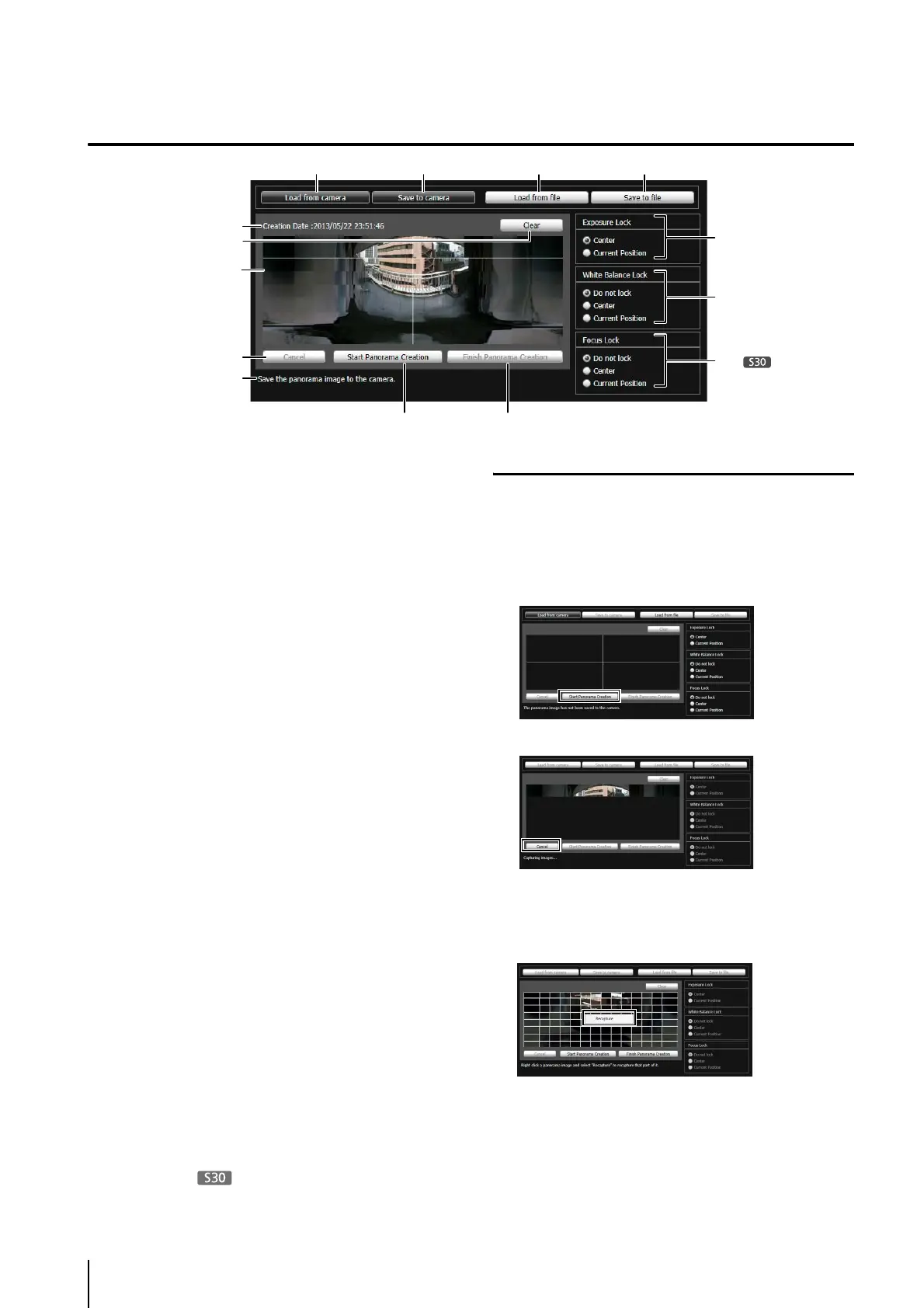
Display Screens of Panorama Creation Tool
(1) [Load from camera]
Show the panorama image saved in the camera.
(2) [Save to camera]
Save the currently shown panorama image in the
camera.
(3) [Load from file]
Show JPEG files as a panorama image.
(4) [Save to file]
Save the currently shown panorama image as a JPEG
file.
(5) Creation date and time
Show the date and time a panorama image was
captured or loaded from a JPEG file.
(6) [Clear]
Delete the currently shown panorama image.
(7) Panorama Image Display Area
Show the panorama image.
(8) [Cancel]
Stop the capture of a panorama image.
(9) [Start Panorama Creation]
Start capturing a panorama image.
(10)[Finish Panorama Creation]
Confirm the captured panorama image.
(11)Status Display
Show the panorama image capturing status, such as
[Capturing images...], etc.
(12)[Exposure Lock]
Select [Center] or [Current Position] for the auto
exposure lock position.
(13)[White Balance Lock]
Set the white balance to [Do not lock], [Center], or
[Current Position].
(14)[Focus Lock]
Set the focus to [Do not lock], [Center], or [Current
Position].
Capturing a Panorama Image
The capture is started.
Change the settings beforehand for [Exposure Lock],
[White Balance Lock], and [Focus Lock] (VB-S30D
only) as necessary.
To stop the capture when underway, click [Cancel].
When you position the mouse pointer over the
panorama image, a white grid is shown. If you want to
recapture part of the panorama, position the pointer
inside the grid, right-click and select [Recapture].
To recapture an entire panorama image, click [Start
Panorama Creation] again.
(1)
(5)
(6)
(7)
(8)
(11)
(9) (10)
(14)
(2) (3) (4)
(12)
(13)
1
Click [Start Panorama Creation].



 To Next Page