Notes on Operating Environment
21
1
Before Use
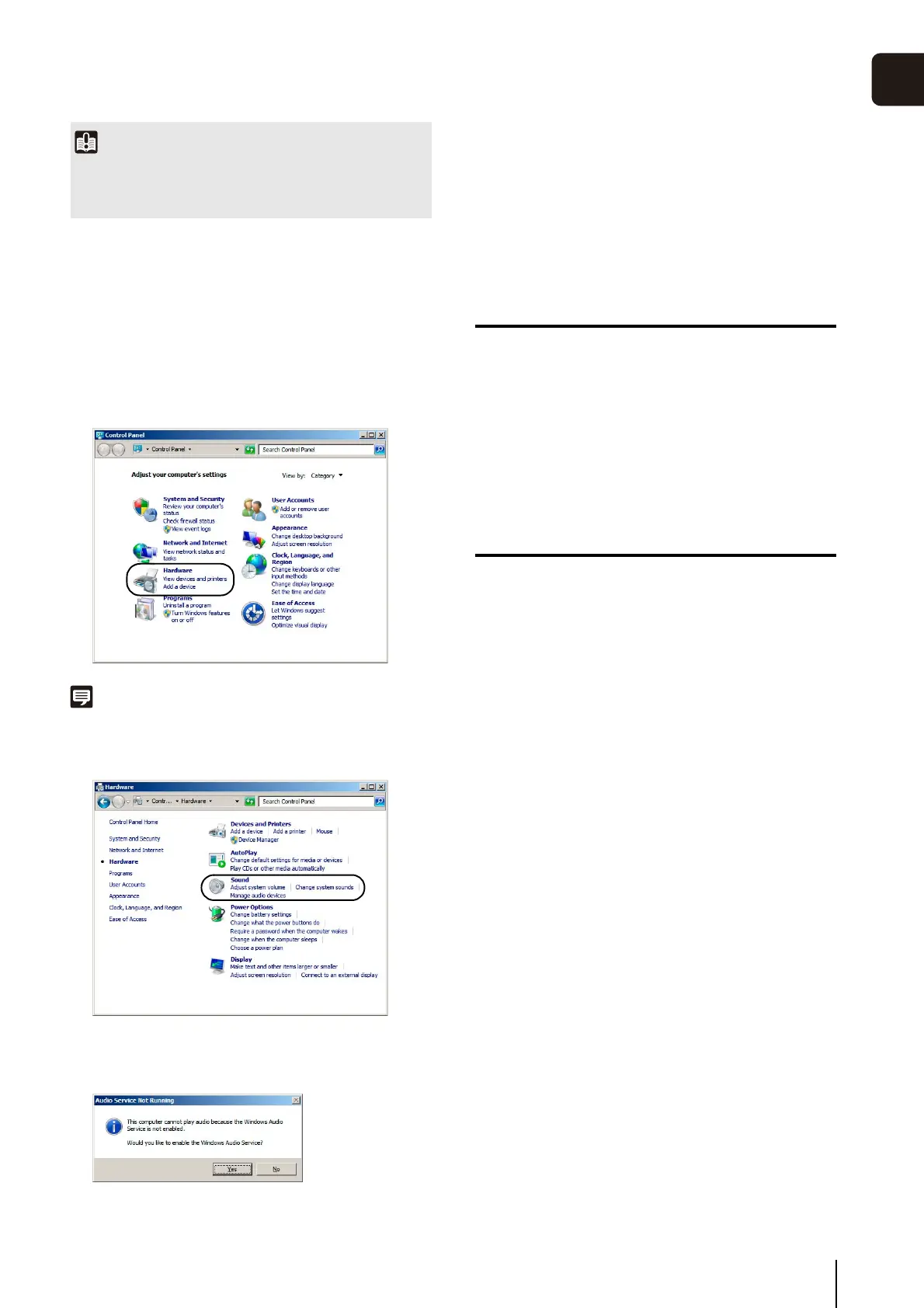
Enabling the Sound Function to Use Audio
In Windows Server 2008/Windows Server 2012, the sound
function is disabled by default.
To receive audio with the Viewer, follow the steps below to
enable the sound function.
Note
If [Control Panel] is in the classic view, double-click [Sound].
Notes on Use with Windows Vista/
Windows 7/Windows 8/Windows Server
2012
The following restrictions apply.
RM-Lite
For important information on the RM-Lite operating
environment, see the “Administrator Manual”.
Notes for Windows 8/Windows Server
2012
Each software application, including Admin Viewer and
Admin Tools, can be started from the desktop only. They
cannot be started from the Start screen.
Important
Note that when IE Enhanced Security Configuration is turned
back on, the [Do not save encrypted pages to disk] checkbox
also becomes enabled.
1
Open [Control Panel] and click [Hardware].
2
Click [Sound].
3
When the [Audio Service Not Running] message
appears, click [Yes].
4
The [Sound] dialog box appears.
Click the [Playback] tab to confirm that an audio device
has been installed. (If no audio device is installed, refer
to your computer manual.)



 To Next Page