Camera Viewer
49
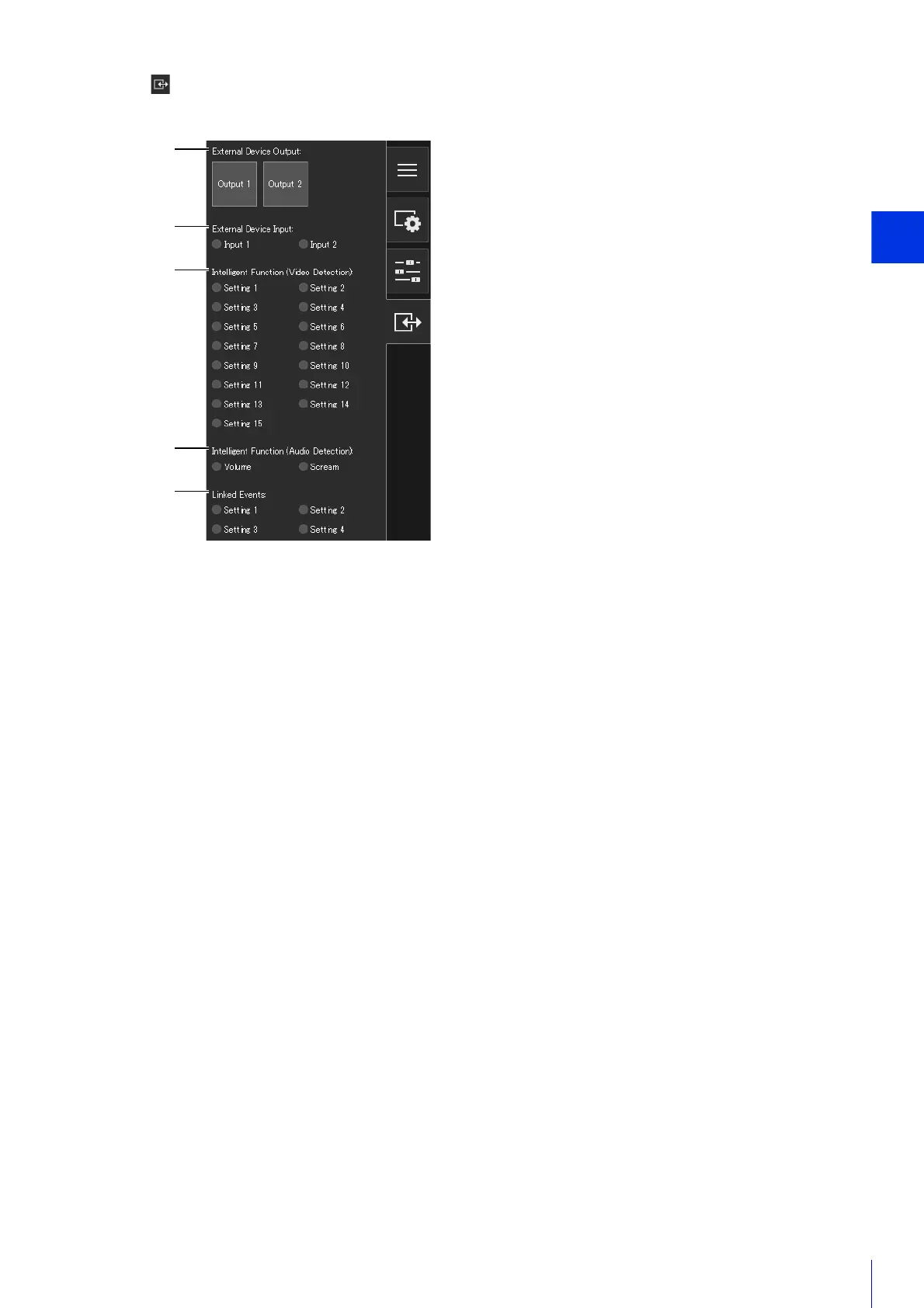
(20) [Event and Input/Output] Menu
Enables you to check the output operations and input status of an external device, the detection status of the
intelligent function and the status of linked events.
(R) External Device Output
Use external device output (P. 72).
(S) External Device Input
Displays the status of the external device input signal for each input source (P. 72).
(T) Intelligent Function (Video Detection)
Displays the status of video detection by the intelligent function for each detection setting number (P. 73).
(U) Intelligent Function (Audio Detection)
Displays the status of [Volume Detection] or [Scream Detection] (P. 73).
(V) Linked Events
Displays the status of linked events (P. 73).
(21) Information Display
Information, warning and error messages are displayed (P. 50).
(22) Pan/Tilt Slider
Drag the sliders to pan (horizontally) or tilt (vertically) the camera (P. 56).
(23) Zoom Slider
Turn the knob to operate the zoom in (telephoto)/zoom out (wide-angle) function of the camera (P. 56).
(24) Preset Selection Menu
Selects a preset registered in the camera in advance (P. 62).
(25) [Home Position] Button
Move the camera angle to the home position (P. 62).



 To Next Page