Viewing Photos
115
Photos
Viewing Photos
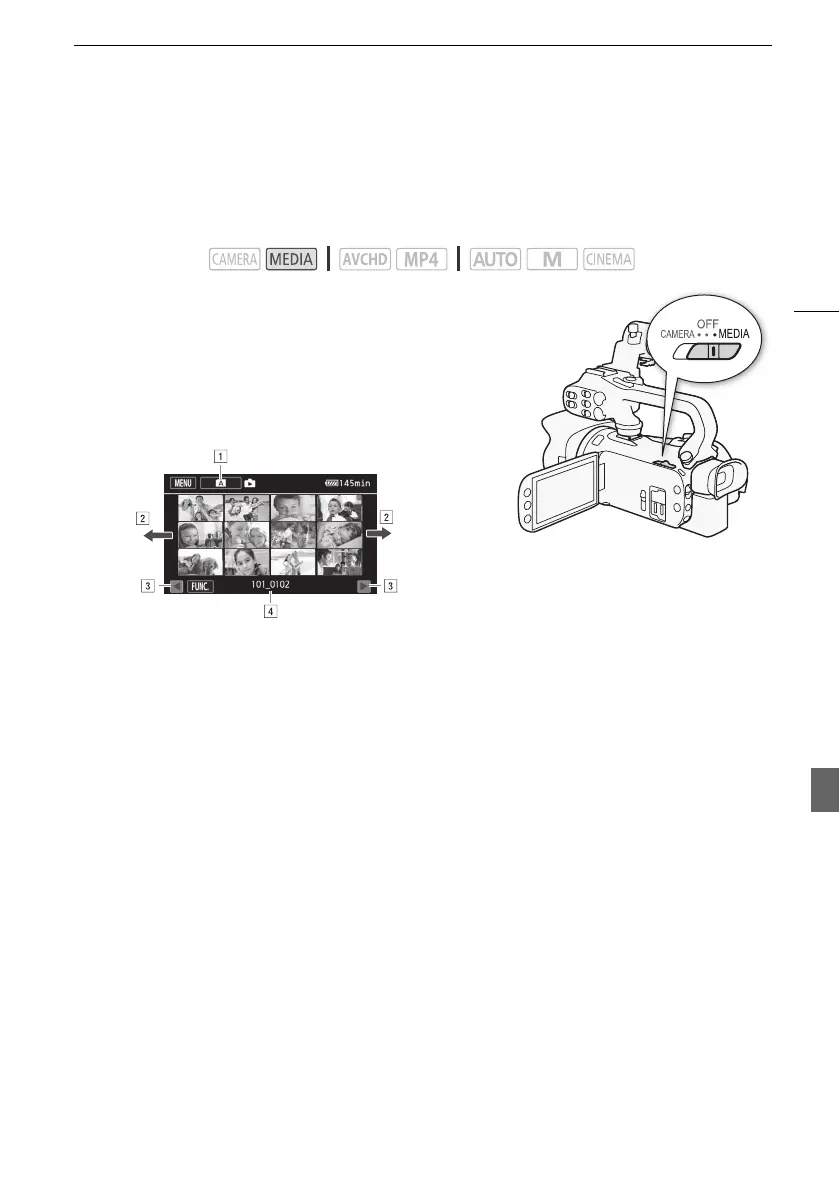
1 Set the power switch to MEDIA.
• The AVCHD movie index screen will appear.
2 Open the photo index screen.
[6 ·] > Tab of the desired memory card (6 or 7) >
[} Photos]
3 Look for the photo you want to play back.
4 Touch the photo you wish to view.
• The photo is displayed in single photo view.
• Drag your finger left/right to browse through the photos one by one.
• If the optional GP-E2 Receiver was attached to the camcorder during recording, GPS information
will also appear.
To return to the index screen from single photo view
1 Touch the screen to display the playback controls.
2Touch [f].
Operating modes:
! Index screen button. Displays the currently selected memory card. Press to change
the index screen.
" Drag your finger left/right for the next/previous index page*.
# Display the next/previous index page.
$ Folder name (A 104).
* While browsing through index pages, a scroll bar will appear at the bottom of the screen
for a few seconds. When you have a large number of photos it may be more convenient
to drag your finger along the scroll bar.
7
Photos


 To Next Page