Recording Audio
84
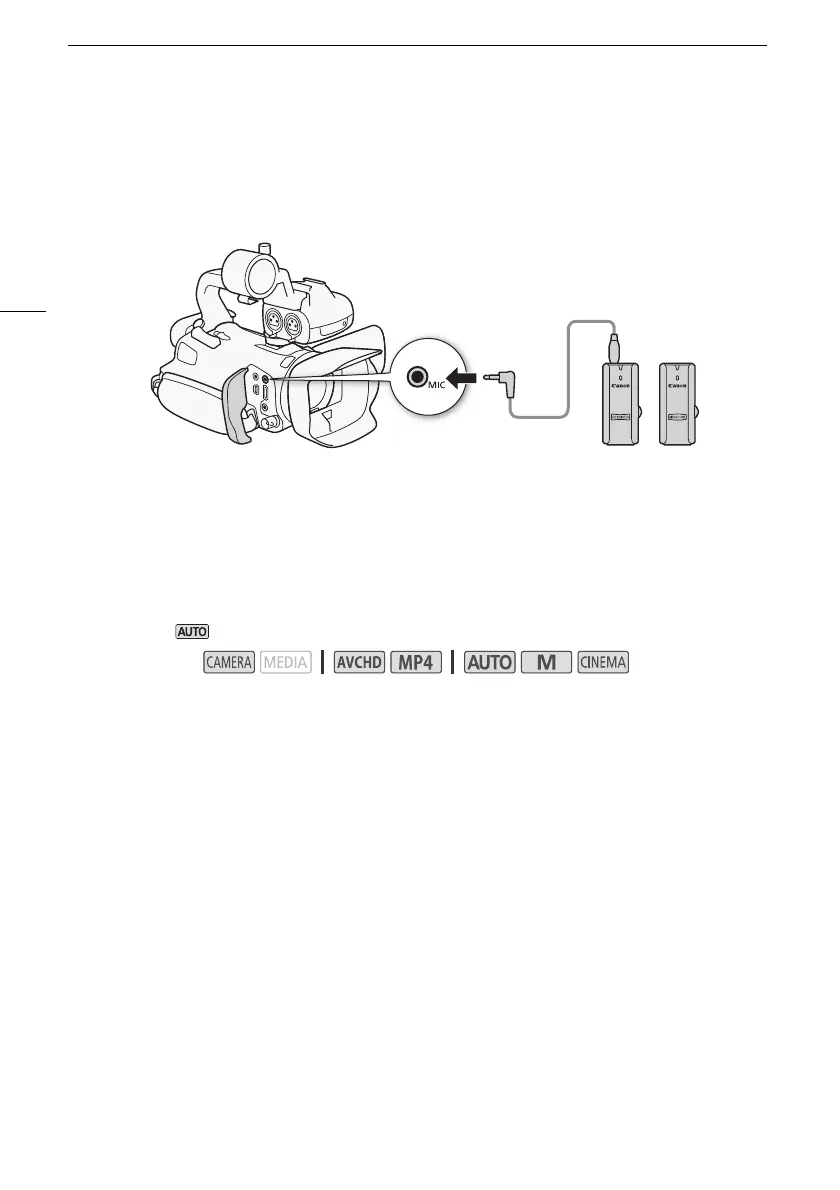
Using the WM-V1 Wireless Microphone
Using the optional WM-V1 Wireless Microphone, you can reliably record sound even when recording
subjects at a distance exceeding the practical range of the built-in microphone. For details about using
the WM-V1, refer to the instruction manual supplied with the microphone.
Audio Scenes and Other Audio Settings
You can have the camcorder optimize the audio settings of the built-in microphone by selecting the
audio scene that matches your surroundings. This will greatly enhance the sense of "being there".
Alternatively, you can select [„ Custom Setting]* in order to adjust the camcorder's various audio
settings to your liking.
See the following table for the settings used by each audio scene.
* Not available in mode.
1 Open the audio scene selection screen.
[FUNC.] > [— Audio Scene]
2 Touch the desired option and then touch [X].
• When you select [„ Custom Setting], customize the audio settings to your preference with the
relevant procedures (see the reference pages in the following table).
Options (
Default value)
Operating modes:
[‘ Standard] To record most general situations. The camcorder records with standard settings.
[’ Music] To vibrantly record music performances and singing indoors.
[‚ Speech] Best for recording human voices and dialog.
[“ Forest and Birds] To record birds and scenes in forests. The camcorder clearly captures sound
as it spreads.
[” Noise Suppression] To record scenes while reducing noise from wind, passing vehicles and
similar ambient sound. Ideal for recording at the beach or in places with a lot of noise.
[„ Custom Setting]
Allows you to adjust the audio settings to your liking. The settings that you can
adjust are the [ä Mic Level] setting in the FUNC. panel and the following settings in the p menu:
[Built-in Mic Wind Screen], [Built-in Mic Att.], [Built-in Mic Freq. Response] (audio equalizer), and [Built-
in Mic Directionality].



 To Next Page