Recording Audio
83
Connecting an External Microphone or External Audio Input Source to the
Camcorder
In order to use the microphone holder and INPUT 1/INPUT 2 terminals, the handle unit must be
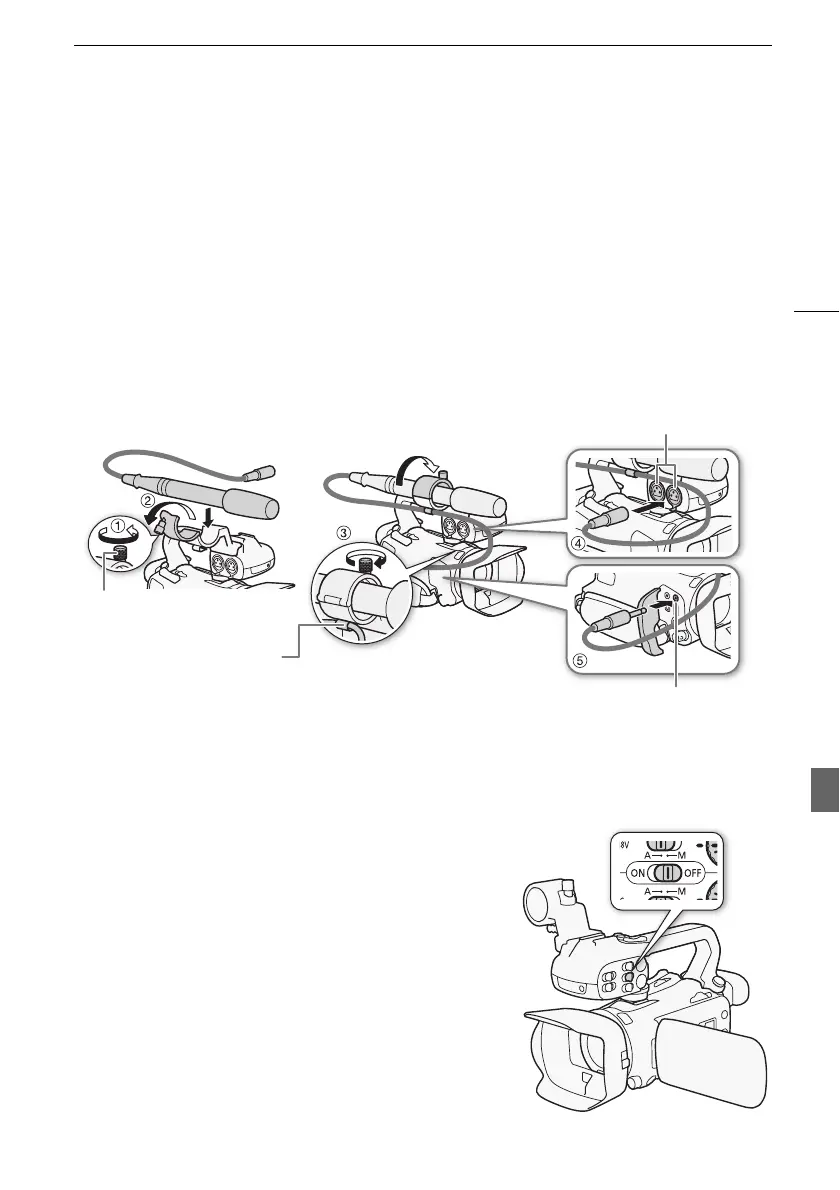
attached to the camcorder. Follow the procedure below to attach a microphone (refer also to the
following illustration). To connect an external device to the camcorder, plug the device’s cable into the
desired terminal (햵).
1 Loosen the microphone lock screw (햲), open the microphone holder and insert the
microphone (햳).
2 Tighten the lock screw and put the microphone cable through the microphone cable
clamp under the microphone holder (햴).
3 Plug the microphone cable into the desired INPUT terminal (햵) or the MIC terminal (햶).
Using the Built-in Microphone or an External Microphone Connected to the
MIC Terminal
Follow the step below to use the built-in microphone or an
external microphone connected to the MIC terminal. Use
commercially available condenser microphones with their own
power supply and a ∅ 3.5 mm mini-stereo plug.
Set the INPUT terminal ON/OFF switch to OFF.
• If you connect a microphone to the MIC terminal while the
INPUT terminal ON/OFF switch is set to OFF, the camcorder
will switch automatically from the built-in microphone to the
external microphone.
Microphone lock screw
Cable clamp
INPUT 1/INPUT 2 terminals
MIC terminal



 To Next Page