Basic Operation of the Camcorder
33
Using the Menus
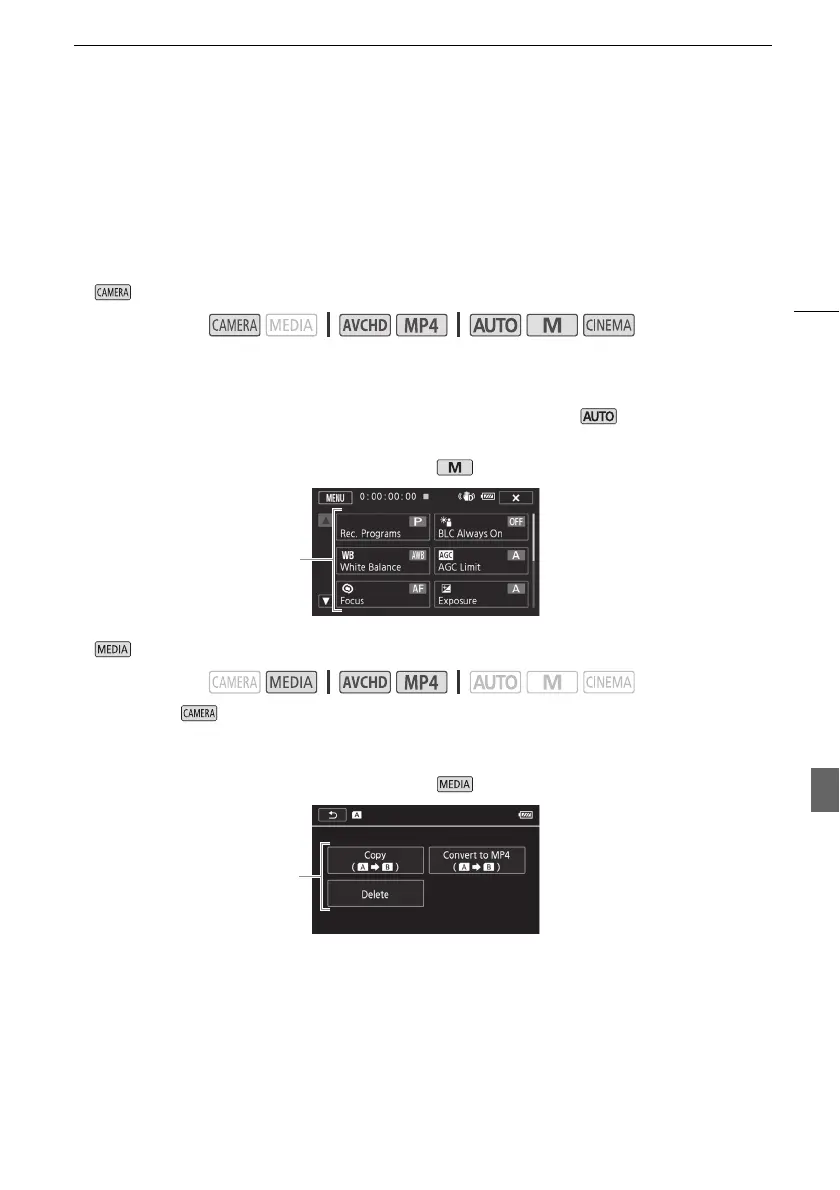
Many of the camcorder’s functions can be adjusted from the FUNC. panel and the setup menus. For
details about the available menu options and settings, refer to the appendix Menu Options Lists
(A 146).
FUNC. Panel
In mode:
There are three ways to access the FUNC. panel: by touching [FUNC.] on the OLED screen, by
pressing F or by pushing the joystick (Ý/Þ) to select [FUNC.] and then pressing S. After
the FUNC. panel is open, select the function you want to use. You may need to scroll up and down the
screen or touch ã/ä to find the control button of the desired function. In mode, access to
functions is limited.
In mode:
Just like during mode, you can open the FUNC. panel by touching [FUNC.] on the OLED screen,
by pressing F or by pushing the joystick (Ý/Þ) to select [FUNC.] and then pressing S.
After the FUNC. panel is open, select the function you want to use.
Operating modes:
Operating modes:
Touch the control
button of the
desired function
FUNC. panel in mode
FUNC. panel in mode
Touch the control
button of the
desired operation



 To Next Page